• Hi Guest!

    We have posted a new VaM2 dev log on Patreon, starting a monthly cadence of written progress updates between Beta releases. Highlights include the new Gizmos System, Selection Carousel, and Modes System with Context-Specific Editing. Beta1.2 is 15 of 21 items complete.

    Read the full post on Patreon, or follow progress on the public Trello roadmap.
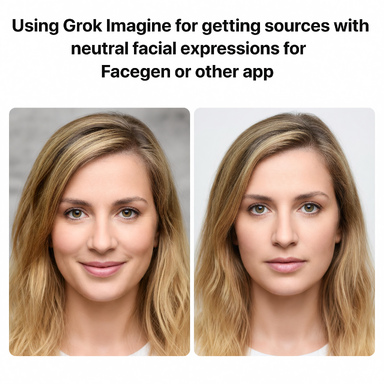
Using Grok Imagine for getting sources with neutral facial expressions for Facegen or other app

Guides Using Grok Imagine for getting sources with neutral facial expressions for Facegen or other app

Positive
Posted:
can do great work depending on the picture used.

*to generate side picture use this prompt*

A professional passport-style photo of the person from the original image. Face perfectly centered, strictly side view. Completely neutral facial expression, no smile, relaxed lips. Symmetrical facial features. High-resolution, even studio lighting, Non-negotiable 100% fidelity to the original facial bone structure, exact eye shape/distance/color, nose, lips, jawline, skin texture, pores, skin tone and all unique features with zero deviations, morphing or artistic interpretation. Perfect alignment, neutral pleasant expression, professional soft even studio lighting, ultra sharp 8k details, clean neutral background. Indistinguishable from a real high-end photograph of this exact person.
Upvote 0
Positive
Posted:
I was using Gemini a while ago to create the faces; in fact, I pay for Gemini AI Plus for that, but I also take the model and turn her sideways so Facegen can add a bit more detail to her face, and I retouch the rest of the texture detail with Krita.
Upvote 0
Positive
Posted:
Just like your previous post about this , this is excellent and will help me a hell of alot . Its a constant issue i face and while i can work around it using various AI providers etc , its trial and error so thanks for this .
ButtPunisher
ButtPunisher
Thank you for the kind words, especially from such a prominent member of the community.
Upvote 0
Back
Top Bottom