* Changed to Timeline animation naming pattern: "Anim 1" -- clone --> "Anim 2" instead of "Anim 1 (copy)"
* Added option to clone same clips in multiple Atoms at once. It's very useful for bigger scenes.
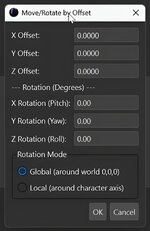
New Move/Rotate Tool: Transform your animations with precision! Use Global mode to rotate in the world, or Local mode to pivot around your character.
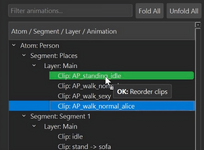
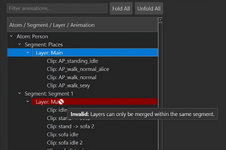
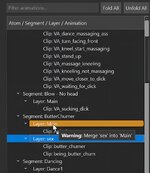
Smarter Drag & Drop: No more guesswork! Get live visual feedback with colors & tooltips to see exactly what your drop will do.
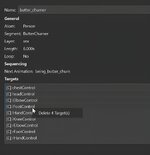
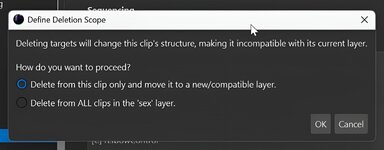
Target Deletion: Clean up clips by removing specific controllers or params. Timeliner will automatically move the modified clip to a compatible layer!
Duplicate Segments: Copy an entire animation segment with one click.
QoL Fix: Your tree view no longer collapses after every action!
More detailed description:
Main new features:
Advanced Transformations: Move/Rotate by Offset
The previous "Move by Offset" feature has been completely replaced by a new, powerful "Move/Rotate by Offset" tool.
Position and Rotation: Allows for the simultaneous translation (on X, Y, Z axes) and rotation (Pitch, Yaw, Roll) of selected clips.
Rotation Modes: Two key rotation modes have been introduced:
Global: Rotates all controllers around the world origin (0,0,0), which is useful for rotating the entire animation within a scene.
Local: Rotates all controllers around the character's axis (using hipControl or a similar controller as a pivot point), allowing the character to be rotated "in place".
This feature is supported by a new, internal Quaternion class for precise mathematical calculations.
Deleting Targets from Clips
Added the ability to delete individual targets (controllers, Float parameters, trigger groups) from clips.
Flexible Deletion Scope: When deleting a target, the application now prompts for the operation's scope:
From this clip only: Deletes the target from a single clip and automatically moves it to a new or existing compatible layer to maintain structural integrity.
From all clips in the layer: Deletes the target from all clips within a given layer, keeping them in their original location.
Duplicating Segments
A new "Duplicate Segment" option has been added to the context menu (right-click) for segments.
This function creates a full copy of the segment, including all its layers and clips, and automatically assigns it a unique name (e.g., "Segment (copy)").
UI and User Experience (UX) Improvements
Smart Drag & Drop
The drag & drop mechanism has been thoroughly overhauled.
Live Action Preview: While dragging items, the application now analyzes and predicts the outcome of the drop operation in real-time.
Visual Cues: The target item is highlighted in different colors, and a tooltip appears next to the cursor with details:
Green: The action is valid and compatible (e.g., reordering).
Blue: The action is valid but will create a new layer.
Orange: The action is potentially destructive (e.g., merging layers).
Red: The action is invalid.
Improved Move Logic: Moving clips to an incompatible layer (with a different controller structure) is no longer blocked. Instead, the application automatically creates a new, compatible layer for them.
Move Restriction: Moving/copying clips to a different layer within the same segment has been disallowed to prevent accidental structural damage.
Bug Fixes & Refactoring
Correct Segment Creation in Scenes: The "New Segment" function now correctly identifies which "Atom" in a scene file the new segment should be assigned to (based on the current selection). Previously, this could lead to errors in files with multiple characters.
Tree State Preservation
Fixed an annoying issue where the tree would collapse after every operation (e.g., renaming, dragging a clip).
The application now remembers which branches (segments, layers) were expanded and restores their state after the view is refreshed.




 Highlights: