


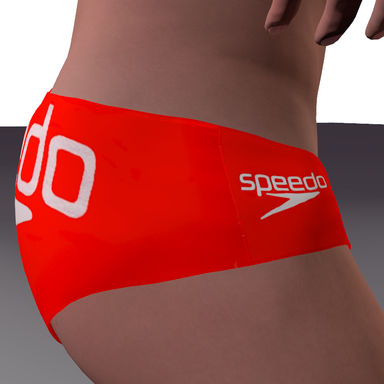


This is my preset pack based on Maru01's Mens briefs , particularly the Mbriefs01_mov1 variant. It does work with the other variants mostly , to use those you will probably need the optional textures pack ( Read how thats done below) .


Clint.Exposed.var includes those plus the other textures found in the Optional Texture Pack
Requirements
Maru01 Mens Briefs .var installed to Virt-a-mate/AddonPackages ( https://hub.virtamate.com/resources/mens-briefs.50321/ )
Clint.Exposed.var installed to Virt-a-mate/AddonPackages
How to Use
After installing both required files above , Load your scene , select an atom/person's root and click the clothing tab.
1. Equip Maru01's Mbriefs01_mov1 onto your Atom model. Red Box The other maru01 brief sets can also modified with the Optional texture Pack.
2. Click "Customize" on the clothing item. Green Box

3. Click the "Presets" tab Green Arrow in the lower-left options layout.
4. Click select existing Yellow Arrow and choose one of my presets.

ENJOY !
Depending on your model atom's (pose/testes size/penis orientation) you may need to tweak some physics settings , Im forever doing this myself as well , some angles arnt perfect with the presets ive provided , they are middle ground. You can adjust the physics under the blue physics tab in the above picture .Otherwise adjust your atom/persons morphs . Also probably make sure Disable Anatomy box is unchecked in the adjustments tab (above pic)
Worth Mentioning: The Mbriefs01_mov1 set is designed to show the penis untucked/exposed, and the testes covered/un-exposed. They do an ok job of achieving this look , im still dialing it in myself, my presets work pretty well with what i got, the main problem usually is testical collision especially during movement. Play with the physics tab slider settings (click reset sim up top to refresh your changes) and your atoms physical morphs and you should get decent results.
Optional Texture Pack
Maru01's Briefs pack also comes with a few other stages of undress , my preset pack focuses on the Mbriefs01_mov1 set , my pack does however mostly work with the other pairs of Maru01's briefs to varying results. Ive included the textures themselves . These are all included with the ClintExposed.var , download the optional texture pack if you want to use these on other variants (see Below)


To use these presets with the other briefs
Unzip the Optional Texture Pack to your Virt-a-Mate/Saves/textures folder.
This might be worth learning as i probably plan to release further textures as just textures instead of a Var file.
Load a set of maru01 Briefs , Click customize
Select the P Tab Red Arrow , Click Textures Yellow Arrow , Click Reset Blue Arrow , Click Select Green Arrow
Navigate to where you saved the textures - Root/saves/textures and select the texture you want..
The colors will need adjusting (see below) and probably the physics. The physics is kinda on you

If the colors look washed out (Or if you have just installed the textures themselves)
Click customize & Click the P tab , Make sure the params tab is selected.
Box 2 RED ARROW drag the selection box to black {the bottom)
Adjust the Diffuse Texture Offset Blue Arrow( downwards mainly) untill the colors look good.

If you want to add the original creators Elastic trimmings to create a more "Underwear/Briefs" look
Swap to the B tab and adjust the alpha Yellow arrow upwards to reveal them or downwards to hide them.
You can color them to your liking on this tab also. Blue Arrow

Credits
Obviously thanks to maru01 for the Briefs pack , I'm not talented enough to create the mesh itself , I've used theirs because even tho its tricky to get right , I like that it morphs around the anatomy. Im currently trying to create my own where the penis is contained but yet bulging inside the material.
On my end I'd like to thank Cigarettes and Jack daniels for helping me thru the process of creating stuff in VAM.
Clint.Exposed.var includes those plus the other textures found in the Optional Texture Pack
Requirements
Maru01 Mens Briefs .var installed to Virt-a-mate/AddonPackages ( https://hub.virtamate.com/resources/mens-briefs.50321/ )
Clint.Exposed.var installed to Virt-a-mate/AddonPackages
How to Use
After installing both required files above , Load your scene , select an atom/person's root and click the clothing tab.
1. Equip Maru01's Mbriefs01_mov1 onto your Atom model. Red Box The other maru01 brief sets can also modified with the Optional texture Pack.
2. Click "Customize" on the clothing item. Green Box
3. Click the "Presets" tab Green Arrow in the lower-left options layout.
4. Click select existing Yellow Arrow and choose one of my presets.
ENJOY !
Depending on your model atom's (pose/testes size/penis orientation) you may need to tweak some physics settings , Im forever doing this myself as well , some angles arnt perfect with the presets ive provided , they are middle ground. You can adjust the physics under the blue physics tab in the above picture .Otherwise adjust your atom/persons morphs . Also probably make sure Disable Anatomy box is unchecked in the adjustments tab (above pic)
Worth Mentioning: The Mbriefs01_mov1 set is designed to show the penis untucked/exposed, and the testes covered/un-exposed. They do an ok job of achieving this look , im still dialing it in myself, my presets work pretty well with what i got, the main problem usually is testical collision especially during movement. Play with the physics tab slider settings (click reset sim up top to refresh your changes) and your atoms physical morphs and you should get decent results.
Optional Texture Pack
Maru01's Briefs pack also comes with a few other stages of undress , my preset pack focuses on the Mbriefs01_mov1 set , my pack does however mostly work with the other pairs of Maru01's briefs to varying results. Ive included the textures themselves . These are all included with the ClintExposed.var , download the optional texture pack if you want to use these on other variants (see Below)
To use these presets with the other briefs
Unzip the Optional Texture Pack to your Virt-a-Mate/Saves/textures folder.
This might be worth learning as i probably plan to release further textures as just textures instead of a Var file.
Load a set of maru01 Briefs , Click customize
Select the P Tab Red Arrow , Click Textures Yellow Arrow , Click Reset Blue Arrow , Click Select Green Arrow
Navigate to where you saved the textures - Root/saves/textures and select the texture you want..
The colors will need adjusting (see below) and probably the physics. The physics is kinda on you
If the colors look washed out (Or if you have just installed the textures themselves)
Click customize & Click the P tab , Make sure the params tab is selected.
Box 2 RED ARROW drag the selection box to black {the bottom)
Adjust the Diffuse Texture Offset Blue Arrow( downwards mainly) untill the colors look good.
If you want to add the original creators Elastic trimmings to create a more "Underwear/Briefs" look
Swap to the B tab and adjust the alpha Yellow arrow upwards to reveal them or downwards to hide them.
You can color them to your liking on this tab also. Blue Arrow
Credits
Obviously thanks to maru01 for the Briefs pack , I'm not talented enough to create the mesh itself , I've used theirs because even tho its tricky to get right , I like that it morphs around the anatomy. Im currently trying to create my own where the penis is contained but yet bulging inside the material.
On my end I'd like to thank Cigarettes and Jack daniels for helping me thru the process of creating stuff in VAM.

