

You are using an out of date browser. It may not display this or other websites correctly.
You should upgrade or use an alternative browser.
You should upgrade or use an alternative browser.
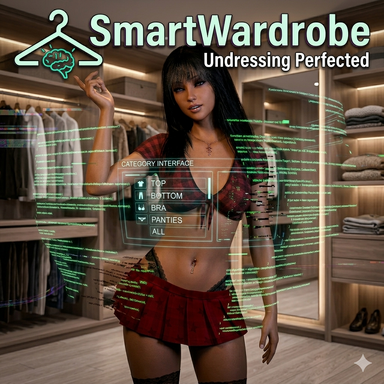
The time has come! SmartWardrobe is getting a massive upgrade that completely changes the way you control outfits in 3D space (and especially in VR). The days of clunky menus are over – say hello to the new context-sensitive Hologram Control Center!
UPDATE: The ultimate Smart Hologram UI is here!
And the best part right away: No triggers. No setup. Everything works out-of-the-box at the push of a button! You no longer have to manually wire up tedious logic nodes or UI triggers. The plugin handles all the thinking and layout work fully automatically.
Here are the absolute highlights of this update:
You can now activate the new "Hologram UI" in the Main tab. The menu detaches from the standard UI and spawns as a floating, interactive 3D canvas directly on an "Empty" atom of your choice.
1. The Floating Hologram Control Center
- Scalable: Adjust the size of the hologram seamlessly via a slider.
- Grabbable: The menu hovers elegantly with a slight offset next to the center of the Empty atom. This allows you to easily grab the atom at any time and move it around in space.
- Auto-Face Camera (Magic Tracking): With a single toggle, the hologram smoothly rotates to always face your exact viewing direction. No matter where you stand in the scene, you're always looking right at the buttons! (And if you prefer it static: just turn it off and you can even operate the buttons mirrored from the back!).
The biggest innovation is the logic behind the buttons. A good button doesn't show you what's happening right now, but what will happen when you click it.For this, we've implemented an entirely new status system: If the character is wearing a top, the button automatically shows what's underneath that top. When you click it, the top is taken off – and the image on the button instantly switches to a worn top, since the next click would put it back on.
2. Smart "Future" Buttons
The buttons now communicate with each other and know exactly what's happening in the other clothing layers! The script analyzes in real-time what is being worn above or below, and adjusts the images automatically:
3. Hardcore Context-Awareness (Layer Logic)
- Tops: When the top is removed, the button "knows" whether a bra is being worn underneath or just bare skin, and displays the exact corresponding image.
- Dresses: The dress button checks both top and bottom. It shows you precisely whether a bra, panties, both, or nothing at all will be revealed after taking off the dress.
- Stockings: The new masterpiece! The logic here truly covers everything. The script detects every conceivable combination of skirts, pants, panties, and heels, always delivering the perfectly matched image for the current state.
The menu is now 100% dynamic and thinks in real-time. Whenever you load a completely new clothing preset, the hologram reacts instantly: Only the buttons that actually have a function will appear.Does your loaded preset have no bra or jacket included? Then those buttons won't even show up in the hologram! No empty placeholders, no ghost buttons – the interface always stays perfectly clean and only shows what can actually be toggled.
4. Dynamic Preset Detection (No more useless buttons!)
I've also massively overhauled the automatic clothing scanner under the hood. I'm hoping that it is now pretty much bulletproof and accurately categorizes the vast majority of clothing items right away. But VaM being VaM – if a specific item still acts up and stubbornly lands in the wrong category, don't panic! Just remember the SW-Tags. You can assign these tags to any item and they will completely override the scanner, giving you the absolute final say!
5. Improved Clothing Scanner & SW-Tags
Conclusion: With this update, you never have to guess what's being worn underneath the clothes or if a button is currently active. Plug & Play perfection – the SmartWardrobe Hologram thinks for you!
Download the update now and let me know in the comments how you like the new hologram feel!

- 2
-
 2
SmartWardrobe Update: Custom Tags, Category Timers & Fixes!
Hey everyone!A new update for SmartWardrobe is ready, bringing some highly requested features and important fixes to improve your workflow and the visual results.
Here is what’s new and improved in this version:
"God-Mode" Custom Override TagsTired of items being miscategorized because creators used confusing naming or random tags? You now have the ultimate power to override the scanner!Simply add a custom tag starting with sw_ to any clothing item (e.g., sw_top, sw_bottom, sw_bra, sw_panties, sw_shoes, sw_accessory, etc.). The plugin will instantly recognize it and categorize it exactly as you want, completely ignoring the creator's default tags. You can even use sw_excluded to permanently hide an item from the plugin's logic.
Individual Auto-Hide Timers per CategoryYou are no longer restricted to a single global timer for the Auto-Hide function! You can now set individual delay times for each clothing category (e.g., 2 seconds for a bra, but 5 seconds for panties).
- Select a category in the dropdown (e.g., "Panties") to adjust its specific hide delay.
- Safety Feature: The slider is intentionally hidden when "All" is selected in the category dropdown to prevent you from accidentally overwriting all your fine-tuned timings at once.
- Your specific times are fully integrated and will be saved in your Outfit Presets and Scene Saves.
Refined Cameltoe MorphsI have adjusted the morph settings for the labia during cameltoe detection. The effect is now much more subtle. It reduces the issue of the labia clipping through the clothing, providing a cleaner look that fits perfectly with most panties.
Additional Fixes & Improvements:
Enjoy the update and the new level of control! Let me know what you think in the comments.
- Scene Patcher included: The Scene Patcher script is back! I forgot to include it in the last update, but it's back in the package now.
- Preset Healing: Fixed an issue where loading an Appearance Preset containing already worn, but "undressed/hidden" clothing would break the Auto-Hide memory. The plugin now acts as a watchdog, detects the silent object swapping by VaM, and automatically heals its internal cache so your pants/bras stay hidden as intended.
- Scanner Tweaks: Fixed the "Eclipse" bug where the scanner mistook words containing "lips" (like Eclipse) for face makeup and excluded them. Make-up items like "EyeSDW" are now also strictly blocked from being categorized as clothing.
- 3
-
3

Fixed the bug where the cumclothes became visible when “autohide” was enabled and “dress all” was selected. The cumclothes are now strictly separated from the other clothes.
- 2
-
2
Hi everyone!Here is the latest update for SmartWardrobe. This time, I mainly focused on a smoother gameplay experience, added clever automations, and massively improved the performance under the hood.
- Smart Simulation Control (Sim-State Memory): The plugin thinks along now! When you take off a piece of clothing, the simulation (sim) is now always automatically turned on so the clothing drops realistically. The best part: When you put the item back on, the plugin remembers the exact original state and restores it (regardless of whether the sim was on or off before taking it off).
- New Auto-Hide Feature for removed clothing: When you activate this new feature, discarded clothing will be automatically hidden after a set time delay. This happens specifically and individually: It only affects the exact piece of clothing you just took off, and each individual item keeps track of its own timer completely separately in the background!
- Safeguard in the Physics Tab: A small but helpful protection: If you select the category "All" from the dropdown menu in the "Physics & Wrap" tab, the adjustment sliders are now hidden by default. This prevents you from accidentally changing the physics values for all clothing items at once and unintentionally ruining your setup.
Under the Hood (Performance):
Have fun with the update! If you notice anything else, let me know in the comments.
- By the way: I have cleaned up the code architecture. The script now runs extremely resource-efficiently in the background (zero-garbage allocation), which effectively prevents annoying micro-stuttering in VaM.
The plugin no longer throws errors due to missing presets if you saved it in your scene with a preset that you've since deleted. You can now also put it in a var without the end user encountering errors due to missing presets.
- 3
-
3
This update brings massive Quality of Life improvements to SmartWardrobe, with a clear focus on a smoother gameplay flow, better VR integration, and smarter background logic.
World Browser for Native Presets (VR & Desktop!)No more constant switching to Edit Mode! You can now load your standard, native VAM clothing presets directly in Play Mode. When you click the new load button in the plugin, a slick 3D World Space Browser opens right next to your character's hip. It rotates with the character but always stays perfectly upright – making quick outfit changes an absolute breeze in both VR and on Desktop.
For Scene Creators, this is a brilliant tool: You can use this perfectly to allow players who download your scenes to load their own clothing presets seamlessly and without any interruption directly into the running scene. Important: To open the window directly in Play Mode, you simply need to set up a corresponding trigger in your scene (for example, via the VR trigger system, a physical button in the room, or similar) that fires the new SmartWardrobe action.
Smart "Currently Worn" SortingThe Closet Tab just got a proper upgrade. When you select the "Currently Worn" filter, all equipped clothing items are now beautifully and clearly grouped by their respective categories (e.g., --- TOP ---, --- BOTTOM ---). This lets you see exactly what your character is wearing at a single glance.
Full Changelog:
- Added: 3D World Space Browser for native VAM presets – usable directly in Play Mode!
- Added: New VAM Trigger Action: "Load Native VAM Preset (World Browser)" for easy integration into timelines, buttons, and custom UIs.
- Improved: The "Outfit Presets" tab has been divided into two distinct sections (SmartWardrobe Presets and Native VAM Presets) for better clarity.
- Improved: All plugin console logs have been unified and switched to clean English.
A special thanks goes out to Hazmhox! The core mechanics for the 3D World Space Browser in this update are built upon elements of the brilliant VAMAppearanceSwapper script from his VamStory plugin. A massive thank you to Hazmhox for the fantastic groundwork and for sharing this code with the VAM community!
Special Credits & Acknowledgments
- 3
-
3
Hello everyone!SmartWardrobe just got a massive upgrade. Alongside a completely new under-the-hood architecture, there are two brand new tabs that will completely change your workflow in VaM. Here are the highlights:
- Powerful Filter Options: Easily filter your library by clothing type (regions like Top, Bottom, etc.) or specifically show items from certain creators.
- Text Search: Looking for a specific item? Use the new search field to quickly scan your entire collection or individual regions by name.
- "Currently worn" Filter: One click and you see exactly only the clothing the character is currently wearing. Perfect for quick adjustments to the current outfit!
- Thumbnails: Supports Custom Thumbnails for quick visual sorting. Important note: VaM's internal default clothing items don't have thumbnails out of the box – they won't show an image by default unless you use the new feature to snap a quick custom thumbnail for them yourself!
BRAND NEW: The Cum Clothes TabA dedicated manager just for your liquid overlays!
- Smart Regions: Overlays are automatically sorted by body region (Face, Chest, Ass, etc. – plus a new "Others" tab for uncategorized items).
- Smooth Blending: Overlays no longer pop in harshly! They now fade in and out smoothly. You can individually adjust the fade speed for each region using a new slider.
- No Duplicates: If you have multiple versions of an overlay installed (e.g., v1 and v2), the tab mercilessly filters out the old ones. You will always only see the latest version.
- Full Material Control: Control Alpha, Gloss, Color, and more conveniently right from the tab.
Persistent Scene MemoryThe plugin will never forget your original morphs again! SmartWardrobe now securely saves all body and material values directly into the scene save. When you reload a scene, the body will be 100% flawlessly restored upon undressing.
I hope the new tabs and features speed up your setup as much as they do mine! Let me know what you think!