• Hi Guest!

    We are extremely excited to announce the release of our first Beta1.1 and the first release of our Public AddonKit!
    To participate in the Beta, a subscription to the Entertainer or Creator Tier is required. For access to the Public AddonKit you must be a Creator tier member. Once subscribed, download instructions can be found here.

    Click here for information and guides regarding the VaM2 beta. Join our Discord server for more announcements and community discussion about VaM2.
  • Hi Guest!

    VaM2 Resource Categories have now been added to the Hub! For information on posting VaM2 resources and details about VaM2 related changes to our Community Forums, please see our official announcement here.
RandomCycleAnimator PLUS (Paid Contents)

Paid Plugins + Scripts RandomCycleAnimator PLUS (Paid Contents)

Go to pay site
1.png

1.png

1.png

“The Trigger Update”​

RCAPLUS V3 is now released.
This update focuses on a new Slot system for instantly switching between multiple configurations, along with external trigger support — “The Trigger Update”.

See it in action in the video below.
(Sorry as always for the low video resolution. I like using Imgur because it’s lightweight to view and easy to upload, but if you have any recommended video upload sites, I’d love to know.)

✅ New Features​

1) Slot System (Multiple Preset States)
You can now save your current settings into slots and switch instantly without going through preset loading.
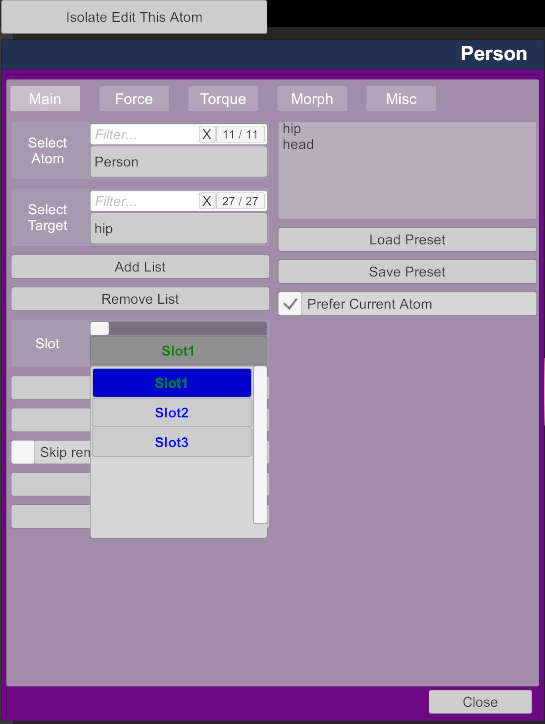
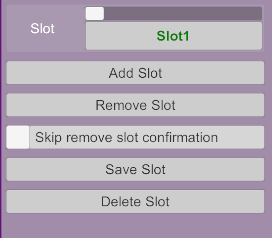
  • After adjusting parameters, click “Save Slot” to store the state, or “Delete Slot” to clear it
  • If you load a preset while a slot is selected, the preset data will be fully applied into that slot
  • Slot labels change color: Green = saved manually, Blue = created via preset load
2) Add / Remove Slots
The default number of slots is 3. You can increase or decrease the slot count from the UI, up to 20 slots.
  • Removing a slot that contains data will show a confirmation dialog to prevent accidental deletion
  • Enable “Skip remove slot confirmation” to bypass the confirmation
3) Slot Blend (Added to the “Misc” page)
Slot Blend smooths the transition when switching slots by interpolating Force / Torque / Morph changes over a Blend Time, reducing abrupt jumps.
4) External Trigger Support for Slots
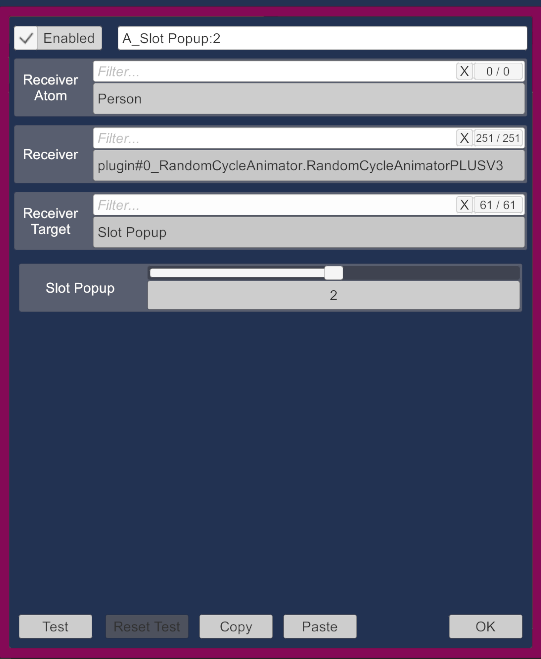
Slot switching now supports external triggers.
By selecting “Slot Popup” as the Receiver Target, you can specify which slot selector should be controlled.
  • Examples: UIButton, Timeline plugins, etc.

🔧 Improvements​

  • Improved preset loading safety / compatibility
    Fixed an issue where preset saving could behave incorrectly under certain conditions
  • Other minor bug fixes

⚠️ Notes / Behavior​

  • Slot Blend is active only when “Use Slot Blend” is ON and “Blend Time > 0”
  • The maximum Blend Time is fixed at 10 seconds
RCAPLUS will continue to evolve. If you have any feature requests, feel free to leave a comment!

English Version: RCAPLUS V2 Release Notes​


RCAPLUS V2 is now released.
This major update focuses on a full UI system overhaul, official Morph feature integration, and improved preset loading stability.
1770466525070.png

1.png
1.png
1.png

新着情報​

1) Major UI Redesign (Multi-page Layout)​


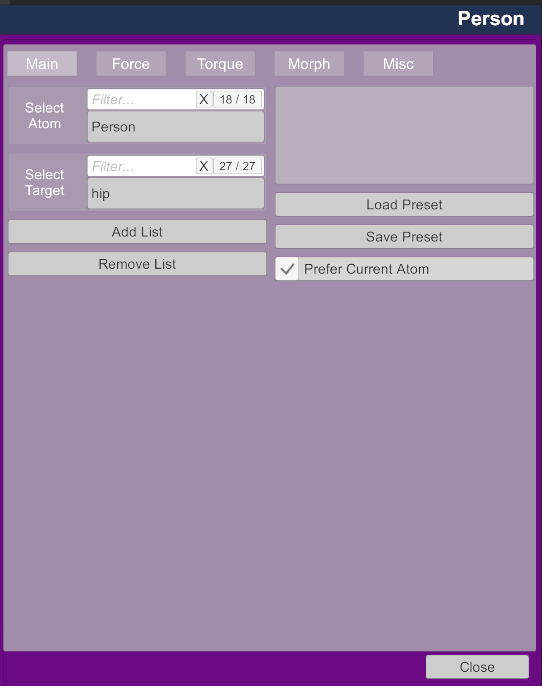
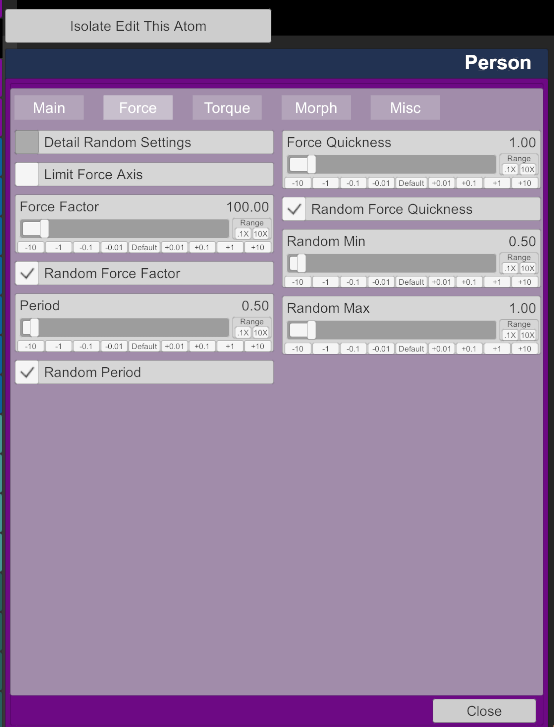
The UI has been redesigned into a multi-page structure (Main / Force / Torque / Morph / Misc).
This greatly improves usability, and because fewer UI elements are displayed per page, it also reduces UI overhead and indirectly improves performance.


  • No impact on existing features
  • Compatible with older presets
  • If anything feels unstable, I recommend re-saving your presets on the latest version

Check out the video below for a quick demo.

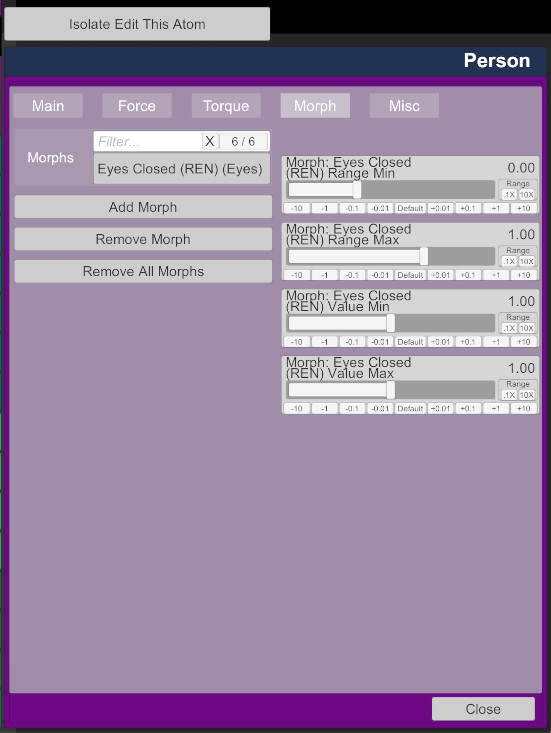
2) Morph Feature: Official Implementation

The Morph feature is no longer shown as “Beta”. It now has its own dedicated page and is enabled by default.
I also expanded the situations where Morph values are fully reset:

  • On removal
  • On plugin reload
  • When loading a preset (NEW)
3) Preset Loading Fix (Multi-Atom Scenes)

Fixed an issue where preset loading could fail under certain conditions, such as scenes with multiple atoms.
Added a new toggle: “Prefer Current Atom”

  • ON: Prioritizes the containingAtom (the atom the plugin is currently on)
  • OFF: Prioritizes the previously selected atom before loading

Technical Notes​

  • Split RCA_UIManager.cs into the UISystem folder (partial classes)
  • Created a new .cslist and updated references
  • Refactored the UI while keeping performance impact minimal
RCAPLUS will continue to evolve. If you have feature requests, feel free to leave a comment!

— Thank you for using RCAPLUS and for your support!
Back
Top Bottom