It's like a subscene but not a subscene, because I don't care and make shit up.
What is this?
This is a combination of empty atom presets and other files that, when loaded on the NEXT template scene, bring in animations, clothes, an environment, music and other resources. All this transforms the NEXT template into a themed scene with new features.
Here are some examples of Hub-hosted quickintros:

A passing grade - Scenes -
‼️ this is now a quickintro preset and is only loaded from the NEXT template scene ❕ Download this VAR Load the NEXT template scene Go to the UI Animations > Intros Follow the written instructions Earn those points! 5 intro animations 2...
 hub.virtamate.com

Make it up - Scenes -
Kate got cocky. She tried to bring down a crime syndicate all by herself, and ultimately had to be rescued by Clint. Now Clint missed his flight to get home for Xmas with his family. She needs to make it up to Clint... somehow... ‼️ this is...
hub.virtamate.com
- Download NEXT and the quickintro VARs you want of course

- Load the NEXT template scene
- Click the Animations UI > Intros
- Click the "Intro preset loader" button and follow the path instructions to where you'l find the quickintro preset
Want to try another one? No problem, just repeat the loading process and enjoy the new theme. Everything happens while on scene in seconds.

How to use the NEXT template scene - Guides -
This guide applies to the NEXT template and any scene/quickintro made from it: https://hub.virtamate.com/resources/next.49271/ This is the first thing I do in any scene, to change the person's appearance. The NEXT template's persons are...
hub.virtamate.com
Graphical process example:
Click on the Animation UI Intros button | Click the Intro preset loader button and follow the instructions to find the quickintro preset |
| Wait some seconds and the UI intro will look different when you return to it, among other things in the scene. Now it's time to play  |
More about the quickintro process and reasons
Why the complication over just sharing individual scenes like before?
Essentially, I want to enjoy VAM better by devoting more time making things and less time maintaining them.
Up until now, whenever I updated the NEXT template scene, I would also need to update all scenes made from it to include the new changes. Needless to say, that was a bit of a pain because it was an investigation process to compare what was different, what needed to be repacked, adjusted, then test the results, ufff...
The annoying part was that what changed was almost always the NEXT template framework, so to speak, and not any of the themed alterations. So why not find a way to only add what the theme needed, like a layer added on to NEXT?
And thus quickintro was born from the cruel environment of maintenance hell. Not the layer that NEXT wanted, but the layer NEXT needed.
What is changed with a quickintro compared to the NEXT template base?
| The picture shows a screenshot of part of the NEXT Template scene atoms. A quickintro VAR loads presets for:
Those atoms exist on NEXT as a template to develop quickintro themes and are not essential for NEXT scene operations. As such, any preset loading on these atoms does not affect NEXT and the other way around. For this reason, I can now develop NEXT independently from any quickintro theme, or expand a quickintro without having to update NEXT. Well, unless there's a massive breaking change in NEXT, but at least if that happens, the changes will be simple to make. |
From the picture is also marked other atoms like quickspeech and quickmusic. These are often changed with presets with a quickintro, but again, not essential for NEXT scene operations as they are empty on content by default. Others that may also be changed in a quickintro are the atoms quickdress and quickplace, concepts already explained in other resources of mine.
What about making changes to essential operations of NEXT?
The picture shows the ControlReset atom, and this one is essential and may be altered when making changes to NEXT. The atom contents relate to reset states and poses, and those are less likely to change much over time in NEXT.
A quickintro theme may load a preset of this atom for specific behaviours or poses in a rest state, but given how little this atom contents change in each NEXT version, and the limited changes implemented usually, this would be a easy atom to update anyway.
Potentially there could be a way to not need to use any ControlReset presets for special quickintro theme needs, but a workaround would reduce flexibility and I can't foresee what those future theme needs might be like.
In-depth quickintro atom operations
This is where all the magic happens. Loading a preset of this atom sets off a chain of reactions that transform NEXT into a themed scene in seconds.
The atom includes these plugins by default:
- VAMStory Director
- Triggers for presets, animations, clothes, etc
- Timeline
- Animations and triggers for Female, Male, and other atoms
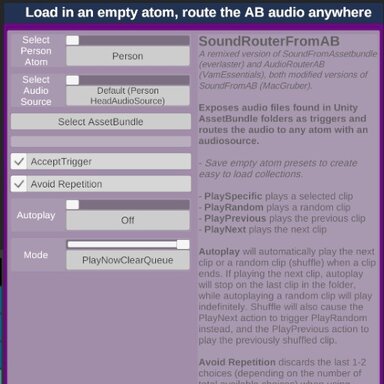
- SoundRouterfromAB
- Intro audiobundles for intro animations (female and male)
Did you know you can use Timeline on persons without it being on the person atom? That's what is done here for the intro animations.
What about controlling a person's headaudiosource with a plugin not included in the person atom? You guessed it, it's coming from the SoundRouterfromAB plugin.
It's with these tools that voiced intro animations can be added on to NEXT using presets and able to load different content without needing to reload the scene. Magic...

Questions, tips and ideas are welcomed
I hope you enjoyed learning more about this process and that some can be used on your scenes. While quickintros are specifically made for the NEXT template scene, the content and core concepts can be adapted to other scenes with some tinkering.
If you want to know more about this, found something here confusing and have some tips, feel free to comment on the Discussion area.
Enjoy my quickintro themes here on the Hub or on my website: