

Video and Image Slideshow player
I built the media solution that I always wanted in VaM. The ability to easily load and manage media with easy playback controls. I wanted Apple TV in VaM. It required a decent amount of learning, and there were quite a few bugs and performance issues to address along the way. And some goals I probably didn't need to hit. It doesn't need to support transparent .pngs, or alpha channel movies - but it does. I'll have a tutorial and tool for making those in the near future, but you can basically make an image with a solid green background, animate it with ltx2 or similar, and a small conversion process can turn the green area transparent during playback.
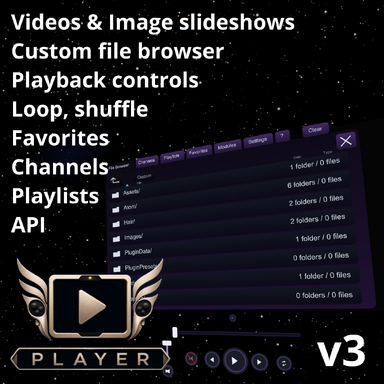
Playlists can store a folder, what you're watching and your current settings.
Channels lets you set up stuff to watch without having to navigate to it.
Favorites lets you make a single playlist that combines images and videos from any folder.
I had to make some changes to the first version for approval, and the second version I erroneously uploaded to the unpublished one, so Version 3 is the first actual version available on the hub.
I'm a UI developer, and despite being more than a bit out of my wheelhouse with C#, Unity and Blender, I wanted to make the media player that I wanted, something comfortable and convenient enough to actually watch a movie.
And never have to open a plugin to do it.
If you want to make it work with other stuff, below is the API. I'll always endeavor to make my stuff as open and compatible with other projects as possible. I know there will be bugs, I know there's a billion things that could be different, and better; and I'm working on them.
Please let me know if you encounter any bugs!


- Custom controls for play/pause, next, previous
- Loop: Off, single, playlist
- Shuffle toggle
- Six Playlists - add any folder and shortcut play from it
- Six Channels - add a folder to /Custom/Images/FAPChannels and it will appear
- Unlimited Favorites
- Built from scratch in Unity, CUA with a plugin
- No ImagePanel
- No VaM buttons
- No reason to open the plugin - ever
- API allowing full control of media playback and app navigation, linked screens, and unlimited integration with other folks' packages.
- Modular framework supporting upcoming modules including astronomy control for StarDome.
- Auto-detect aspect ratios
- Includes preset for easy addition to any scene
- Multiple player instances can be linked (examples will be in an upcoming update)
I built the media solution that I always wanted in VaM. The ability to easily load and manage media with easy playback controls. I wanted Apple TV in VaM. It required a decent amount of learning, and there were quite a few bugs and performance issues to address along the way. And some goals I probably didn't need to hit. It doesn't need to support transparent .pngs, or alpha channel movies - but it does. I'll have a tutorial and tool for making those in the near future, but you can basically make an image with a solid green background, animate it with ltx2 or similar, and a small conversion process can turn the green area transparent during playback.
Playlists can store a folder, what you're watching and your current settings.
Channels lets you set up stuff to watch without having to navigate to it.
Favorites lets you make a single playlist that combines images and videos from any folder.
I had to make some changes to the first version for approval, and the second version I erroneously uploaded to the unpublished one, so Version 3 is the first actual version available on the hub.
I'm a UI developer, and despite being more than a bit out of my wheelhouse with C#, Unity and Blender, I wanted to make the media player that I wanted, something comfortable and convenient enough to actually watch a movie.
And never have to open a plugin to do it.
If you want to make it work with other stuff, below is the API. I'll always endeavor to make my stuff as open and compatible with other projects as possible. I know there will be bugs, I know there's a billion things that could be different, and better; and I'm working on them.
Please let me know if you encounter any bugs!
Markdown (GitHub flavored):
# Frame Angel Player Public API

## Player API

Frame Angel Player can be controlled from VaM plugin code with action ids and
JSON arguments. The public API is the `Player.*` action set below.

### Calling An Action

Use the player's broker storables:

| Storable | Use |
| --- | --- |
| `Sync Broker Action Id` | The action id, such as `Player.Play`. |
| `Sync Broker Args Json` | A JSON object string. Use `{}` when the action has no args. |
| `Sync Broker Execute` | Trigger this after setting action id and args. |
| `Sync Broker Result Json` | Read the JSON result here. |
| `Sync Last Error` | Empty means success. Non-empty means the action failed. |

All actions return the same envelope:

```json
{
 "ok": true,
 "summary": "player_play ok",
 "message": "player_play ok",
 "payload": {}
}
```

Most actions need a player selector. The examples use `<player-key>` as a
placeholder for the player key used by your scene or module.

```json
{
 "playbackKey": "<player-key>"
}
```

### Media Actions

| Action id | Purpose |
| --- | --- |
| `Player.GetState` | Return current player state. |
| `Player.LoadPath` | Load an image or video. Can also load a playlist. |
| `Player.LoadNone` | Clear the selected player's media while keeping the player available. |
| `Player.Clear` | Clear selected player state, or clear all player state when no selector is provided. |

#### `Player.LoadPath`

Common args:

| Arg | Type | Notes |
| --- | --- | --- |
| `playbackKey` | string | Player selector. |
| `mediaPath` | string | Image or video path. `path` and `url` are accepted aliases. |
| `displayName` | string | Optional display name. `title` is also accepted. |
| `playlist` | string array | Optional ordered media list. |
| `playlistDisplayNames` | string array | Optional display names matching `playlist`. |
| `currentIndex` | number | Playlist index to select. |
| `play` | bool | Start playing after load. |
| `loopMode` | string | `none`, `single`, or `playlist`. |
| `random` | bool | Shuffle playlist order. |
| `volume` | number | `0..1`. |
| `muted` | bool | Mute state. |

Load one video:

```json
{
 "playbackKey": "<player-key>",
 "mediaPath": "Custom/Videos/MyFolder/intro.mp4",
 "displayName": "Intro",
 "play": true,
 "loopMode": "none",
 "volume": 0.75,
 "muted": false
}
```

Load an image playlist:

```json
{
 "playbackKey": "<player-key>",
 "mediaPath": "Custom/Images/MySlides/slide_001.png",
 "playlist": [
 "Custom/Images/MySlides/slide_001.png",
 "Custom/Images/MySlides/slide_002.png",
 "Custom/Images/MySlides/slide_003.png"
 ],
 "playlistDisplayNames": [
 "Start",
 "Controls",
 "Settings"
 ],
 "currentIndex": 0,
 "play": false,
 "loopMode": "playlist",
 "random": false
}
```

### Transport Actions

| Action id | Args | Purpose |
| --- | --- | --- |
| `Player.Play` | selector | Play video, or start image slideshow playback. |
| `Player.Pause` | selector | Pause video, or stop image slideshow playback. |
| `Player.Next` | selector | Load the next playlist item. |
| `Player.Previous` | selector | Load the previous playlist item. |
| `Player.SeekToSeconds` | selector plus `seconds` | Seek to a video time. |
| `Player.SeekNormalized` | selector plus `normalized` | Seek by `0..1` progress. |
| `Player.SkipBySeconds` | selector plus `seconds` | Skip by signed seconds. |
| `Player.SkipForward` | selector, optional `seconds` | Skip forward. |
| `Player.SkipBackward` | selector, optional `seconds` | Skip backward. |
| `Player.SetSkipSeconds` | selector plus `seconds` | Set the skip amount used by skip controls. |

Seek halfway through the current item:

```json
{
 "playbackKey": "<player-key>",
 "normalized": 0.5
}
```

Skip back 30 seconds:

```json
{
 "playbackKey": "<player-key>",
 "seconds": 30
}
```

### Playback Settings

| Action id | Args | Purpose |
| --- | --- | --- |
| `Player.SetVolume` | selector plus `volume` | Set volume from `0..1`. |
| `Player.SetMute` | selector plus `muted` | Mute or unmute. |
| `Player.SetLoopMode` | selector plus `loopMode` | Set `none`, `single`, or `playlist`. |
| `Player.SetRandom` | selector plus `random` | Turn shuffle on or off. |
| `Player.SetSlideshowInterval` | selector plus `seconds` | Set image slideshow timing. |

Set volume and unmute:

```json
{
 "playbackKey": "<player-key>",
 "volume": 0.6
}
```

```json
{
 "playbackKey": "<player-key>",
 "muted": false
}
```

Set a 10-second image slideshow:

```json
{
 "playbackKey": "<player-key>",
 "seconds": 10
}
```

### Favorites

| Action id | Args | Purpose |
| --- | --- | --- |
| `Player.AddFavoriteCurrent` | selector | Add the current media item to favorites. |
| `Player.RemoveFavoriteCurrent` | selector | Remove the current media item from favorites. |
| `Player.ClearFavorites` | `{}` | Clear favorites. |
| `Player.LoadFavorites` | selector | Load favorites as a playlist. |
| `Player.SetFavoritesSelection` | `mediaPath` | Select an existing favorite. |

Add the current item:

```json
{
 "playbackKey": "<player-key>"
}
```

### Navigation

| Action id | Args | Purpose |
| --- | --- | --- |
| `Player.FileBrowser.Open` | optional selector | Open Navigation. |
| `Player.FileBrowser.Close` | optional selector | Close Navigation. |
| `Player.FileBrowser.Toggle` | optional selector | Toggle Navigation. |
| `Player.FileBrowser.ShowFileBrowser` | optional selector | Open File Browser tab. |
| `Player.FileBrowser.ShowChannels` | optional selector | Open Channels tab. |
| `Player.FileBrowser.ShowPlaylists` | optional selector | Open Playlists tab. |
| `Player.FileBrowser.ShowFavorites` | optional selector | Open Favorites tab. |
| `Player.FileBrowser.ShowModules` | optional selector | Open Modules tab. |
| `Player.FileBrowser.ShowSettings` | optional selector | Open Settings tab. |
| `Player.FileBrowser.ShowHelp` | optional selector | Open Help tab. |
| `Player.FileBrowser.SelectTab` | `tab` | Select a tab. |
| `Player.FileBrowser.SetTab` | `tab` | Select a tab. |
| `Player.FileBrowser.NavUp` | `{}` | Move highlight up. |
| `Player.FileBrowser.NavDown` | `{}` | Move highlight down. |
| `Player.FileBrowser.HighlightRowByIndex` | `index` | Highlight a row. |
| `Player.FileBrowser.SelectRowByIndex` | `index` | Select a row. |
| `Player.FileBrowser.ActivateSelection` | optional selector | Activate the highlighted row. |
| `Player.FileBrowser.ScrollToNormalized` | `normalized` | Scroll by `0..1` position. |
| `Player.FileBrowser.DirectoryUp` | optional selector | Move up one folder in File Browser. |
| `Player.FileBrowser.NavigateToDirectory` | `directory` | Browse to a supported folder. |
| `Player.FileBrowser.NavigateBreadcrumbByIndex` | `breadcrumbIndex` | Browse to a breadcrumb. |
| `Player.FileBrowser.CreateFapChannelsRoot` | `{}` | Create the Channels folder. |

Tab values:

| Tab | Accepted values |
| --- | --- |
| File Browser | `file_browser`, `file`, `browser`, `load`, `load_media` |
| Channels | `channels`, `channel` |
| Playlists | `playlists`, `playlist` |
| Favorites | `favorites`, `favorite` |
| Modules | `modules`, `module` |
| Settings | `settings`, `setting` |
| Help | `help`, `?` |

Open Settings:

```json
{
 "playbackKey": "<player-key>"
}
```

Select Favorites:

```json
{
 "tab": "favorites"
}
```

### Bundled Contents

Bundled Contents lets a package expose its own media through the File Browser.

| Action id | Args | Purpose |
| --- | --- | --- |
| `Player.Modules.EnableBundledContents` | `{}` | Enable bundled media browsing. |
| `Player.Modules.DisableBundledContents` | `{}` | Disable bundled media browsing. |
| `Player.Modules.ToggleBundledContents` | `{}` | Toggle bundled media browsing. |
| `Player.Modules.SetEnabled` | `moduleId`, `enabled` | Set module state. |

Enable Bundled Contents:

```json
{}
```

Set explicitly:

```json
{
 "moduleId": "bundled_contents",
 "enabled": true
}
```

### Controls Visibility

| Action id | Args | Purpose |
| --- | --- | --- |
| `Player.Controls.Show` | `{}` | Show player buttons and sliders. |
| `Player.Controls.Hide` | `{}` | Hide player buttons and sliders. |
| `Player.Controls.Toggle` | `{}` | Toggle buttons and sliders. |

Hide controls:

```json
{}
```

## Broker API

### Broker Storables

The broker is the generic command ingress for the plugin API.

| Storable | Type | Default | Hidden | Stored |
| --- | --- | --- | --- | --- |
| `Sync Last Error` | string | empty | no | no |
| `Sync Broker Action Id` | string | empty | yes | no |
| `Sync Broker Args Json` | string | `{}` | yes | no |
| `Sync Broker Result Json` | string | `{}` | yes | no |
| `Sync Broker Execute` | action | n/a | n/a | n/a |

### Call Sequence

1. Set `Sync Broker Action Id` to the exact action id.
2. Set `Sync Broker Args Json` to a JSON object string.
3. Trigger `Sync Broker Execute`.
4. Read `Sync Broker Result Json`.
5. Read `Sync Last Error`.

An empty `Sync Last Error` means the broker action completed successfully. A
failed action returns `ok: false` in the result JSON and writes an error string.

### Result Envelope

All broker actions return the same outer shape:

```json
{
 "ok": true,
 "summary": "player_random ok",
 "message": "player_random ok",
 "payload": {}
}
```

`summary` and `message` are currently the same string. `payload` is either an
action-specific object or `{}`.

Unavailable actions return this shape:

```json
{
 "ok": false,
 "summary": "player action not available in this build: Player.SetPlaylist",
 "message": "player action not available in this build: Player.SetPlaylist",
 "payload": {}
}
```

### JSON Argument Rules

The runtime parser is intentionally small and flat.

Rules:

1. Pass a JSON object string.
2. String args must be JSON strings.
3. Numeric args must be JSON numbers.
4. Bool args may be JSON booleans or strings accepted by `bool.TryParse`.
5. Bool strings `"1"` and `"0"` are accepted by bool readers that use the
 common helper.
6. List args are JSON string arrays.
7. Unknown args are ignored unless the action explicitly rejects them.
8. `correlationId` and `messageId` are optional pass-through event ids.

Minimal request body:

```json
{}
```

### Player Selectors

Most player actions need a runtime record selector.

| Selector | Meaning |
| --- | --- |
| `playbackKey` | Direct lookup of an existing player record. |
| `id` | Alias for `playbackKey`. |
| `instanceId` plus `slotId` | Resolve by instance and screen slot. |
| `instanceId` plus `screenSlotId` | Alias form for slot selection. |
| `instanceId` plus `displayId` | Resolve by instance and display id. |

Hosted CUA selector shape:

```json
{
 "instanceId": "hosted_player_host:<hostAtomUid>",
 "slotId": "screen_surface",
 "displayId": "main",
 "playbackKey": "hosted_player_host:<hostAtomUid>::main"
}
```

Attached plugin UI actions build the selector for the current host. External
broker clients should pass the selector explicitly unless they are calling a
host bridge action.

### Actions That Can Create Or Bind A Record

| Action | Creation or binding behavior |
| --- | --- |
| `Player.LoadPath` | Can create a record for a valid writable target. |
| `Player.BindScreen` | Creates or refreshes the screen-bound record. |
| `Player.BindControlSurface` | Can resolve or create a target record for a control surface. |

actions require an existing record.

### Shared Values

#### Aspect Modes

Accepted arg keys: `aspectMode`, `displayMode`, `screenMode`.

| Value | Meaning |
| --- | --- |
| `fit` | Fit media within the screen surface. |
| `crop` | Crop to fill the screen surface. |
| `full_width` | Fill screen width. |
| `stretch` | Stretch to screen dimensions. |

#### Loop Modes

Accepted arg keys: `loopMode`, `mode`, `value`.

Bool aliases `loop` and `isLooping` are accepted where a loop flag is expected.

| Canonical value | Aliases |
| --- | --- |
| `none` | empty, false, unknown values |
| `single` | `one`, `track`, `single_loop` |
| `playlist` | `all`, `loop_all`, `playlist_loop` |

#### Playlist Sources

Accepted arg keys: `playlistSource`, `source`.

| Value | Meaning |
| --- | --- |
| `media_path` | User media or direct media path. |
| `preset` | Runtime state came from a saved preset. |
| `favorites` | Runtime state is backed by the favorites collection. |
| `auto_channel` | Runtime state is backed by an auto channel id. |

`auto_channel` also reads `autoChannelId` or `channelId`.

#### Seek Values

Seek seconds keys: `seconds`, `timeSeconds`, `positionSeconds`,
`seekSeconds`, `value`.

Seek normalized keys: `normalized`, `normalizedTime`, `seekNormalized`,
`progress`, `value`.

Normalized seek values are clamped to `0..1`.

#### Skip Seconds

Accepted keys: `seconds`, `deltaSeconds`, `skipSeconds`, `amountSeconds`.

Configured choices: `15`, `30`, `60`, `120`, `300`, `600` seconds.

Invalid, non-positive, NaN, or infinite values normalize to `15`.

#### Slideshow Interval Seconds

Accepted keys: `seconds`, `intervalSeconds`, `slideshowIntervalSeconds`,
`value`.

Configured choices: `0.25`, `0.50`, `0.75`, `1`, `2`, `5`, `10`, `15`, `30`,
`60`, `300`, `600`, `900` seconds.

Invalid values normalize to `1`.

## Action Reference

### Direct Action Catalog

| Action id | Selector | Main args | Success summary |
| --- | --- | --- | --- |
| `Player.GetState` | optional | optional selector | `player_state ok` |
| `Player.Diagnostics.Snapshot` | optional | diagnostics action | diagnostics snapshot |
| `Player.EnsureHost` | host bridge | `hostAtomUid`/`atomUid`/`targetAtomUid` | player receipt |
| `Player.LoadPath` | selector or writable target | `mediaPath`/`path`/`url` | `player_load_path ok` |
| `Player.SetPlaylist` | writable target | playlist array | `player_playlist ok` |
| `Player.LoadNone` | required | selector | `player_load_none ok` |
| `Player.Clear` | optional | selector or all-clear | `player_clear ok` |
| `Player.Play` | required | none | `player_play ok` |
| `Player.Pause` | required | none | `player_pause ok` |
| `Player.Next` | required | none | `player_next ok` or `player_next no_change` |
| `Player.Previous` | required | none | `player_previous ok` or `player_previous no_change` |
| `Player.SeekToSeconds` | required | seek seconds aliases | `player_seek_seconds ok` |
| `Player.SeekNormalized` | required | normalized aliases | `player_seek_normalized ok` |
| `Player.SkipBySeconds` | required | skip seconds aliases | `player_skip ok` |
| `Player.SkipForward` | required | optional skip seconds aliases | `player_skip ok` |
| `Player.SkipBackward` | required | optional skip seconds aliases | `player_skip ok` |
| `Player.SetSkipSeconds` | required | skip seconds aliases | `player_skip_seconds ok` |
| `Player.SetVolume` | required | `volume` number `0..1` | `player_volume ok` |
| `Player.SetMute` | required | `muted`/`mute` bool | `player_mute ok` |
| `Player.SetLoopMode` | required | loop mode aliases | `player_loop_mode ok` |
| `Player.SetRandom` | required | random bool aliases | `player_random ok` |
| `Player.SetSlideshowInterval` | required | slideshow interval aliases | `player_slideshow_interval ok` |
| `Player.SetAspectMode` | required | aspect aliases | `player_aspect_mode ok` |
| `Player.SetDisplaySize` | required | size/scale args | `player_display_size ok` |
| `Player.BehaviorTimeline.StartRecording` | optional | `takeId`/`id`/`name` | `player behavior timeline recording started` |
| `Player.BehaviorTimeline.StopRecording` | optional | none | `player behavior timeline recording stopped` |
| `Player.BehaviorTimeline.Clear` | optional | none | `player behavior timeline cleared` |
| `Player.BehaviorTimeline.Get` | optional | none | `player behavior timeline` |
| `Player.BehaviorTimeline.Load` | optional | `timelineJson`/`json`/`value` | `player behavior timeline loaded` |
| `Player.BehaviorTimeline.Replay` | optional, or media-clock selector | optional `timelineJson`, `speed`, `clock`/`clockMode` | `player behavior timeline replay started` |
| `Player.BehaviorTimeline.StopReplay` | optional | none | `player behavior timeline replay stopped` |
| `Player.AddFavoriteCurrent` | required | current media from state | `player_favorite_added` or `player_favorite_selected` |
| `Player.RemoveFavoriteCurrent` | required | current media from state | `player_favorite_removed` or `player_favorite_missing` |
| `Player.ClearFavorites` | optional | none | `player_favorites_cleared` |
| `Player.LoadFavorites` | required | selector | `player_load_favorites ok` |
| `Player.SetFavoritesSelection` | optional | `mediaPath`/`path`/`value` | `player_favorites_selection ok` |
| `Player.BindScreen` | host bridge | host atom plus screen target | `player_screen_bound` |
| `Player.ClearScreenBinding` | host bridge | host atom plus options | `player_screen_binding_cleared` |
| `Player.BindControlSurface` | control-surface instance | control surface plus target | `player_control_surface_bound` |
| `Player.GetControlSurfaceBinding` | control-surface instance | instance id | `player_control_surface_binding ok` |
| `Player.TriggerControlSurfaceElement` | bound control surface | element/action selector | `player_control_surface_element_triggered` |
| `Player.LayoutControlSurfaceRelative` | control surface plus target | layout args | `player_control_surface_layout ok` |

### Behavior Timeline Actions

Purpose: record and replay player-owned semantic behavior, not controller
input or raw clicks.

Timeline JSON uses schema `frame_angel_player_behavior_timeline_v1`.

```json
{
 "schemaVersion": "frame_angel_player_behavior_timeline_v1",
 "takeId": "take-20260525-120000",
 "recordedAtUtc": "2026-05-25T18:00:00.0000000Z",
 "entries": [
 {
 "t": 1.25,
 "action": "Player.FileBrowser.ShowSettings",
 "args": {}
 }
 ]
}
```

Replay defaults to wall-clock timing. For companion-video sync, call
`Player.BehaviorTimeline.Replay` with `clock`/`clockMode` set to `media` and a
normal player selector when needed. Media-clock replay reads the actual player
video clock, so pausing the video naturally pauses pending behavior playback.

### State And Diagnostics

#### `Player.GetState`

Purpose: return the current standalone player state.

Args:

| Arg | Type | Notes |
| --- | --- | --- |
| selector fields | mixed | Optional. If supplied, returns matching record state. |

Payload schema: `standalone_player_state_v1`.

Minimal request:

```json
{}
```

Selected request:

```json
{
 "playbackKey": "hosted_player_host:fap::main"
}
```


### Media And Playlist Actions

#### `Player.LoadPath`

Purpose: load one media path into a player record. If a playlist array is
provided, the player uses that list and selects the matching or requested item.

Args:

| Arg | Type | Required | Notes |
| --- | --- | --- | --- |
| `mediaPath` | string | yes | Primary media path. |
| `path` | string | alias | Alias for `mediaPath`. |
| `url` | string | alias | Alias for `mediaPath`. |
| `playlist` | string array | no | Playlist entries. |
| `playlistPaths` | string array | no | Alias for `playlist`. |
| `paths` | string array | no | Alias for `playlist`. |
| `currentIndex` | int | no | Index to select after playlist load. |
| `playlistIndex` | int | no | Alias for `currentIndex`. |
| `index` | int | no | Alias for `currentIndex`. |
| `currentPath` | string | no | Preferred current playlist path. |
| `selectedPath` | string | no | Alias for `currentPath`. |
| `displayName` | string | no | Current media display label. |
| `mediaDisplayName` | string | no | Alias for `displayName`. |
| `mediaTitle` | string | no | Alias for `displayName`. |
| `title` | string | no | Alias for `displayName`. |
| `playlistDisplayNames` | string array | no | Display names parallel to playlist. |
| `playlistTitles` | string array | no | Alias for playlist display names. |
| `displayNames` | string array | no | Alias for playlist display names. |
| `titles` | string array | no | Alias for playlist display names. |
| `autoPlay` | bool | no | Desired playing. |
| `play` | bool | no | Alias for `autoPlay`. |
| `desiredPlaying` | bool | no | Alias for `autoPlay`. |
| `loopMode` | string | no | Loop mode. |
| `random` | bool | no | Initial random state. |
| `volume` | number | no | Stored volume `0..1`. |
| `muted` | bool | no | Initial mute state. |
| `aspectMode` | string | no | Aspect mode. |
| `playlistSource` | string | no | Source marker. |
| `autoChannelId` | string | no | Channel id when source is `auto_channel`. |

Behavior:

1. Images default to `desiredPlaying=false`.
2. Videos default to playing unless `autoPlay` or `play` says otherwise.
3. If no playlist is provided, the media path becomes a one-item playlist.
4. Playlist changes clear random history.
5. If `random=true`, random order is initialized around the selected item.
6. Unsupported media paths fail.

Example:

```json
{
 "playbackKey": "hosted_player_host:fap::main",
 "mediaPath": "Custom/Images/MySlides/intro_001.png",
 "playlist": [
 "Custom/Images/MySlides/intro_001.png",
 "Custom/Images/MySlides/intro_002.png"
 ],
 "currentIndex": 0,
 "play": false,
 "loopMode": "playlist",
 "random": false
}
```

#### `Player.SetPlaylist`

Purpose: replace the playlist for a player record.

Required: writable target and a non-empty playlist array.

Args:

| Arg | Type | Notes |
| --- | --- | --- |
| `playlist` | string array | Preferred playlist field. |
| `playlistPaths` | string array | Alias. |
| `paths` | string array | Alias. |
| `currentIndex` | int | Optional selected item. |
| `loadCurrent` | bool | When true, load selected item. |
| `autoLoad` | bool | Alias for `loadCurrent`. |

Default `loadCurrent`: true if the record has no media path yet; otherwise
false.

#### `Player.LoadNone`

Purpose: clear media from the selected player while keeping the record.

Required: selector.

Success payload: selected standalone state with no media loaded.

#### `Player.Clear`

Purpose: clear standalone player records.

With a selector, clears that record. Without a selector, it can clear the
broader standalone registry. Use it as a runtime reset action, not navigation.

### Transport And Timeline Actions

#### `Player.Play`

Required: selector.

Behavior:

1. For still images, starts slideshow mode and resets the slideshow timer.
2. For videos, sets `desiredPlaying=true` and starts or resumes when prepared.
 runtime-opened.

#### `Player.Pause`

Required: selector.

Behavior:

1. Sets `desiredPlaying=false`.
2. For images, stops slideshow mode.
3. Clears seek resume state.
4. Pauses VideoPlayer when present.

#### `Player.Next`

Required: selector.

Behavior:

1. Moves forward.
2. Fails if the playlist is empty.
3. Uses random order when `randomEnabled=true`.
4. Respects playlist loop mode at the end.
5. Stops image slideshow when manually changing images.
6. Navigating to video sets `desiredPlaying=true`.
7. Navigating to image does not force play unless slideshow is active.

#### `Player.Previous`

Required: selector.

Behavior:

1. Moves backward.
2. Uses the same playlist, random, loop, and slideshow rules as `Player.Next`.

Transport contract:

1. `Player.Next` and control action `next` move forward.
2. `Player.Previous`, `previous`, `prev`, and `playlist_previous` move
 backward.
3. Internal or authored button ids are not semantic proof if they have been
 renamed or reversed.

#### `Player.SeekToSeconds`

Required: selector plus seek seconds.

Behavior:

1. Target is clamped to `>=0`.
2. If duration is known, target is clamped to duration.
4. If desired state is playing, seek tries to resume.

#### `Player.SeekNormalized`

Required: selector plus normalized value.

Behavior:

1. Normalized value is clamped to `0..1`.
2. For images, normalized seek maps to a playlist index.
3. For videos, normalized seek maps to current duration.
4. If duration is unknown, only runtime-supported media parity seeks are
 accepted.

#### `Player.SkipBySeconds`

Required: selector plus explicit skip seconds.

Applies signed seconds directly and follows normal seek clamping.

#### `Player.SkipForward`

Required: selector.

Uses explicit skip seconds when provided; otherwise uses the record's
configured `skipSeconds`.

#### `Player.SkipBackward`

Required: selector.

Same as `Player.SkipForward`, but subtracts the skip amount.

### Playback Setting Actions

#### `Player.SetSkipSeconds`

Required: selector plus skip seconds aliases.

Normalizes to the nearest configured choice and writes `record.skipSeconds`.

#### `Player.SetVolume`

Required: selector plus `volume` number.

Behavior:

1. Clamps `volume` to `0..1`.
2. Writes `storedVolume`.
3. Effective volume becomes `0` when muted, otherwise `storedVolume`.
4. Applies audio state to the runtime player.

#### `Player.SetMute`

Required: selector plus `muted` or `mute` bool.

Writes `record.muted`, reapplies effective volume, and refreshes audio state.

#### `Player.SetLoopMode`

Required: selector plus loop mode aliases or bool loop aliases.

Normalizes mode to `none`, `single`, or `playlist`.

#### `Player.SetRandom`

Purpose: turn playlist random/shuffle mode on or off for a record.

Required bool arg:

| Arg | Notes |
| --- | --- |
| `random` | Preferred public arg. |
| `randomEnabled` | State-shaped alias. |
| `enabled` | Generic toggle alias. |
| `value` | Generic value alias. |

Behavior:

1. Writes `record.randomEnabled`.
2. When enabled, builds random order anchored to the current playlist index.
3. When disabled, clears random history and random order.
4. Playlist replacement clears random history.
5. Public state reports `randomEnabled`; internal random order is not serialized.

#### `Player.SetSlideshowInterval`

Required: selector plus slideshow interval aliases.

Normalizes to the nearest configured interval, writes
`record.slideshowIntervalSeconds`, and resets the slideshow timer.

#### `Player.SetAspectMode`

Required: selector plus aspect aliases.

Writes `record.aspectMode` and marks the screen for refresh.

#### `Player.SetDisplaySize`

Required: selector plus at least one size target.

Args:

| Arg | Type | Notes |
| --- | --- | --- |
| `targetHostScale` | number | Direct VaM host scale target. |
| `hostScale` | number | Alias. |
| `displayWidthMeters` | number | Target screen width. |
| `targetWidthMeters` | number | Alias. |
| `widthMeters` | number | Alias. |
| `displayHeightMeters` | number | Target screen height. |
| `targetHeightMeters` | number | Alias. |
| `heightMeters` | number | Alias. |
| `resizeBehavior` | string | `smooth` default or `instant`. |
| `behavior` | string | Alias. |
| `resizeAnchor` | string | Default `bottom_anchor`. |
| `resizeSeconds` | number | Default `0.25`, minimum `0`. |
| `durationSeconds` | number | Alias. |

Behavior:

1. Mutates the VaM host atom `Scale` parameter.
2. Clamps host scale to `0.10..100`.
3. Width and height targets derive a scale multiplier from the screen plane.
4. If both width and height require non-uniform scaling by more than `0.05`,
 the request fails.
5. Smooth resize returns immediately, then emits `player_resize_finished` when
 complete.

### Favorites Actions

Favorites storage and schemas are documented in

#### `Player.AddFavoriteCurrent`

Required: selector resolving a record with supported current media.

Adds current media if missing, selects it in the favorites collection, writes
the collection file, and refreshes favorites UI state.

#### `Player.RemoveFavoriteCurrent`

Required: selector resolving a record with supported current media.

Removes current media when present and moves selection to a successor entry
when needed.

#### `Player.ClearFavorites`

Clears entries and selected media path, then writes the collection file.

#### `Player.SetFavoritesSelection`

Args:

| Arg | Type | Notes |
| --- | --- | --- |
| `mediaPath` | string | Select this favorite. |
| `path` | string | Alias. |
| `value` | string | Alias. |

Passing empty or `none` clears the selected favorite. Passing a path that is
not already in favorites fails with `favorite selection not found`.

#### `Player.LoadFavorites`

Required: selector.

Builds a valid favorites playlist, selects the collection selected path, sets
playlist source to `favorites`, and clears selected preset id.

## Navigation And Modules API

This file documents generated Navigation, controls visibility, and module
actions. These actions are for scene helpers, module clients, and documentation
flows that need to drive the player-owned Navigation surface.

### Navigation Action Catalog

| Action id | Panel state | Args | Result |
| --- | --- | --- | --- |
| `Player.FileBrowser.Open` | opens panel | optional selector | file-browser state |
| `Player.FileBrowser.Close` | closes panel | optional selector | file-browser state |
| `Player.FileBrowser.Toggle` | opens or closes | optional selector | file-browser state |
| `Player.FileBrowser.ShowFileBrowser` | opens panel, selects File Browser | optional selector | file-browser state |
| `Player.FileBrowser.ShowChannels` | opens panel, selects Channels | optional selector | file-browser state |
| `Player.FileBrowser.ShowPlaylists` | opens panel, selects Playlists | optional selector | file-browser state |
| `Player.FileBrowser.ShowFavorites` | opens panel, selects Favorites | optional selector | file-browser state |
| `Player.FileBrowser.ShowModules` | opens panel, selects Modules | optional selector | file-browser state |
| `Player.FileBrowser.ShowSettings` | opens panel, selects Settings | optional selector | file-browser state |
| `Player.FileBrowser.ShowHelp` | opens panel, selects Help | optional selector | file-browser state |
| `Player.FileBrowser.SelectTab` | selects tab | `tab`/`tabId`/`view`/`mode` | file-browser state |
| `Player.FileBrowser.SetTab` | selects tab | `tab`/`tabId`/`view`/`mode` | file-browser state |
| `Player.FileBrowser.NavUp` | requires open panel | none | file-browser state |
| `Player.FileBrowser.NavDown` | requires open panel | none | file-browser state |
| `Player.FileBrowser.HighlightRowByIndex` | requires open panel | `index` | file-browser state |
| `Player.FileBrowser.SelectRowByIndex` | requires open panel | `index` | file-browser state |
| `Player.FileBrowser.ActivateSelection` | requires open panel | optional selector | selected-row receipt |
| `Player.FileBrowser.ScrollToNormalized` | requires open panel | `normalized`/`value` | file-browser state |
| `Player.FileBrowser.DirectoryUp` | requires open panel | optional selector | file-browser state |
| `Player.FileBrowser.NavigateToDirectory` | opens/selects File Browser tab | `directory`/`path`/`value` | file-browser state |
| `Player.FileBrowser.NavigateBreadcrumbByIndex` | requires open panel | `breadcrumbIndex`/`index`/`breadcrumb` | file-browser state |
| `Player.FileBrowser.CreateFapChannelsRoot` | requires open panel | none | file-browser state |

### Tab Values

Direct show actions select the tab directly. `SelectTab` and `SetTab` normalize
string args.

| Canonical tab | Accepted aliases |
| --- | --- |
| `file_browser` | `file`, `browser`, `load`, `load_media` |
| `channels` | `channel` |
| `playlists` | `playlist` |
| `favorites` | `favorite` |
| `modules` | `module` |
| `settings` | `setting` |
| `help` | `?` |

The Modules, Settings, and Help tabs are visible in the current inspected
boundary.

### File Browser State Payload

Navigation actions return the file-browser state in the broker payload.

```json
{
 "root": "Custom",
 "directory": "Custom",
 "tab": "file_browser",
 "pageStart": 0,
 "maxPageStart": 0,
 "entries": 0,
 "scrollPosition": 0,
 "highlightedEntryIndex": -1,
 "sortColumn": "title",
 "sortDirection": 1,
 "defaultImagePickerActive": false,
 "scrollbarDebug": {}
}
```

Fields:

| Field | Meaning |
| --- | --- |
| `root` | Current root path. |
| `directory` | Current browsed path or virtual bundled-content path. |
| `tab` | Active tab id. |
| `pageStart` | First entry index in the visible row window. |
| `maxPageStart` | Highest legal page start. |
| `entries` | Number of entries in the current tab/list. |
| `scrollPosition` | Continuous scroll position. |
| `highlightedEntryIndex` | Highlighted entry index, or `-1`. |
| `sortColumn` | `title`, `date`, or `type` for file-browser rows. |
| `sortDirection` | `1` ascending, `-1` descending, `0` none. |
| `defaultImagePickerActive` | Reserved state flag. |
| `scrollbarDebug` | Pointer/scrollbar coordinate telemetry. |

### File Browser Tab

The File Browser tab is the real user-media browser surface.

Current behavior:

1. Starts at `Custom` unless prior valid state is available.
2. Preserves the last valid navigated directory across close/reopen.
3. Uses `FileManagerSecure` for path listing and guarded navigation.
4. Supports title/date/type sorting.
5. Hides empty placeholder rows when fewer than the visible row count exists.
6. Can show a virtual `Custom\Bundled Contents` root when Bundled Contents is
 enabled and a compatible package is present.

Action notes:

1. `DirectoryUp` is meaningful only on the File Browser tab.
2. `NavigateToDirectory` opens Navigation if needed, selects the File Browser
 tab, and navigates to a guarded `Custom` or Bundled Contents path.
3. `NavigateBreadcrumbByIndex` is meaningful only for File Browser
 breadcrumbs.
4. `CreateFapChannelsRoot` creates only `Custom/Images/FAPchannels` plus a
 small `readme.txt` through `FileManagerSecure`.

### Channels Tab

The Channels tab lists channel slots backed by existing preset/channel APIs.

Current behavior:

1.
2. Row body activation loads the channel/preset through existing player paths.
3. The FAP channels setup action creates the channel root if it is missing.

The public API action for the setup button is:

```json
{
 "actionId": "Player.FileBrowser.CreateFapChannelsRoot",
 "args": {}
}
```

### Playlists Tab

The Playlists tab lists saved playlist/preset slots backed by existing preset
storage.

Current behavior:

1. Row body activation loads the selected playlist/preset through existing
 player paths.
2. The generated `Add Current Folder` chip is guarded by existing playlist
 rules and uses the current generated browser directory.
3. Playlist row delete uses the existing safe delete path.
4. Main controls `savePlaylist` behavior remains separate from the generated
 Playlists chip behavior.

### Favorites Tab

The Favorites tab lists existing player favorites from the player-owned
favorites collection.

Current behavior:

1. Row body activation selects that favorite and loads the Favorites playlist
 with it as current.
2. Heart accessory clicks remove without closing Navigation.
3. `Add to favorites` reuses `Player.AddFavoriteCurrent` when current media is
 supported and not already favorited.

### Modules Broker Actions

| Action id | Args | Result payload |
| --- | --- | --- |
| `Player.Modules.EnableBundledContents` | none | `{"module":"bundled_contents","enabled":true}` |
| `Player.Modules.DisableBundledContents` | none | `{"module":"bundled_contents","enabled":false}` |
| `Player.Modules.ToggleBundledContents` | none | module enabled state |
| `Player.Modules.SetEnabled` | `moduleId` plus `enabled` | module enabled state |

`Player.Modules.SetEnabled` reads:

| Arg | Type | Notes |
| --- | --- | --- |
| `moduleId` | string | Preferred module id. |
| `module` | string | Alias. |
| `id` | string | Alias. |
| `enabled` | bool | Preferred state. |
| `value` | bool | Alias. |
| `checked` | bool | Alias. |

If `moduleId` is omitted, `Player.Modules.SetEnabled` defaults to
`bundled_contents`.

Accepted module ids:

1. `bundled_contents`
2. `bundledContents`

Unknown module ids return:

```text
player module unavailable
```

### Bundled Contents

Bundled Contents is a module-level content-discovery switch.

Current behavior:

1. The module state is stored in `Module Bundled Contents Enabled`.
2. Enabling the module can select the virtual bundled root when available.
3. Disabling the module repairs the file browser away from that virtual root.
4. The browser presents bundled package media through
 `Custom\Bundled Contents`.


The package-relative path still contains the old `demo_channels` folder name in
source. Current docs should present the feature as Bundled Contents.

### Controls Visibility Actions

| Action id | Args | Result payload |
| --- | --- | --- |
| `Player.Controls.Show` | none | `{"hidden":false}` |
| `Player.Controls.Hide` | none | `{"hidden":true}` |
| `Player.Controls.Toggle` | none | current hidden state |

Behavior:

1. These actions drive the existing player controls-hidden state.
2. They do not create a new scene-owned control layer.
3. If controls are hidden while Navigation is open and the hidden-navigation
 setting allows it, the generated Navigation panel can be preserved.

### Documentation Module Integration

The Documentation module should use this existing surface:

1. `Player.FileBrowser.ShowModules` to open the Modules tab.
2. `Player.Modules.EnableBundledContents` to expose bundled documentation
 media after it is accepted and packaged.
3. `Player.LoadPath` or `Player.SetPlaylist` to load a slide sequence.
4. `Player.Next` and `Player.Previous` for slide movement. Joystick movement is
 expected only when accepted documentation media is being viewed through
 Bundled Contents.
5. `Player.Play` and `Player.Pause` for timed slideshow playback.
6. `Player.Controls.Hide` when docs need a clean reading surface.
7. `Player.Controls.Show` to return the normal control presentation.
8. The Help tab/template for the user-facing docs index and attribution entry.
9. Future visual docs should stay in generated candidates until accepted, then
 use packaged documentation roots and preserve the attribution rules
 documented in the Touch Plus and StarDome side guide.

First-slice documentation content should stay as generated candidates until
visually accepted:

```text
Generated/Candidates/documentation_module/slides
```

No generated slide should be bound into final package payloads until accepted.


### Handled Element Actions

#### Media And Transport

| Action id | Args | Behavior |
| --- | --- | --- |
| `loadMedia` | none | Opens the media browser through the player path. |
| `load_player_media` | none | Alias for `loadMedia`. |
| `load_sample_media` | none | Legacy sample-media alias. Do not use for new docs. |
| `play_pause` | none | Toggles play or pause from current state. |
| `previous` | none | Runs `Player.Previous`. |
| `prev` | none | Alias for previous. |
| `playlist_previous` | none | Alias for previous. |
| `next` | none | Runs `Player.Next`. |
| `playlist_next` | none | Alias for next. |
| `scrub_normalized` | `normalized`/`value`/`seekNormalized`, optional `continuous` | Seeks normalized. Continuous mode queues preview and debounced commit. |

Transport contract:

1. `next` moves forward.
2. `previous`, `prev`, and `playlist_previous` move backward.
3. Do not infer behavior from internal authored button names.

#### Skip And Volume

| Action id | Args | Behavior |
| --- | --- | --- |
| `skip_backward` | none | Runs `Player.SkipBackward`. |
| `skip_minus` | none | Alias for backward skip. |
| `scrub_minus` | none | Alias for backward skip. |
| `skip_forward` | none | Runs `Player.SkipForward`. |
| `skip_plus` | none | Alias for forward skip. |
| `scrub_plus` | none | Alias for forward skip. |
| `volume_normalized` | `normalized`/`value`/`volume`/`volumeNormalized` | Runs `Player.SetVolume`. |
| `volume` | same as `volume_normalized` | Alias for volume. |
| `mute_toggle` | none | Toggles mute. |
| `toggle_mute` | none | Alias for mute toggle. |

#### Random, Loop, Favorites

| Action id | Args | Behavior |
| --- | --- | --- |
| `random_toggle` | none | Toggles `Player.SetRandom`. |
| `toggle_random` | none | Alias for random toggle. |
| `toggleShuffle` | none | Alias for random toggle. |
| `cycleLoop` | none | Cycles `playlist -> single -> none -> playlist`. |
| `loop_toggle` | none | Toggles `none` and `playlist`. |
| `toggle_loop` | none | Alias for loop toggle. |
| `loadFavorites` | none | Runs `Player.LoadFavorites`. |
| `toggleFavoriteCurrent` | none | Adds or removes current media in favorites. |

#### Playlists, Channels, Presets

| Action id | Args | Behavior |
| --- | --- | --- |
| `playlist_item_select` | element index from playlist element id | Loads configured playlist item and closes the playlist panel. |
| `deletePresetSlot<n>` | slot suffix | Deletes embedded preset slot. |
| `loadChannelSlot<n>` | slot suffix | Loads auto-channel slot. |
| `setDefaultPresetSlot<n>` | slot suffix | Sets default preset slot. |
| `savePlaylist` | none | Saves current playlist when allowed. |
| `save_playlist` | none | Alias for save playlist. |
| `addPlaylist` | none | Alias for save playlist. |
| `add_playlist` | none | Alias for save playlist. |

#### Navigation And Settings Presentation

| Action id | Args | Behavior |
| --- | --- | --- |
| `toggleGaze` | none | Toggles the `Gaze` storable when available. |
| `toggleGazeFocusRim` | none | Toggles `Gaze Focus Rim Enabled` when available. |
| `togglePlaylistsPanel` | none | Opens or closes the playlist/navigation panel when available. |
| `toggleSettingsPanel` | none | Legacy disabled settings-panel stub. Do not use for new docs. |
| `consumePointer` | none | Consumes pointer event; exempt from screen interaction lock. |
| `consume_pointer` | none | Alias for pointer consume. |

#### Aspect

| Action id | Args | Behavior |
| --- | --- | --- |
| `aspect_cycle` | none | Cycles aspect mode when available. |
| `toggle_aspect` | none | Alias for aspect cycle. |
| `aspect_mode` | aspect value args | Sets explicit aspect. |
| `set_aspect_mode` | aspect value args | Alias for explicit aspect. |
| `select_aspect_mode` | aspect value args | Alias for explicit aspect. |

Explicit aspect selector args:

| Arg | Type |
| --- | --- |
| `aspectMode` | string |
| `displayMode` | string |
| `screenMode` | string |
| `value` | string |
| `selectedValue` | string |
| `optionId` | string |

### `Player.LayoutControlSurfaceRelative`

Purpose: position a control surface relative to a target screen/player.

Args:

| Arg | Type | Required | Notes |
| --- | --- | --- | --- |
| `controlSurfaceInstanceId` | string | yes | Control surface instance. |
| `instanceId` | string | alias | Alias for control surface instance. |
| `targetInstanceId` | string | yes | Target player/screen instance. |
| `targetSlotId` | string | no | Target slot. |
| `targetDisplayId` | string | no | Target display. |
| `anchor` | string | no | Layout anchor id. |
| `offsetX` | number | no | Horizontal offset. |
| `offsetY` | number | no | Vertical offset. |
| `offsetZ` | number | no | Depth offset. |
| `scale` | number | no | Layout scale multiplier. |

Use this for layout assistance only. It does not transfer behavior ownership to
the scene or control surface.

## State, Storables, And Storage

This file documents state payloads, plugin storables, and player-owned storage.
It is API reference material. It is not a product feature list.

### State Payload

`Player.GetState` returns `standalone_player_state_v1` when a standalone player
record is selected or available.

Payload shape:

```json
{
 "schemaVersion": "standalone_player_state_v1",
 "recordCount": 1,
 "records": []
}
```

Record fields:

| Field | Type | Meaning |
| --- | --- | --- |
| `playbackKey` | string | Runtime record id, usually `<instanceId>::<displayId>`. |
| `instanceId` | string | Hosted player or InnerPiece instance id. |
| `slotId` | string | Screen slot id. Hosted player uses `screen_surface`. |
| `displayId` | string | Display id. Hosted player uses `main`. |
| `mediaPath` | string | Requested/current media path. |
| `resolvedMediaPath` | string | Localized or resolved path used by runtime. |
| `mediaDisplayName` | string | Display label for current media. |
| `playlistSource` | string | `media_path`, `preset`, `favorites`, or `auto_channel`. |
| `autoChannelId` | string | Auto-channel id when source is `auto_channel`. |
| `currentIndex` | int | Current playlist index, or `-1` when empty. |
| `playlistCount` | int | Number of playlist entries. |
| `playlistPaths` | string array | Current playlist paths. |
| `currentPath` | string | Path at `currentIndex`. |
| `mediaKind` | string | `image` or `video`. |
| `aspectMode` | string | Current aspect mode. |
| `loopMode` | string | Current loop mode. |
| `randomEnabled` | bool | Random/shuffle mode flag. |
| `skipSeconds` | number | Configured skip quantum. |
| `slideshowEnabled` | bool | Image slideshow running flag. |
| `slideshowIntervalSeconds` | number | Configured image interval. |
| `prepared` | bool | Runtime media/player prepared. |
| `desiredPlaying` | bool | Target playback state. |
| `isPlaying` | bool | VideoPlayer live playback state. |
| `looping` | bool | Runtime looping flag. |
| `currentTimeSeconds` | number | Current video time or zero. |
| `currentDurationSeconds` | number | Current known duration or zero. |
| `currentTimeNormalized` | number | Presentation progress `0..1`. |
| `durationKnown` | bool | True if duration is known. |
| `muted` | bool | Mute flag. |
| `volume` | number | Effective volume after mute. |
| `storedVolume` | number | Remembered volume `0..1`. |
| `textureWidth` | int | Source texture width. |
| `textureHeight` | int | Source texture height. |
| `renderTextureWidth` | int | Runtime render texture width. |
| `renderTextureHeight` | int | Runtime render texture height. |
| `displayWidthMeters` | number | Current resolved screen width. |
| `displayHeightMeters` | number | Current resolved screen height. |
| `targetDisplayWidthMeters` | number | Last resize target width. |
| `targetDisplayHeightMeters` | number | Last resize target height. |
| `resizeBehavior` | string | `smooth` or `instant`. |
| `resizeAnchor` | string | Anchor id; default `bottom_anchor`. |
| `resizeInFlight` | bool | Smooth resize running. |
| `resizeProgressNormalized` | number | Resize progress `0..1`. |
| `lastError` | string | Last runtime-local error on the record. |
| `screenDebug` | object | Binding/debug details when present. |

### Broker Storables

| Storable | Type | Default | Hidden | Stored |
| --- | --- | --- | --- | --- |
| `Sync Last Error` | string | empty | no | no |
| `Sync Broker Action Id` | string | empty | yes | no |
| `Sync Broker Args Json` | string | `{}` | yes | no |
| `Sync Broker Result Json` | string | `{}` | yes | no |
| `Sync Broker Execute` | action | n/a | n/a | n/a |

### Behavior Timeline Storables

These are transient helper storables for recording and replaying semantic
player behavior. They are not scene-owned storage and they do not write files.

| Storable | Type | Default | Hidden | Stored |
| --- | --- | --- | --- | --- |
| `Player Behavior Timeline Recording` | bool | `false` | yes | no |
| `Player Behavior Timeline Json` | string | timeline JSON | yes | no |
| `Player Behavior Timeline Status` | string | `idle` | yes | no |

### Operator Playback Storables

These are the plugin UI state/control storables that map to player-owned
actions.

| Storable | Type | Default | Notes |
| --- | --- | --- | --- |
| `scrub_normalized` | float | `0` | Slider `0..1`; queues normalized seek. |
| `volume_normalized` | float | `0.75` | Slider `0..1`; writes stored volume. |
| `Mute` | bool | `false` | Mute state, separate from volume zero. |
| `Video Scrub` | chooser | `15s` | Skip quantum choices. |
| `Image Slideshow` | chooser | `1s` | Slideshow interval choices. |
| `None Loaded` | bool | `false` | Routes true edge through `Player.LoadNone`. |
| `Shuffle` | bool | `false` | Routes through `Player.SetRandom`. |
| `Loop` | chooser | `playlist` | Loop mode chooser. |

Configured skip choices:

```text
15s, 30s, 1m, 2m, 5m, 10m
```

Configured slideshow choices:

```text
250ms, 500ms, 750ms, 1s, 2s, 5s, 10s, 15s, 30s, 1m, 5m, 10m, 15m
```

### Presentation And Module Storables

| Storable | Type | Default | Stored | Notes |
| --- | --- | --- | --- | --- |
| `Settings Menu Open` | bool | `false` | no | Hidden transient UI state. |
| `Playlists Panel Open` | bool | `false` | no | Hidden transient UI state. |
| `Controls Hidden` | bool | `false` | yes | Player controls visibility. |
| `Navigation Visible When Controls Hidden` | bool | `true` | yes | Allows Navigation recovery while controls are hidden. |
| `Module Bundled Contents Enabled` | bool | `false` | yes | Enables Bundled Contents discovery. |
| `Controls Animation Sequence` | chooser | `all_at_once` | yes | Control-hide animation sequence. |
| `Controls Animation Speed` | chooser | `normal` | yes | Control-hide animation speed. |
| `Controls Animation Curve` | chooser | `ease_out` | yes | Control-hide animation curve. |
| `Tooltips Enabled` | bool | `true` | yes | Hover/presentation preference. |
| `Solid Media Backplate` | bool | `true` | yes | Opaque-media backing preference. |
| `Transparent Media Backplate` | bool | `true` | yes | Transparent-media backing preference. |
| `Disable Pointers` | bool | `false` | yes | Pointer hiding while gaze/input focus owns control. |
| `Screen Interaction Locked` | bool | `false` | yes | available only when the legacy interaction-lock is enabled. |

`Screen Interaction Locked` is a compatibility surface. It should not be
presented as a current general API requirement.

### Favorites Storage

Favorites are player-owned state stored at:

```text
Custom/PluginData/FrameAngel/Player/favorites/player_favorites_v1.json
```

Collection schema:

```json
{
 "schema": "frameangel_player_favorites_v1",
 "collectionId": "favorites",
 "displayName": "Favorites",
 "entries": [],
 "selectedMediaPath": "",
 "updatedAtUtc": ""
}
```

Entry schema:

```json
{
 "mediaPath": "",
 "displayName": "",
 "addedAtUtc": ""
}
```

Favorites storables:

| Storable | Type | Notes |
| --- | --- | --- |
| `FrameAngel Player Favorites Collection` | chooser | Favorites selection. |
| `Player Add Favorite Current` | action | Runs `Player.AddFavoriteCurrent`. |
| `Player Remove Favorite Current` | action | Runs `Player.RemoveFavoriteCurrent`. |
| `Player Clear Favorites` | action | Runs `Player.ClearFavorites`. |
| `Player Load Favorites` | action | Runs `Player.LoadFavorites`. |

Favorites action payload fields:

| Field | Meaning |
| --- | --- |
| `collection` | Full favorites collection JSON. |
| `favoritesCount` | Entry count. |
| `currentMediaPath` | Current selected player media path. |
| `currentMediaIsFavorited` | Whether current media is in favorites. |
| `playlistSource` | Current record playlist source. |

### Preset And Playlist Storage

Paths:

| Path | Purpose |
| --- | --- |
| `Custom/PluginData/FrameAngel/Player/presets` | Saved preset records. |
| `Custom/PluginData/FrameAngel/Player/preset_preferences.json` | Default preset id and load-default preference. |
| `Custom/Images/FAPchannels` | Auto-channel media root. |

Preset schema id:

```text
frameangel_player_preset_v1
```

Preset record fields:

| Field | Type | Meaning |
| --- | --- | --- |
| `presetId` | string | Internal preset id. |
| `displayName` | string | UI display label. |
| `favorite` | bool | Favorite preset marker. |
| `hasAudioState` | bool | Whether mute/volume should restore. |
| `muted` | bool | Stored mute. |
| `storedVolume` | number | Stored volume. |
| `hasMediaPath` | bool | Whether a media path should restore. |
| `mediaPath` | string | Stored media path. |
| `playlistPaths` | string array | Stored playlist. |
| `hasTimeSeconds` | bool | Whether time should restore. |
| `timeSeconds` | number | Stored video time. |
| `hasHostScale` | bool | Whether CUA scale should restore. |
| `hostScale` | number | Stored host scale. |
| `hasLoopMode` | bool | Whether loop mode should restore. |
| `loopMode` | string | Stored loop mode. |
| `hasRandomEnabled` | bool | Whether shuffle should restore. |
| `randomEnabled` | bool | Stored shuffle flag. |
| `playWhenLoaded` | bool | Desired playback after load. |
| `isAutoChannel` | bool | Auto-channel preset marker. |
| `autoChannelId` | string | Auto-channel id. |

Preset storables:

| Storable | Type | Default | Notes |
| --- | --- | --- | --- |
| `FrameAngel Player Preset Status` | string | `No playlists saved yet` | Status text. |
| `Load Preset On Select` | bool | `true` | Loading behavior. |
| `Load Default at Start` | bool | `false` | Written to preset preferences. |
| `FrameAngel Player Default Preset Id` | string | empty | Hidden; written to preset preferences. |
| `Select Existing...` | chooser | `none` | Preset chooser. |
| `Favorites` | chooser | `none` | Favorite preset chooser. |
| `Preset Name` | string | empty | Save name input. |
| `Favorite` | bool | `false` | Save flag. |
| `Store Media` | bool | `true` | Save flag. |
| `Store Video Time` | bool | `true` | Save flag. |
| `Store Volume/Mute` | bool | `true` | Save flag. |
| `Store CUA Scale` | bool | `true` | Save flag. |
| `Store Loop Mode` | bool | `true` | Save flag. |
| `Store Shuffle` | bool | `true` | Save flag. |
| `Player Preset Save` | action | n/a | Saves preset through UI path. |
| `Player Preset Load` | action | n/a | Loads selected preset. |
| `Player Preset Slot <n> Load` | action | n/a | Dynamic slot actions. |
| `Player Preset Slot <n> Delete` | action | n/a | Dynamic slot actions. |

### Documentation Module Candidate Storage

Generated documentation slides are candidates until accepted:

```text
Generated/Candidates/documentation_module/slides
```

Accepted package-local documentation-module content should eventually live
under a module payload path, for example:

```text
Custom/PluginData/FrameAngel/Player/modules/documentation/...
```

Do not overwrite authored source assets with generated documentation output.
Do not bind generated candidates into final package payloads until visually
accepted.

## Examples

These examples use the public `Player.*` actions. Replace `<player-key>` and
sample media paths with values from your scene or module.

### Read State

Action id:

```text
Player.GetState
```

Args:

```json
{
 "playbackKey": "<player-key>"
}
```

### Load One Image

Action id:

```text
Player.LoadPath
```

Args:

```json
{
 "playbackKey": "<player-key>",
 "mediaPath": "Custom/Images/MyFolder/image_001.png",
 "displayName": "Image 001",
 "play": false,
 "loopMode": "none"
}
```

### Load A Video

Action id:

```text
Player.LoadPath
```

Args:

```json
{
 "playbackKey": "<player-key>",
 "mediaPath": "Custom/Videos/MyFolder/intro.mp4",
 "displayName": "Intro",
 "play": true,
 "loopMode": "none",
 "volume": 0.75,
 "muted": false
}
```

### Load An Image Playlist

Action id:

```text
Player.LoadPath
```

Args:

```json
{
 "playbackKey": "<player-key>",
 "mediaPath": "Custom/Images/MySlides/slide_001.png",
 "playlist": [
 "Custom/Images/MySlides/slide_001.png",
 "Custom/Images/MySlides/slide_002.png",
 "Custom/Images/MySlides/slide_003.png"
 ],
 "playlistDisplayNames": [
 "Start",
 "Controls",
 "Settings"
 ],
 "currentIndex": 0,
 "play": false,
 "loopMode": "playlist",
 "random": false
}
```

### Move Through A Playlist

Next item:

```text
Player.Next
```

```json
{
 "playbackKey": "<player-key>"
}
```

Previous item:

```text
Player.Previous
```

```json
{
 "playbackKey": "<player-key>"
}
```

### Play And Pause

Play:

```text
Player.Play
```

```json
{
 "playbackKey": "<player-key>"
}
```

Pause:

```text
Player.Pause
```

```json
{
 "playbackKey": "<player-key>"
}
```

### Seek And Skip

Seek halfway:

```text
Player.SeekNormalized
```

```json
{
 "playbackKey": "<player-key>",
 "normalized": 0.5
}
```

Skip back 30 seconds:

```text
Player.SkipBackward
```

```json
{
 "playbackKey": "<player-key>",
 "seconds": 30
}
```

Set skip amount:

```text
Player.SetSkipSeconds
```

```json
{
 "playbackKey": "<player-key>",
 "seconds": 60
}
```

### Mute And Volume

Set volume:

```text
Player.SetVolume
```

```json
{
 "playbackKey": "<player-key>",
 "volume": 0.6
}
```

Mute:

```text
Player.SetMute
```

```json
{
 "playbackKey": "<player-key>",
 "muted": true
}
```

### Loop And Shuffle

Set playlist loop:

```text
Player.SetLoopMode
```

```json
{
 "playbackKey": "<player-key>",
 "loopMode": "playlist"
}
```

Turn shuffle on:

```text
Player.SetRandom
```

```json
{
 "playbackKey": "<player-key>",
 "random": true
}
```

### Image Slideshow

Set slideshow timing:

```text
Player.SetSlideshowInterval
```

```json
{
 "playbackKey": "<player-key>",
 "seconds": 10
}
```

Start slideshow:

```text
Player.Play
```

```json
{
 "playbackKey": "<player-key>"
}
```

### Favorites

Add the current item:

```text
Player.AddFavoriteCurrent
```

```json
{
 "playbackKey": "<player-key>"
}
```

Load favorites:

```text
Player.LoadFavorites
```

```json
{
 "playbackKey": "<player-key>"
}
```

### Navigation

Open File Browser:

```text
Player.FileBrowser.ShowFileBrowser
```

```json
{
 "playbackKey": "<player-key>"
}
```

Open Settings:

```text
Player.FileBrowser.ShowSettings
```

```json
{
 "playbackKey": "<player-key>"
}
```

Select Favorites:

```text
Player.FileBrowser.SelectTab
```

```json
{
 "tab": "favorites"
}
```

Highlight and activate a row:

```text
Player.FileBrowser.HighlightRowByIndex
```

```json
{
 "index": 2
}
```

```text
Player.FileBrowser.ActivateSelection
```

```json
{
 "playbackKey": "<player-key>"
}
```

### Bundled Contents

Enable bundled media browsing:

```text
Player.Modules.EnableBundledContents
```

```json
{}
```

Set explicitly:

```text
Player.Modules.SetEnabled
```

```json
{
 "moduleId": "bundled_contents",
 "enabled": true
}
```

### Controls Visibility

Hide controls:

```text
Player.Controls.Hide
```

```json
{}
```

Show controls:

```text
Player.Controls.Show
```

```json
{}
```