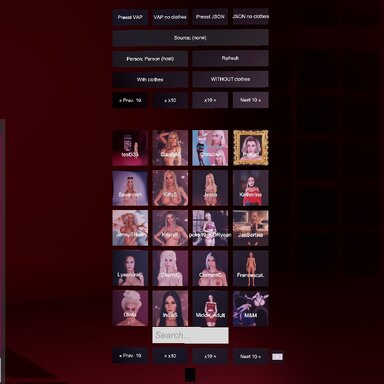
This script lets you load your characters from scenes, VAP files, or JSON saves.
The controls are simple—its features are shown in the video.
You can load your favorite characters without interrupting your workflow.
Select a scene by clicking it—for example, on the tile in the main panel. If your scene has multiple characters, choose in Person the character you want to load the look onto. Then, if the scene you’re loading the look from has multiple characters, choose who you want to load from using the Source button. Finally, choose whether to load the character with clothing or without clothing by clicking the corresponding button.
Sometimes the textures on a character may not load. This isn't the plugin's fault; it's just how VAM works. Just reload your character and everything will be Ok.
The script works in both desktop and VR. I tested it using Oculus VR headsets. I don't know how the controllers will interact with the buttons on other headsets.
The controls are simple—its features are shown in the video.
You can load your favorite characters without interrupting your workflow.
Select a scene by clicking it—for example, on the tile in the main panel. If your scene has multiple characters, choose in Person the character you want to load the look onto. Then, if the scene you’re loading the look from has multiple characters, choose who you want to load from using the Source button. Finally, choose whether to load the character with clothing or without clothing by clicking the corresponding button.
Sometimes the textures on a character may not load. This isn't the plugin's fault; it's just how VAM works. Just reload your character and everything will be Ok.
The script works in both desktop and VR. I tested it using Oculus VR headsets. I don't know how the controllers will interact with the buttons on other headsets.
https://hub.virtamate.com/resources/appearance-loader.18684/ - Here I looked and took the code for the buttons to call the download of Person Vap and Person Json, so as not to search for a long time