

Outliner — Fast Scene Navigation & Lighting Workflow for Virt-A-Mate
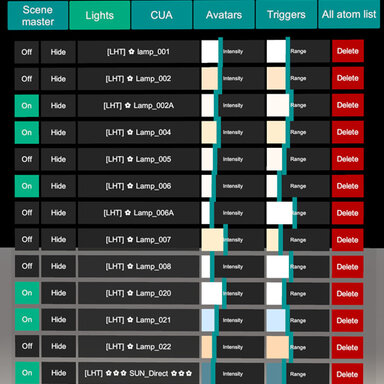
Outliner is a compact in-scene control panel built to speed up real VaM scene work. It gives you a clean, scrollable atom list with smart filters, plus direct controls for Lights, Reflection Probes, Scene Master, and CUA tools — so you can iterate without digging through multiple VaM menus.
Outliner is a compact in-scene control panel built to speed up real VaM scene work. It gives you a clean, scrollable atom list with smart filters, plus direct controls for Lights, Reflection Probes, Scene Master, and CUA tools — so you can iterate without digging through multiple VaM menus.
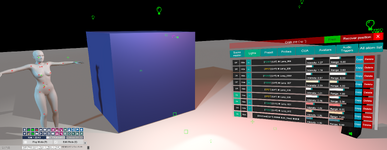
 Instant scene navigation
- Quick filters for the atoms you use most: Scene Master, Lights, Probes, Presets, CUA, Avatars, Audio/Triggers, and All atoms
- One-click selection and fast camera workflow for crowded scenes
 Per-Scene Light Presets (scene-linked)
Outliner uses a per-scene preset list: each scene keeps its own set of lighting presets, so when you switch scenes you only see/load the presets that belong to that scene.How it works
- The scene file stores the preset references (a list of preset names linked to that specific scene).
- The preset files themselves are stored globally on disk, so they’re easy to back up and reuse.
 Lights: intensity & range, right where you need them
- Adjust Light Intensity and Light Range directly from the list (fast look-dev, fast fixes)
- Quick on/off controls for rapid A/B testing while lighting
 Reflection Probes (no menu diving)
- Dedicated controls for probe tuning (e.g., intensity and blending behavior)
- Makes reflections and scene “readability” faster to dial in
 Workflow shortcuts
- ALT + LMB: instantly focus the camera on the selected asset — perfect for crowded scenes
 Scene Master: global lighting control
- Central panel for scene-wide lighting settings (Skybox, exposure/ambient feel, overall lighting balance)
- Great for quick “make the whole scene work” passes
 CUA workflow tools
- Quickly duplicate or delete CUA items while you build
- Toggle collisions on/off when you need clean posing, performance, or less interference
 Hotkeys (fast access, zero friction)
- Open/close Outliner instantly via a hotkey (F2 by the default)
- Customizable binding so it fits your setup and avoids conflicts
 Flexible UI placement
- Follow camera, fixed distance, or “stick to screen” style behavior
- Adjustable UI scale and visible rows to fit any monitor and workflow
 Optional background low-power mode
- Lowers load when VaM is minimized/unfocused so your GPU isn’t wasting power while you multitask (as an option in the plugin settings)