• Hi Guest!

    We are extremely excited to announce the release of our first Beta1.1 and the first release of our Public AddonKit!
    To participate in the Beta, a subscription to the Entertainer or Creator Tier is required. For access to the Public AddonKit you must be a Creator tier member. Once subscribed, download instructions can be found here.

    Click here for information and guides regarding the VaM2 beta. Join our Discord server for more announcements and community discussion about VaM2.
  • Hi Guest!

    VaM2 Resource Categories have now been added to the Hub! For information on posting VaM2 resources and details about VaM2 related changes to our Community Forums, please see our official announcement here.
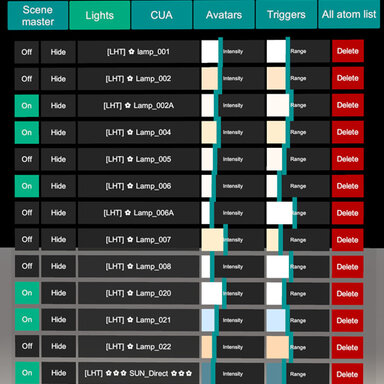
Outliner CUA & Light panel (Out from Alpha/Beta)

Plugins + Scripts Outliner CUA & Light panel (Out from Alpha/Beta)

Download [7.07 MB]

New​

  • Added Reset buttons to Scene controls:
    • Master Intensity
    • Diffuse Intensity
    • Specular Intensity
    • Unity Ambient Light on Assets
    • Camera Exposure
    • Shadows
  • Added Allow Grab / Not Allow control for CUA atoms
    • Quickly enables or disables gizmo interaction
    • Controls both position and rotation grab states
  • Added preset reordering buttons
    • Move presets up
    • Move presets down
  • Added Update button for presets
    • Overwrites an existing preset with the current lighting state
  • Clicking a preset name now loads that preset directly
  • Increased maximum light distance/range to 22

Improved​

  • Improved ReflectiveSlate handling in the CUA list
    • ReflectiveSlate atoms are now shown as:
      • [Mirror] AtomName
  • Improved readability of selected light type labels
    • POINT now uses a clearer highlight color when selected

Fixed​

  • Fixed Scene values not updating correctly when changed through the standard VaM UI
  • Fixed reset buttons changing the slider but not refreshing the displayed numeric value
  • Fixed duplicated UI elements in the Scene tab
    • Could happen after using:
      • ambient RGB/hue controls
      • shadow slider at certain values
      • preset update actions
  • Fixed layout breakage around:
    • Unity Ambient Light on Assets
    • Shadows slider row
    • Scene ambient picker container
  • Fixed preset list refresh duplicating rows after pressing Update
  • Fixed inconsistent Allow Grab button behavior
  • Fixed CUA live sync so row state stays updated for:
    • On / Off
    • Hide / Hidden
    • Collision
  • Blocked preset loading while a preset is being renamed
  • Fixed compatibility with older saved tab names
  • Added cleanup for Scene color picker resources on unload

Performance​

  • Optimized the Scene ambient color picker
  • Reduced unnecessary UI rebuilds during live sync
  • Improved hue / RGB picker behavior
  • Reduced expensive texture updates and unnecessary allocations
  • Improved responsiveness and reduced FPS drops while interacting with Scene color controls
Improvements v1.1:
Added preset renaming functionality
Added preset import from other scenes (works if the light names match between scenes)
Added visual gizmos for lights (range sphere for point lights, range and angle cone for spot lights)
Added highlight for the selected CUA
Added a reflection probe (as a demo for interaction)
Added a CUA pole (as a demo object for interaction)

Out from Alpha/Beta​

1. Light preset system. You can save lights and load any configuration.
Presets folder - Saves\PluginData\Outliner_Exports
2. Improved list menu. Selected atom is highlighted in the list for better visibility.
3. "Grab me" fixed (drag function work correctly in the scene space)
4. CUAs duplication (including links to prefabs and assetbundles)
5. Changed the logic of sticking to the main camera (does not work perfectly)
6. Recovery system after errors of loading presets. Exception handling. If something goes wrong your scene will not be damaged. Outliner stores data separately from scenes.
1. When you hide the menu outliner switches to performance/freeze mode. The menu is literally not taking any resources and not stealing frames.
2. Safe mode by default
3. Added button "copy atoms" (not all atoms are copied yet)
4. Fixed the scroll menu - one step of mouse wheel scrolls the list up or down on one atom
5. Added button to сontrol collisions for CUA (enable/disable)
1. Fixed values for lamps via menu (atom sync was broken) I didn't notice it in alpha2
2. Fixed hide button
1. Menu can be linked to the camera and hidden or shown in any time. Very handy. (in the plugin settings menu)
2. Reflect probes added
3. Now you can see intensity and range and type of lighs
4. Fixed issues (except hide/show atom)
5. Autocolor update
6. The menu cannot be more than 50% of your monitor's vertical resolution.

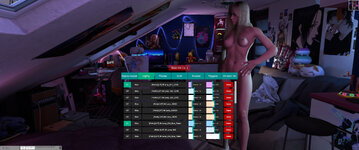
VaM 2025-10-27 21-35-00.jpg
Back
Top Bottom