-
Hi Guest!
We are extremely excited to announce the release of our first Beta1.1 and the first release of our Public AddonKit!
To participate in the Beta, a subscription to the Entertainer or Creator Tier is required. For access to the Public AddonKit you must be a Creator tier member. Once subscribed, download instructions can be found here.
Click here for information and guides regarding the VaM2 beta. Join our Discord server for more announcements and community discussion about VaM2. -
Hi Guest!
VaM2 Resource Categories have now been added to the Hub! For information on posting VaM2 resources and details about VaM2 related changes to our Community Forums, please see our official announcement here.

You are using an out of date browser. It may not display this or other websites correctly.
You should upgrade or use an alternative browser.
You should upgrade or use an alternative browser.
Download [<1 MB]

-- Small Addition & Fixes:
- Added custom "Mouth Open Wide 1 Custom" morph to fix lip sync / jaw drive from sound, plugin will now drive it's own unique custom morph without conflicts with other plugins like vammoan or bodylanguage that use the vam native "Mouth Open Wide" morph for example.
- Adjusted the mouth alignment curve starting point for better oral penetration alignment.





** Not directly backwards compatible, needs .cs to .cslist rename in scene save .json file. **
-- New Features & Improvements:
- Re-Designed plugin UI with collapsible header menus, their state can be saved & restored with presets.
- Added tooltips system to all UI elements for a cleaner UI look, now the info texts only show on hovering upon UI elements. (can disable in advanced tab)
- Split visual toggles for less clutter in visuals with newly added motion direction visual. this should make fine tuning the plugin much more easier.
- Fixed tongue collision ignore logic for vam dildo.
- Replaced finger mode selection menu with 5 individual toggles for each finger for all possible combinations.
- Fixed penetration alignment torque mode for CUA toys by overriding unity's standard MaxAngularVelocity, removed joint rotation target mode as it is no longer needed.
- Fixed incorrect CUA Align axis auto detection and added visuals for the auto Axis for CUA.
- Reworked Alignment Fade logic to also affect rotation drive with better fade in/out effect for very high values on proximity enter & exit.
- Fixed optimized mass application by applying with proximity detection + current penetration depth conditions. this should prevent male gens from falling off on proximity enter due to added weight.
- Improved pre-open morphs activation range.
- Improved external fingers, self fingers & tongue alignment to be less snappy. Should be applied very smoothly from now on.
- Refactored plugin script file into 42 smaller files for better maintainability.
-- Preview:
-- Settings for preventing male genitals from poking through the back of the neck:
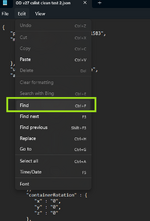
-- Tutorial on how to fix backwards compatibility due to change from ".cs" script file to a ".cslist" file:
- All you really need to do is:
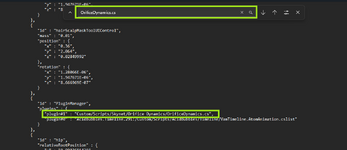
1. open your scene .json file with notepad
2. find keyword "OrificeDynamics.cs", you'll find it in a line like so:
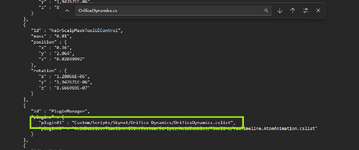
3. replace it with keyword "OrificeDynamics.cslist", should look something like this:
(if you had it loaded on multiple females in scene you'll need to replace all occurrences)
4. save your scene file and reload the scene in vam and all should be good. this will also restore all trigger references to the plugin like UIbutton triggers or timeline keyframes for example.
-- Note:
- Due to a huge change in plugin file structure, some bugs might pop up that i didn't come across yet, be sure to report them if you stumble upon any in the discussion forum


-- Fixes & Improvements:
- Optimized heap memory usage to 0.1MB/s~ down from previous 0.2MB/s~.
- Fixed Optimized Mass & Friction from getting applied to male atoms via detecting male hands or tongue, should only apply through detecting gens.
- Refined Collision filter list in deep penetration (Restored normal collision with some Thigh colliders to prevent clipping for CUA penetrators)
- Optimized performance to 0.2ms ~ down from previous 0.5ms ~ in frame time.

-- Fixes & Improvements:
- Adjusted plugin triggers & collider components initialization & handling workflow to stop @JayJayWon VUML plugin exception errors, pointed out by @Dragontales .
- Fixed vam native LipTrigger being stuck on collision detection on scene reloads.
- Added separate hand handling for both self female & external Male atoms, this should prevent left hand from colliding with depth planes if right hand is in an orifice for example.
- Added separate body part handling for external male atoms, meaning the left hand, right hand, gens and tongue will be treated as standalone penetrators allowing same male atom to penetrate multiple female orifices at once with alignment enabled for all orifices, this should allow compatibility with 69 poses for example.
-- New Features & Improvements:
- Further Optimizations to Heap memory usage, rate is 0.2MB/s ~ down from previous 1.5MB/s ~.
- Added feature for smoother tab switching, spreading UI elements handling across multiple frames.
- Added new alignment modules for male fingers, male tongue and female self fingers, with multiple finger combination alignment modes. (Experimental Feature)
- Fixed plugin stops working if disabled and re-enabled from person plugins tab.
- Fixed error logs that were visible if using AcidBubbles DevTools.
-- Improvements:
- Added logic to force enable Soft body physics for female, It can get confusing as there are 3 parameters scattered around VaM that all need to enabled for plugin to work correctly. This should prevent errors on scenes that have soft body turned off by default.
From now on it will be done automatically by the plugin. (force enables: female soft body setting in control & physics 1 tab, soft body setting in User Preferences tab and soft body setting in F Glute physics tab)
** Critical Update, please do update your scenes (preferably to the newer v23 version above) if you are a scene creator **
-- Bug Fix:
- Fixed a critical bug that causes the majority of the plugin modules to stop working & cause vam to crash (due to a mistake in morph drives that set morphs with NaN values)
-- Improvements:
- Removed morph clamps from lips in & out morph drives.
- Edited lips out motion morph for smoother look around the cheeks.
- 10
-
 10
10
-- New Features & Improvements:
- Added person pose change event to temporarily disable hip force & penetration alignment on changing poses to prevent misalignment with orifices. (works also for timeline poses)
- Added Position Fade Speed slider, will allow a smooth transition of the alignment effect on penetrators on proximity enter & exit.
- Added Optimized Mass Toggle to adjust penetrators mass for less collision jitter with mouth.
- Added Optimized Friction Toggle to adjust penetrators friction for smoother collision with mouth & throat.
- Added custom mouth width corrective morph, Useful if using big gens on mouth orifice. (controlled with BJ Lips Widen slider)
- Added CUA asset name changed event handler for proper trigger & cache refreshes on CUA asset name changes.
- Added two new proximity triggers for each orifice, one for penetration alignment and the other for the rest of the modules. allowing larger trigger range for alignment without messing up the other functionalities.
- Added Joint Target rotation drive mode for penetration alignment, Works better for aligning CUAs.
- Reworked UI contents & description texts.
- Reworked penetration alignment system for smoother position drive alignment, max values are increased to 50000. (now position drive only affects axes perpendicular to the 3D curve)
- Fixed optimized physics settings not being restored on feature disable or plugin removal. and fine tuned collider filter list in deep penetration feature.
- Fixed cross compatibility with potentially all other plugins by simply not touching colliders that are triggers in deep penetration feature. (probably)
- Fixed alignment system aligning wrong CUA axis if CUA asset name changes.
- Optimizations to Heap Memory usage.
-- New Features:
- Modified Deep penetration to be compatible with @hazmhox VamMoan & VamMoan 2 Teaser plugins, And a fix for Bodylanguage blowjob sounds.
-- Note:
- @CheesyFX Bodylanguage's slap triggers throw exception errors because of deep penetration feature, So far there isn't any workaround that i know of on my end so disable that module if using Orifice Dynamics or just don't use Deep Penetration.
-- New Features:
- Modified Deep Penetration logic for the plugin to be compatible with @CheesyFX Bodylanguage plugin.
- Added smoothing to Optimized physics targets, the glute fat colliders will now smoothly transition in size to remove that sudden snap in collisions on proximity detection.
-- Bug Fix:
- Fixed penetration alignment oscillating on & off between chest & neck area.