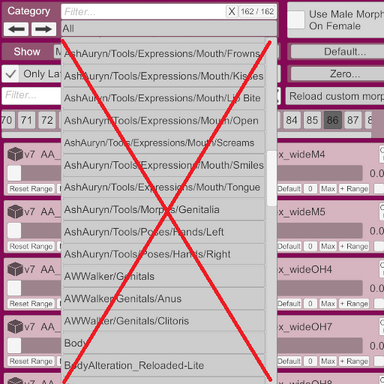
This plugin is currently under development and is far from final appearance. I decided to publish it early to get more time for the community to guide the development.
This is a tool for browsing, filtering, and adjusting morphs on a Person atom. It accompanies the default Morphs Tab with a compact array and adds multi-criteria filtering.
Can override existing morph classification system to bring some Order.
UI Overview
UI Interaction tips:
- **Hover** any control to see a tooltip at the bottom of the UI including some extended morph info.
- **Right-click** a popup chooser or a text input to reset it to `All` / empty string.
- **Shift+Scroll** on a slider → coarse adjustment; **Alt+Scroll** → fine (×0.1) adjustment.
- **Right-click** on a slider → reset its value to 0.
*Last Touched Morph*
A morph becomes the *last touched* when you change its value or Left-clicked it. If the last touched morph survives a filter change, the view jumps to the page containing it.
MorphCache — How Filters Work
At startup (and after `Cache` or `Alter`) the plugin builds three dictionaries that map categories to the full morph list. When the filter is active with **Include Children**, any key that starts with the chosen path + `"/"` is included. With **Inverse**, all keys *except* the matched ones are included.
The cache built based on internal DAZMorph data:
GuessCreator logic examples
A parent key (everything before the first `/`) is **always added** for creator so that `"AshAuryn"` covers `"AshAuryn/Pose_Tools"`.
Flag Filter Syntax
The flag string is a sequence of single-character flags. Each flag either **requires** the property to be true (no prefix) or **forbids** it (`!` prefix).
This brings functionality similar to "Show" filter in the standard Morph Tab.
Flags table:
Examples
`a` Only morphs that are currently active
`!g` Only morphs that are NOT in a package (built-in)
`f` Only morphs marked as favorite
`a!gf` Morphs that are active **AND** not in a package **AND** favorite
`!pf` Morphs that are NOT pose controls **AND** are favorite
`!d` Only morphs that are NOT driven
Characters not in `apftrgd` are ignored, so you can use punctuation for readability (e.g. `"a,!g,f"` is equivalent to `"a!gf"`).
Regex Filter
The regex is matched against `DAZMorph.resolvedDisplayName` with `RegexOptions.IgnoreCase`.
The `Alter` Button
Loads `Saves/PluginData/MorphHelper/replace.json` (a JSON array of objects).
Each object may contain (similar to any Morph Preset *.vap):
Lookup prefers `uid`; falls back to `name`. The matched morph gets `overrideRegion` and `group` reassigned, then the cache is rebuilt. After `Alter`, all choosers are updated and the filter is re-applied.
Example file:
Save morphs list
Writes every morph known to the plugin into `Saves/PluginData/MorphHelper/MorphsAll.json`.
Important caveats:
- The morph list is **highly user-dependent**. It reflects exactly which packages and community content are installed on your machine. Two users will almost certainly see different lists.
- Some morphs are marked with `"preloadMorphs" : "false"` in their package metadata. These morphs are **loaded on demand** and will **not appear** in the list until they have been activated at least once in the current session. If you don't see a morph you expect, try searching for it in VaM's native morph browser first, then re-save.
Typical workflow to alter your categories:
1. Press **Save morphs list** — produces `MorphsAll.json`.
2. Use an external tool (editor, script, diff tool) to examine the JSON and create a `replace.json` with the morphs whose region/group you want to reassign.
3. Press **Alter** — the changes are applied and the cache is rebuilt.
The `MorphsAll.json` file is purely informational; Alter reads only `replace.json`. This two-file design lets you inspect the full morph database offline and craft batch edits without trial-and-error in VaM.
Why I do this?
The standard interface offers several filtering options. These include categories, morph type, and filtering by name. Currently, the "categories" are cluttered with junk and aren't helpful for filtering.

Why is this? I think it's because there's no filtering by morph creator (which, by the way, is available in the clothing selection), so authors try to compensate for this (and each in their own way): they include their name in the morph title or category. If you look inside the morph system, you'll see the following information, compiled from .vmi files provided by morph authors: region, group, isPoseControl. The author's name itself isn't listed. However, it can be extracted from the package name and/or the morph path as they should follow some rules. Potentially with three such filters, you can quickly find the desired morph if the data is properly filled in. So, if all authors suddenly update their morph packages, in which the region and group are selected from some relatively fixed set according to a uniform principle, and the file paths are selected for controlled extraction of the author's name, then the problem is solved! Clearly, this won't happen. Then all that remains is to replace the regions and groups for all/some morphs in the current session without changing the .vmi files (changing .vmi file is not a good option). This script provides such tools: you can export all the information about your morphs, create a replacement list, and import these replacements. I asked some AI tool to create a Python script for creating the replacements, but the moderators forbid sharing it. I (and you too!) can only share the resulting replacement file.
The script categorizes morphs into the following regions.
Regions:
Groups are an important classification that is currently largely unused. Currently, morphs essentially have only two groups, defined by isPoseControl flag, and this flag is used to select morphs for saving in different preset file types. I propose using it to assign morph handling method. The internal mechanics of other scripts can and should be guided by these values, so it's important to adhere to a unified principle, which I hope you can help me formulate. For example, scripts such BootyMagic, ShakeIt have dozens of active morphs that don't need to be saved to a pose preset. These morphs can be assigned a group that will be ignored when saving a pose.
Groups:
This is a tool for browsing, filtering, and adjusting morphs on a Person atom. It accompanies the default Morphs Tab with a compact array and adds multi-criteria filtering.
Can override existing morph classification system to bring some Order.
UI Overview
| Control | Description |
| Group / Creator / Region popup | Drop-down with `All` default. Each has two toggles: **C** (include Children subcategories) and **I** (Invert the selection) |
| Filter Flags | Enter a flag string to require or forbid morph properties |
| Regex Match | Filter morphs whose display name matches a .NET regex |
| `<` `>` buttons | Scroll the morph slider bank backward/forward by one page |
| Page slider | Horizontal slider — jump directly to any page of the current filter result |
| min / range- / default / range+ / max / snap 0.1 | Per-morph value actions on the *last touched* slider |
| Morph sliders | 4×3 grid of custom sliders; each displays the morph name and current value |
| Save morphs list | Dumps every known morph into `Saves/PluginData/MorphHelper/MorphsAll.json` |
| Log last morph | Prints *last touched* morph information |
| Alter | Batch-reassign region/group from `Saves/PluginData/MorphHelper/replace.json` |
| Cache | Rebuild the internal MorphCache (useful after externally adding/removing morphs) |
UI Interaction tips:
- **Hover** any control to see a tooltip at the bottom of the UI including some extended morph info.
- **Right-click** a popup chooser or a text input to reset it to `All` / empty string.
- **Shift+Scroll** on a slider → coarse adjustment; **Alt+Scroll** → fine (×0.1) adjustment.
- **Right-click** on a slider → reset its value to 0.
*Last Touched Morph*
A morph becomes the *last touched* when you change its value or Left-clicked it. If the last touched morph survives a filter change, the view jumps to the page containing it.
MorphCache — How Filters Work
At startup (and after `Cache` or `Alter`) the plugin builds three dictionaries that map categories to the full morph list. When the filter is active with **Include Children**, any key that starts with the chosen path + `"/"` is included. With **Inverse**, all keys *except* the matched ones are included.
The cache built based on internal DAZMorph data:
region filter = DAZMorph.resolvedRegionName (same as Category in the standard Morph Tab),group filter = DAZMorph.group (absent in the standard Morph Tab),creator filter = GuessCreator() my routine for creator identification as this information is not provided internally.GuessCreator logic examples
Code:
DAZMorph.isRuntime == false → "BuiltIn"
DAZMorph.isInPackage == false: extraction from DAZMorph.uid:
ex1:
"Custom/Atom/Person/Morphs/female/kemenate/f_lashes_separate.vmi" → "kemenate"
ex2:
"Custom/Atom/Person/Morphs/female/AUTO/Hip Width2.vmi" → "N/A"
DAZMorph.isInPackage == true
from DAZMorph.packageUid:
"AshAuryn.Pose_Tools.5.var" → "AshAuryn/Pose_Tools"
** now disabled **
from DAZMorph.uid :
"AshAuryn.Pose_Tools.5.var:/Custom/Atom/Person/Morphs/female/AshAuryn/Pose Tools/Smiles/AA_basicsquint4.vmi" → "AshAuryn/Pose Tools/Smiles"
The result is which is longer: "AshAuryn/Pose Tools/Smiles"
** now disabled as it makes more mess, example:
AWWalker.AWW_GenMorphResources.9:/Custom/Atom/Person/Morphs/female_genitalia/data/3feetwolf/New Genitalia For Victoria 6/Genitalia-default/Morphs/AWWALKER/AWW_Legacy/ab_gen_close.vmi" →
"data/3feetwolf/New Genitalia For Victoria 6/Genitalia-default/Morphs/AWWALKER/AWW_Legacy" and there are much of them**
Flag Filter Syntax
The flag string is a sequence of single-character flags. Each flag either **requires** the property to be true (no prefix) or **forbids** it (`!` prefix).
This brings functionality similar to "Show" filter in the standard Morph Tab.
Flags table:
| Char | DAZMorph Property |
| a | active |
| p | isPoseControl |
| f | favorite |
| t | isTransient |
| r | isRuntime |
| g | isInPackage |
| d | isDriven |
`a` Only morphs that are currently active
`!g` Only morphs that are NOT in a package (built-in)
`f` Only morphs marked as favorite
`a!gf` Morphs that are active **AND** not in a package **AND** favorite
`!pf` Morphs that are NOT pose controls **AND** are favorite
`!d` Only morphs that are NOT driven
Characters not in `apftrgd` are ignored, so you can use punctuation for readability (e.g. `"a,!g,f"` is equivalent to `"a!gf"`).
Regex Filter
The regex is matched against `DAZMorph.resolvedDisplayName` with `RegexOptions.IgnoreCase`.
The `Alter` Button
Loads `Saves/PluginData/MorphHelper/replace.json` (a JSON array of objects).
Each object may contain (similar to any Morph Preset *.vap):
{ "uid": "path_to_morph.vmi", "name": "Display Name", "region": "assigned region", "group": "assigned group" }Lookup prefers `uid`; falls back to `name`. The matched morph gets `overrideRegion` and `group` reassigned, then the cache is rebuilt. After `Alter`, all choosers are updated and the filter is re-applied.
Example file:
JSON:
{
"replace": [
{ "name": "MyMorph", "region": "head/face", "group": "shape" },
{
"name": "Nostrils flat",
"uid": "Spacedog.Import_Reloaded_Lite.2:/Custom/Atom/Person/Morphs/female/Nose_Reloaded-Lite/Nostrils flat.vmi",
"region": "head/face/nose",
"group": "shape"
},
{
"name": "Thigh Front",
"uid": "Custom/Atom/Person/Morphs/female/AUTO/Thigh Front.vmi",
"region": "body/legs/thighs",
"group": "shape"
},
{
"name": "belly2",
"uid": "Skynet.OrificeDynamics.30:/Custom/Atom/Person/Morphs/female/OrificeDynamics/belly2.vmi",
"region": "body/torso/belly",
"group": "pose/tension/dynamic"
},
]
}
Save morphs list
Writes every morph known to the plugin into `Saves/PluginData/MorphHelper/MorphsAll.json`.
Code:
["name"] = DAZMorph.resolvedDisplayName,
["uid"] = DAZMorph.uid,
["package"] = DAZMorph.packageUid,
["region"] = DAZMorph.resolvedRegionName,
["group"] = DAZMorph.group,
["pose"] = DAZMorph.isPoseControl,
["creator"] = GuessCreator(morph)
- The morph list is **highly user-dependent**. It reflects exactly which packages and community content are installed on your machine. Two users will almost certainly see different lists.
- Some morphs are marked with `"preloadMorphs" : "false"` in their package metadata. These morphs are **loaded on demand** and will **not appear** in the list until they have been activated at least once in the current session. If you don't see a morph you expect, try searching for it in VaM's native morph browser first, then re-save.
Typical workflow to alter your categories:
1. Press **Save morphs list** — produces `MorphsAll.json`.
2. Use an external tool (editor, script, diff tool) to examine the JSON and create a `replace.json` with the morphs whose region/group you want to reassign.
3. Press **Alter** — the changes are applied and the cache is rebuilt.
The `MorphsAll.json` file is purely informational; Alter reads only `replace.json`. This two-file design lets you inspect the full morph database offline and craft batch edits without trial-and-error in VaM.
Why I do this?
The standard interface offers several filtering options. These include categories, morph type, and filtering by name. Currently, the "categories" are cluttered with junk and aren't helpful for filtering.

Why is this? I think it's because there's no filtering by morph creator (which, by the way, is available in the clothing selection), so authors try to compensate for this (and each in their own way): they include their name in the morph title or category. If you look inside the morph system, you'll see the following information, compiled from .vmi files provided by morph authors: region, group, isPoseControl. The author's name itself isn't listed. However, it can be extracted from the package name and/or the morph path as they should follow some rules. Potentially with three such filters, you can quickly find the desired morph if the data is properly filled in. So, if all authors suddenly update their morph packages, in which the region and group are selected from some relatively fixed set according to a uniform principle, and the file paths are selected for controlled extraction of the author's name, then the problem is solved! Clearly, this won't happen. Then all that remains is to replace the regions and groups for all/some morphs in the current session without changing the .vmi files (changing .vmi file is not a good option). This script provides such tools: you can export all the information about your morphs, create a replacement list, and import these replacements. I asked some AI tool to create a Python script for creating the replacements, but the moderators forbid sharing it. I (and you too!) can only share the resulting replacement file.
The script categorizes morphs into the following regions.
Regions:
Code:
"body",
"body/anus",
"body/genitalia",
"body/torso",
"body/torso/chest",
"body/torso/chest/breasts",
"body/torso/back",
"body/torso/belly",
"body/torso/abs",
"body/torso/waist",
"body/torso/hips",
"body/torso/pelvis",
"body/torso/butt",
"body/torso/belle",
"body/neck",
"body/arms",
"body/arms/shoulders",
"body/arms/upper",
"body/arms/forearms",
"body/arms/elbows",
"body/arms/wrists",
"body/arms/hands",
"body/legs",
"body/legs/thighs",
"body/legs/knees",
"body/legs/shins",
"body/legs/calves",
"body/legs/ankles",
"body/legs/feet",
"head",
"head/scalp",
"head/hair",
"head/ears",
"head/ears/lobe",
"head/face",
"head/face/brow",
"head/face/cheeks",
"head/face/chin",
"head/face/eyes",
"head/face/eyes/eyelids",
"head/face/eyes/eyelashes",
"head/face/jaw",
"head/face/mouth",
"head/face/mouth/lips",
"head/face/mouth/teeth",
"head/face/mouth/tongue",
"head/face/mouth/gums",
"head/face/nose",
"head/face/nostrils",
"head/face/temples",
"head/face/forehead",
"character" (for full head and body morph)
Groups:
Code:
"shape",
"shape/alteration", [scars/old/young/mutant]
"shape/correction", [lashes/glasses, not pose-related]
"pose",
"pose/deform", [caused by a force]
"pose/deform/clothes",
"pose/deform/impact",
"pose/fingers", [ special for fingers bend ]
"pose/tension", [muscle tension in hold pose, BetterBends, ShakeIt]
"pose/tension/expressions", [special facial expressions ]
"pose/tension/dynamic" [muscle tension in running, BootyMagic, ShakeIt, OrificeDynamics]