Mechanicus GUI

Plugins + Scripts Mechanicus GUI

Download [<1 MB]
mechanicus_logo.png


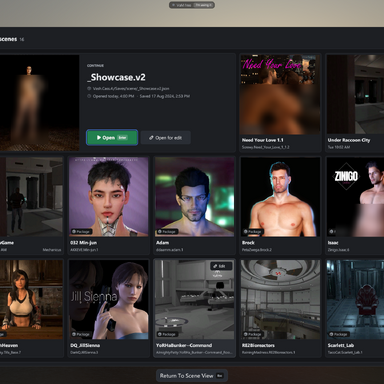
GUI Theme that includes minor functional changes to the UI. Focusing however mostly on cosmetic changes.


Install


  • Put Mechanicus.VAM122M_EditionUI.1.var in VaM’s AddonPackages folder, or download it from the Hub.
  • If an older copy is already there, remove it first.
  • Start VaM, or click Rescan Packages if it’s already running.
Turn it on (this session)

  • Open the main menu and go to the Session Plugins tab.
  • Click Add Plugin, then Select File… on the new row.
  • In the plugin browser, open the package Mechanicus.VAM122M_EditionUI.1 and pick VAM 1.22M Edition UI.cs. It’s the only file in its folder, Mechanicus/VAM 1.22M Edition UI/.
  • If VaM asks whether to allow the package’s plugin, choose Allow Always so it doesn’t ask again at every start.
  • The theme applies at once. Click Open Custom UI… on its row to see the panel: Basic shows Theme on and the status line.
Keep it on every time VaM starts (user default)

  • With the plugin loaded, go to the Session Plugin Presets tab. The panel’s first-run card has an Open Session Plugin Presets button that takes you there.
  • Click Change User Defaults…
  • Click Set Current As User Defaults.
  • The card on the plugin’s panel then changes to “Loads with VaM”, which confirms it’s saved.

1793202860472.png


1793202897526.png


1793202874019.png
React to this content...

Share this resource

Latest reviews

Positive
Version: 1 Beta
Posted:
Amazing UI! makes VAM look like an actual 2020s game. The new loading tab gives a much better idea of how its progressing and also says which (unity) asset exactly we are waiting for.
Upvote 0
Positive
Version: 1 Beta
Posted:
The idea is good, but many plugins partially lack an interface. And there’s also a missing 1000.
Mechanicus
Mechanicus
Hey! Thanks for the feedback. I aim to improve this as much as I can. If you like send specific input as a pm. I promise I will look into it and try and fix as much as possible.
Upvote 0
Positive
Version: 1 Beta
Posted:
5 stars, it doesn't just change the UI but improves usability as well. Great job!
Upvote 0
Positive
Version: 1 Beta
Posted:
Beautiful!
Upvote 0
Positive
Version: 1 Beta
Posted:
Really amazing work. Very well done. Been waiting for someone to do this for ages.
Upvote 0
Positive
Version: 1 Beta
Posted:
Amazing Job. Really dig the look and feel as well as it being dark mode. Thanks for the hard work. Working great so far.
Upvote 0
Positive
Version: 1 Beta
Posted:
Okay... this is huge. I look forward to working with this for a while. Thank you so so much. My monitor thanks you for no more burn-in!
Upvote 0
Positive
Version: 1 Beta
Posted:
Awesome work! Lookin' forward to crafting in style!
Upvote 0
Back
Top Bottom