


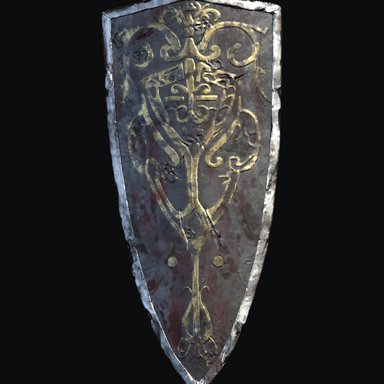


Lothric Knight Weapons
Five standalone weapon and shield CustomUnityAsset assets adapted from DARK SOULS III for Virt-A-Mate.
INCLUDED
- Lothric Knight straight sword
- Lothric Knight greatsword
- Lothric Knight shield
- Lothric Knight greatshield
- Cloth-free long spear
HOW TO USE
1. Place Coco.LothricWeaponsRelease.1.var in your VaM/AddonPackages folder without extracting it.
2. Rescan packages, then open Lothric_Weapons_Showcase_Release from the scene browser.
3. To use an individual asset, add a CustomUnityAsset atom, choose Select Asset, and browse this package under Custom/Assets/LocalDS3/LothricWeapons. Select an assetbundle and its matching prefab. The spear is in the NoCloth subfolder.
4. Adjust position, rotation and scale for your scene.
REQUIREMENTS
Virt-A-Mate 1.x. No third-party package dependencies.


Five standalone weapon and shield CustomUnityAsset assets adapted from DARK SOULS III for Virt-A-Mate.
INCLUDED
- Lothric Knight straight sword
- Lothric Knight greatsword
- Lothric Knight shield
- Lothric Knight greatshield
- Cloth-free long spear
HOW TO USE
1. Place Coco.LothricWeaponsRelease.1.var in your VaM/AddonPackages folder without extracting it.
2. Rescan packages, then open Lothric_Weapons_Showcase_Release from the scene browser.
3. To use an individual asset, add a CustomUnityAsset atom, choose Select Asset, and browse this package under Custom/Assets/LocalDS3/LothricWeapons. Select an assetbundle and its matching prefab. The spear is in the NoCloth subfolder.
4. Adjust position, rotation and scale for your scene.
REQUIREMENTS
Virt-A-Mate 1.x. No third-party package dependencies.
