Earlier versions did not handle nearby / style joints correctly, so on some styles an unseen force would pull the strands back to the original side once SIM was on. Thanks to
BANANANA for the report.
I thought this would be a quick fix and even planned to take the plugin down for a short time. Getting the fix and the full automation right took much longer than expected — sorry about that.
I almost gave up and switched to a semi-manual workflow. After many internal builds, it works: click Save, and the rebuild finishes on its own.
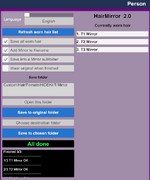
2.0 adds a completion status bar. After you click Save, wait until the plugin finishes. Please do not do other things in the meantime. Use the new hair only after you see the done message.
When it finishes, the mirrored hair is worn automatically. You can also check the option to keep wearing the original.
Most hairs mirror cleanly, but a few unusual styles may not look right. Wear the mirrored hair, then try Open In Creator → Generate & Style → Rebuild Style Joints, or fine-tune Physics and Look. It should alleviate the problem.
Fixes
- Sim pulling strands back to the original side: rebuild style joints after save and write them back