• Hi Guest!

    We are extremely excited to announce the release of our first Beta1.1 and the first release of our Public AddonKit!
    To participate in the Beta, a subscription to the Entertainer or Creator Tier is required. For access to the Public AddonKit you must be a Creator tier member. Once subscribed, download instructions can be found here.

    Click here for information and guides regarding the VaM2 beta. Join our Discord server for more announcements and community discussion about VaM2.
  • Hi Guest!

    VaM2 Resource Categories have now been added to the Hub! For information on posting VaM2 resources and details about VaM2 related changes to our Community Forums, please see our official announcement here.
Color Harmony Tool

Paid EA Plugins + Scripts Color Harmony Tool

Go to pay site
Early-Access End Date
Apr 16, 2026
Early Access to all my tiers. Becomes CC-BY on April 16th

Ever stare at a color you love and have no idea what other colors will actually work with it?
That's exactly what this plugin solves.


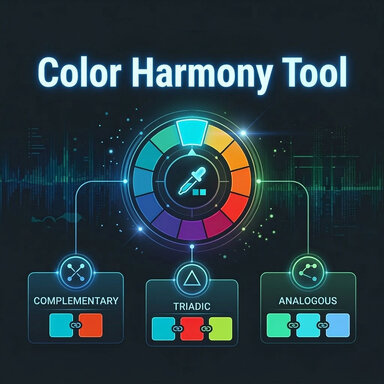
The Color Harmony Tool is a simple utility plugin for VirtaMate that takes any color you pick and instantly shows you three families of colors that are mathematically guaranteed to work well with it — based on real color theory.

What are Color Harmonies?
Color harmony is the idea that certain combinations of colors are naturally pleasing to the eye because of how they relate to each other on the color wheel. Artists, designers, and filmmakers have used these relationships for centuries to create palettes that feel intentional and balanced rather than random.


What the plugin gives you:
🎨 Complementary — The color sitting directly opposite yours on the wheel. High contrast, bold, and eye-catching. Great for making something pop.
🎨 Triadic — Two colors spaced equally around the wheel at 120 degrees each. Together with your input color they form a triangle of hues that feels vibrant and balanced without being jarring.
🎨 Analogous — Two colors that sit just beside yours on the wheel. They're close relatives — they share a mood and blend together naturally. Perfect for soft, cohesive looks. A slider lets you control how wide or narrow the spread is.


How to use it:
Load it onto any atom in your scene — an Empty atom works great.
Open the Custom UI, pick your base color or paste one you've copied
The other five pickers update instantly. Use the colors as reference when coloring hair, skin, clothing, lights, or environment elements.

It's a small tool but one that I hope hope helps you!

Color Harmonies.jpg
React to this content...

Share this resource

More resources from Dragontales

Back
Top Bottom