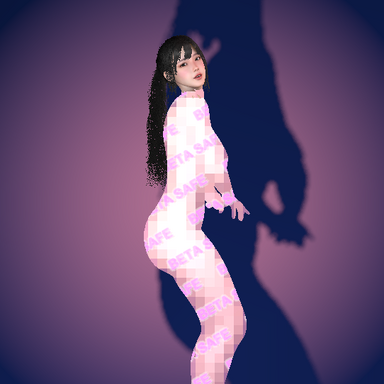
BodyCensor

Plugins + Scripts BodyCensor

Download [<1 MB]
One censor for the whole scene. Load BodyCensor as a Session plugin or Scene plugin instead of adding it to each person. A new General tab lists everyone in the scene:
  • Censor (name): a checkbox for each person, on by default. Untick someone to leave them uncensored.
  • Same Settings For Everyone: on by default. Turn it off to give each person their own look, and use Edit Person to pick whose settings the other tabs change.
  • People added to or removed from the scene are picked up within a second. As a Session plugin it stays loaded when you change scenes, and settings are kept by each person's name.
  • Anyone who has BodyCensor added to them directly keeps using that one, so nobody is censored twice.
  • The Info tab shows each censored person's status.
Adding BodyCensor to a Person works exactly as before.
Glitch style. A mosaic whose slices jump sideways at random, with the colors split apart and a few corrupted blocks. Set it with Glitch Amount, Shift, Slice Height, Color Split and Speed.
ASCII style. The body is redrawn as text characters, with denser characters on brighter areas.
  • ASCII Characters: Simple ( .:-=+*#%@), Blocks or Binary.
  • ASCII Color: the body's own colors, the Censor Color, or grayscale.
  • ASCII Background: how dark the space around the characters is.
  • Characters are Censor Intensity tall and stay put in the world like the mosaic.
  • New built-in preset: ASCII Terminal (green on black).
TV Static on any style. Static is now a TV Static checkbox instead of a Censor Style, so the noise can go over Solid, Mosaic, Blur, Glitch or ASCII. Static Opacity sets how much of the style shows through.
Censor Feet. Covers the feet and toes up to the ankle, with a soft edge. Feet Cut Height and Feet Fade Width are on the Fit tab.

Changes​

  • Glitch and ASCII can also be used as the Nipple Style.
  • Built-in presets now set TV Static on or off, so loading one after TV Static clears the noise.
  • Your own presets no longer save the plugin's on/off switch and label.

Compatibility​

  • Scenes and presets that used the old Static style load as Blur with TV Static on, which looks the same.
  • Scenes saved with v2 still load the v2 plugin. Keep v2 installed for them, or re-add the plugin from v3 to update a scene.
BodyCensor v2

New
  • Static style: animated TV static, with grain size, speed and opacity controls. Lower the opacity to let a blur of the body show through.
  • Hexagon mosaic: choose Square or Hexagon blocks.
  • Mosaic that stays put: the mosaic grid now stays fixed in the world and the body moves under it, instead of the blocks sliding along with the body. The old behavior is still available (Exp. tab, Use Old Mosaic).
  • Separate genitals and nipples: Censor Genitals and Censor Nipples are now separate toggles, each with its own patch sliders. Nipple Style gives the nipples their own style, e.g. solid nipples with a mosaic below.
  • Presets: six built-in looks (Pink Mosaic, Hex Mosaic, Black Bar, Frosted Blur, TV Static, Censored Stamp), plus saving, loading and deleting your own. Presets can be loaded from triggers.
  • Neck fade: the head and body censors now fade out softly at the neck instead of ending in a hard line (Fit tab, Neck Fade Width).
  • Exp. tab: experimental settings, each with an explanation: Use Old Mosaic, Match Skin Tessellation and Render Queue.

Gallery:
New UI
Screenshot 2026-10-12 125409.png


Preset Saving and Loading
Screenshot 2026-10-12 125453.png


New Censor - Static
Screenshot 2026-10-12 125550.png


New Censor - Hexagon Mosaic
Screenshot 2026-10-12 125532.png


Improved
  • Much better skin coverage: the censor now follows VaM's smoothed skin exactly, so skin no longer pokes through in spots on curves (buttocks, breasts, shoulders). Censor Lift can go much lower (around 0.3 mm), so tight clothing and accessories stay on top.
  • One Censor Intensity slider replaces Blur Size and Mosaic Block Size.
  • Reorganized panel: tabs are Presets, Censor, Text | Fit, Info, Exp., and only the controls that apply to your current settings are shown.

Gallery:
Fix: Better Skin Coverage
Screenshot 2026-10-12 125445.png


Fixed
  • The censor disappeared in scenes with a tonemap / color-correction CUA (common in many scene packs). It now shows, and gets tonemapped like the rest of the scene.

Old scenes
  • Scenes with Censor Privates off load with both Censor Genitals and Censor Nipples off. Triggers that set Censor Privates still work.
  • Mosaic Follows Body is read as Use Old Mosaic.
  • Blur Size and Mosaic Block Size from v1 aren't carried over. Set Censor Intensity once in those scenes.
Back
Top Bottom