

You are using an out of date browser. It may not display this or other websites correctly.
You should upgrade or use an alternative browser.
You should upgrade or use an alternative browser.
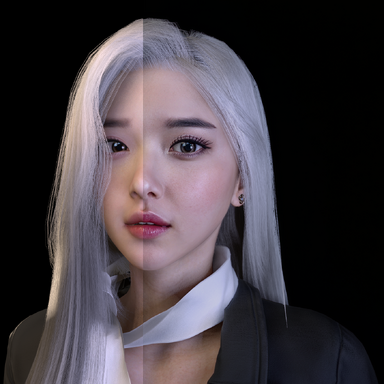
Paid Plugins + Scripts VaM DLSS Suite Upscaling+Neural Rendering+Frame Gen
- Thread starter UncleBurrito
- Start date


DLSS 4.5 Off: 77fps
DLSS 4.5 On: 67fps
This is without DLSS 5, just regular DLSS 4.5 and no frame generation.
Tested with DLSS 4.5, 4, 3 and Performance & Balanced. Tested on both Flatscreen & VR.
The performance is less compared to without DLSS, anyone else getting the same results?


DLSS 4.5 On: 67fps
This is without DLSS 5, just regular DLSS 4.5 and no frame generation.
Tested with DLSS 4.5, 4, 3 and Performance & Balanced. Tested on both Flatscreen & VR.
The performance is less compared to without DLSS, anyone else getting the same results?

Excellent plugin! It is a must have for vam.

Frame Gen isn't working for me, testing out 1.0.3 on my newer laptop with a 4080. When turned on it says waiting for first frame.
To clarify when you say 'Desktop only' for frame gen do you mean it only works in desktop mode in VAM? or the actual desktop 40 series cards and above?
To clarify when you say 'Desktop only' for frame gen do you mean it only works in desktop mode in VAM? or the actual desktop 40 series cards and above?
Desktop mode AND rtx 40/50 seris gpu onlyFrame Gen isn't working for me, testing out 1.0.3 on my newer laptop with a 4080. When turned on it says waiting for first frame.
To clarify when you say 'Desktop only' for frame gen do you mean it only works in desktop mode in VAM? or the actual desktop 40 series cards and above?
Great plug-in! Initially I couldn't get Neural Rendering to work on my 5090, it would cause an Access Violation and crash. Fixed it by updating the Nvidia driver to 616.64 from 576.88.
Update to the latest driver, then in NVIDIA App > Graphics > Program Settings > vam.exe, change the DLSS preferred setting to Use 3D application setting. My GPU is a 4060 laptop, and I successfully enabled 4x frame generation.Frame Gen isn't working for me, testing out 1.0.3 on my newer laptop with a 4080. When turned on it says waiting for first frame.
Frame Gen 对我不起作用,我正在配备 4080 的新款笔记本电脑上测试 1.0.3 版本。开启后,它显示“正在等待第一帧”。
Frame Gen 对我不起作用,我正在配备 4080 的新款笔记本电脑上测试 1.0.3 版本。开启后,它显示“正在等待第一帧”。
To clarify when you say 'Desktop only' for frame gen do you mean it only works in desktop mode in VAM? or the actual desktop 40 series cards and above?
想确认一下,你说帧生成“仅限桌面端”时,是指它只能在 VAM 的桌面模式下工作,还是指实际的桌面版 40 系列显卡及更高版本?
想确认一下,你说帧生成“仅限桌面端”时,是指它只能在 VAM 的桌面模式下工作,还是指实际的桌面版 40 系列显卡及更高版本?
更新到最新驱动,然后在 NVIDIA App > 图形 > 程序设置 > vam.exe 中,将 DLSS 首选设置更改为使用 3D 应用程序设置。我的 GPU 是 4060 笔记本电脑显卡,并且已成功启用 4 倍帧生成。
For me it say OK when turning the Frame Gen on but it doesnt do anything. The FPS stays the same no matter what setting I change.Update to the latest driver, then in NVIDIA App > Graphics > Program Settings > vam.exe, change the DLSS preferred setting to Use 3D application setting. My GPU is a 4060 laptop, and I successfully enabled 4x frame generation.
更新到最新驱动,然后在 NVIDIA App > 图形 > 程序设置 > vam.exe 中,将 DLSS 首选设置更改为使用 3D 应用程序设置。我的 GPU 是 4060 笔记本电脑显卡,并且已成功启用 4 倍帧生成。View attachment 621875
Frame Gen isn't working for me, testing out 1.0.3 on my newer laptop with a 4080. When turned on it says waiting for first frame.
To clarify when you say 'Desktop only' for frame gen do you mean it only works in desktop mode in VAM? or the actual desktop 40 series cards and above?
Got it working, my dumbass forgot i had smooth motion enabled in the nvidia app, that must've been conflicting with it. doh

With the performance monitoring tool in Vam.How do you measure FPS ?
Vam will only show you the original framerate. It can't see the generated frames.For me it say OK when turning the Frame Gen on but it doesnt do anything. The FPS stays the same no matter what setting I change.
You need to follow the download link to Patreon for the script that operates it in Vam. Download it as well and unzip it to the same folder and it should work. Yes, it is a paid add-on, but the version 3 works GREAT and in VR.
How'd you get it to work in VR? My camera / view splits into 3 (triptych-view) when I enable Neural Rendering... Also It makes me very tall but my hands are at my "knees," everything still being controllable. Also same thing happens when I enable DLSS without Neural Rendering.
I guess I still would feel a difference? Its just as choppy and laggy with as without the Framegen.Vam will only show you the original framerate. It can't see the generated frames.

Are you using Version 3 of the software? What you are describing is what versions 1 and 2 looked like when I tried it in VR.How'd you get it to work in VR? My camera / view splits into 3 (triptych-view) when I enable Neural Rendering... Also It makes me very tall but my hands are at my "knees," everything still being controllable. Also same thing happens when I enable DLSS without Neural Rendering.
If you are in version 3 set all the settings at the lowest raing in the DLLS app, turn off MSA rendering in Vam user preferences, turn off most lights in the scene and increase the brightness of scene lighting, I have it about half ways up. Do all of this in desktop, now add in a light or two so the scene looks good. Save the scene and open it VR. See what happens.
In one of your example videos where you show this tech you can clearly see the FPS jumps up when you enable FG but it doesnt do anything for me.Vam will only show you the original framerate. It can't see the generated frames.
Last edited:

Got it working thankyou so much for making this! Just wondering dose this work great with other games other than Vam?
Using this mod , make windows to think the game is not active on screen and after some time it start screen saver. Look like DLSS/DLAA plugin break the connection between the game and SetThreadExecutionState. Can you fix it ?
To be sure i make test : I remove plugin and test it , wait 5-10 minutes no saver . Back it again and after 5-minutes saver is on .
To be sure i make test : I remove plugin and test it , wait 5-10 minutes no saver . Back it again and after 5-minutes saver is on .
Haven't tried it yet, but adding frame gen in Unity is very impressive. I don't know how you did it. but nice job. Plenty of unoptimized games woud like a piece of that (like tarkov).
Check if hardware scheduling is enabled in windows, I remember having it disabled resulted in DLSS FG straight up missing as an option in some games (in payday).In one of your example videos where you show this tech you can clearly see the FPS jumps up when you enable FG but it doesnt do anything for me.

v 1.0.3 thanks for the limb and body separation feature. A very necessary feature. However, it does not increase productivity at all. Logically, if I turn on NR only for the face, then the performance should increase, but this does not happen for me.
And a question about the video driver. Which one is best recommended? On the latest ver of the video driver, the frame gen is not working on my 3080. Although it works fine on the ver 590
And a question about the video driver. Which one is best recommended? On the latest ver of the video driver, the frame gen is not working on my 3080. Although it works fine on the ver 590
Last edited:
I tried it out in both of my desktop pc Rtx 5060 ti and my gaming laptop RTX 5080. Strange tho that my RTX 5080 Mobile graphics are better than my desktop RTX 5060 ti 16gb. Tho they both have 16gb of vram. Is there a recommended Desktop GPU I should be using?
It is enabled in Windows 11 settings. Hm.. Does DLSS have to be enabled for FG to work?Haven't tried it yet, but adding frame gen in Unity is very impressive. I don't know how you did it. but nice job. Plenty of unoptimized games woud like a piece of that (like tarkov).
Check if hardware scheduling is enabled in windows, I remember having it disabled resulted in DLSS FG straight up missing as an option in some games (in payday).

vam performance manager doesnt show frame generation frames it seems. Has anyone made it work. If yes what are you using to measure the frames.
Has anyone been able to make it work with super shot by the way. Ping me if you have made it work somehow.
Thanks!
Has anyone been able to make it work with super shot by the way. Ping me if you have made it work somehow.
Thanks!
My performance manager has been showing the frame rate all along. As for Super Shot, have some problems with it dropping out, but rebooting Vam usually fixes it. I run the DLSS plugin at a moderate level though, I avoid going over 2 passes on NR and I keep Frame Gen off. I was also wondering if you are running the latest version, Version 3, which is much more stable and VR capable?vam performance manager doesnt show frame generation frames it seems. Has anyone made it work. If yes what are you using to measure the frames.
Has anyone been able to make it work with super shot by the way. Ping me if you have made it work somehow.
Thanks!
Similar threads


- Replies
- 1
- Views
- 772
