CUA Collision

Plugins + Scripts CUA Collision

Download [<1 MB]

EvilBox

Well-known member
Joined
Aug 24, 2023
Messages
132
Reactions
1,908
EvilBox submitted a new resource:

CUA Collision - GPU-powered mesh collisions for VaM hair and clothing on CUAs.

View attachment 614209

CUA Collision adds GPU-based collision between simulated VaM hair or clothing and the actual triangle mesh of a Custom Unity Asset. Instead of approximating a complex object with capsules or spheres, the plugin uses the CUA’s readable MeshCollider geometry. This allows hair and clothing to interact with detailed surfaces such as furniture, beds, sofas, tables and other custom objects...

[COLOR=rgb(147, 101...[/quote]

Read more about this resource...
 
EvilBox updated CUA Collision with a new update entry:

Fix

Fix log
  • Fixed AssetBundle loading from VAR packages and improved handling of conflicts with older CUACollision versions.
  • Fixed collisions sometimes failing when a CUA or its MeshCollider loads with a delay.
  • Fixed stale contact data after changing or removing hair and clothing.
  • Fixed GPU buffer cleanup and rebuilding when simulation targets or particle counts...

Read the rest of this update entry...
 
Great job, buddy! This was sorely missed in VAM.
Thanks! The current version isn’t perfect unfortunately :( I still don’t know how to solve a couple of issues. There are two known problems right now:
1. Restarting the scene from the menu doesn’t reactivate the collisions.
2. If you switch the prefab too quickly using the slider on a CUA atom, some hair particles may get destroyed.
Basically these are the kinds of problems that can currently only be fixed by restarting the game completely. If you find any other issues please let me know. Clear steps to reproduce them are really important and would help a lot.
 
Thanks! The current version isn’t perfect unfortunately :( I still don’t know how to solve a couple of issues. There are two known problems right now:
1. Restarting the scene from the menu doesn’t reactivate the collisions.
2. If you switch the prefab too quickly using the slider on a CUA atom, some hair particles may get destroyed.
Basically these are the kinds of problems that can currently only be fixed by restarting the game completely. If you find any other issues please let me know. Clear steps to reproduce them are really important and would help a lot.
I understand you. It's hard to perfect something. I have several scripts and programs for VAM in development myself 😅
 
Could you provide support for box colliders for the plugin? Using mesh colliders for the entire scene does have some performance overhead.:p
 
Could you provide support for box colliders for the plugin? Using mesh colliders for the entire scene does have some performance overhead.:p
I’m not sure automatically generating box or capsule colliders from arbitrary scene geometry would be practical. Are you asking for support for colliders that you would place manually? Also, what kind of scene are you using? My test scene has around 250k colliders vertices, and the performance is still very good. I have this - https://hub.virtamate.com/resources...-to-30-faster-physics-up-to-60-more-fps.43427
One important detail: FPS depends heavily on the hairstyle and its simulation settings, as well as the clothing. If the hair or clothing items are very heavy or poorly optimized performance will obviously be worse than with well-made, optimized items even with the same collision geometry.
 
Last edited:
Hi, the plugin seems to be have collision issue. Some cua withing the same assetbundle seem to have collision but others dont. Is it due to mesh groups in unity. If you can provide and option to select the exact mesh withing the asset to take part in collision then it might fix the issue as well as provide users with option to optimize the scene. btw great plugin
 
Last edited:
1786887286187.png


get the same error with random assetbundles some collide some dont. Then ones that dont collide get the "Skipping non-readable mesh: " line of error
 
Last edited:
View attachment 615150

get the same error with random assetbundles some collide some dont. Then ones that dont collide get the "Skipping non-readable mesh: " line of error
The log confirms that the collider is found, but its mesh was exported without Read/Write enabled option in unity. CUACollision needs CPU access to the mesh vertices and triangles to build its GPU BVH. A mesh selector would help with optimization, but it cannot make a non-readable mesh usable. The asset author needs to enable Read/Write Enabled on the collider mesh and rebuild the assetbundle.
 
I’m not sure automatically generating box or capsule colliders from arbitrary scene geometry would be practical. Are you asking for support for colliders that you would place manually? Also, what kind of scene are you using? My test scene has around 250k colliders vertices, and the performance is still very good. I have this - https://hub.virtamate.com/resources...-to-30-faster-physics-up-to-60-more-fps.43427
One important detail: FPS depends heavily on the hairstyle and its simulation settings, as well as the clothing. If the hair or clothing items are very heavy or poorly optimized performance will obviously be worse than with well-made, optimized items even with the same collision geometry.
When creating environments, I don't use mesh colliders for simple furniture, but for furniture with a high vertex count, such as a carved cabinet, box collisions are obviously more suitable. Of course,I will manually place the box collider. it just needs to be supported within the plugin.😊
 
When creating environments, I don't use mesh colliders for simple furniture, but for furniture with a high vertex count, such as a carved cabinet, box collisions are obviously more suitable. Of course,I will manually place the box collider. it just needs to be supported within the plugin.😊
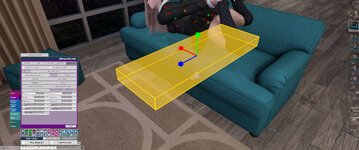
Well, I managed to get something working. we can place virtual colliders inside a cua. But it’s still pretty rough at the moment. I’ve also fixed the old bug where collisions stopped working after reloading the scene. I’ll release the update once I’m sure everything is stable.
As for automatic colliders they’re simply not practical for a large scene. They might work for a small simple prop, but even then automatically generating a simplified collider is too difficult and often inaccurate. There’s no guarantee it will properly match the mesh topology 🙃


VaM 2026-08-17 18-08-33.jpg
 
Well, I managed to get something working. we can place virtual colliders inside a cua. But it’s still pretty rough at the moment. I’ve also fixed the old bug where collisions stopped working after reloading the scene. I’ll release the update once I’m sure everything is stable.
As for automatic colliders they’re simply not practical for a large scene. They might work for a small simple prop, but even then automatically generating a simplified collider is too difficult and often inaccurate. There’s no guarantee it will properly match the mesh topology 🙃


View attachment 615469
That's absolutely fantastic, bro! Looking forward to your updates!
 
EvilBox updated CUA Collision with a new update entry:

update 3

Changelog:
  • Added the opt-in MESHES tab. You can now choose which CUA MeshColliders participate in Hair and Clothing collision. Selections are saved with the scene.
  • Added GPU Box and Capsule proxy collisions. Proxies can be created manually, imported from existing Unity colliders, or generated from a selected mesh.
  • Added numeric proxy controls and a desktop scene gizmo with Move, Rotate, and Size tools.
  • Added the Show Collision Mesh diagnostic wireframe.
  • Exact mesh...

Read the rest of this update entry...
 
How can the collision between CUA hair and body be implemented? asked several plugin authors, but they didn't reply to me.
 
Hm, any tips on making hair less jittery? I tried disabling some colliders in cua and put just simple box with the plugin, but no matter the settings I use, it is always flickering. Maybe specific hair problem? Also looks like hairs go through CUA colliders sometimes. Collider is there and initially hair do collide, but if you lay the head close enough, it will clip through it. Feels like the amount of force applied is making it faster.. but even gently laid down, it will just clip, hm..
 
Hm, any tips on making hair less jittery? I tried disabling some colliders in cua and put just simple box with the plugin, but no matter the settings I use, it is always flickering. Maybe specific hair problem? Also looks like hairs go through CUA colliders sometimes. Collider is there and initially hair do collide, but if you lay the head close enough, it will clip through it. Feels like the amount of force applied is making it faster.. but even gently laid down, it will just clip, hm..

Yes, the specific hair can make a big difference here. Hair weight directly affects collision stability and quality heavier or more aggressive hair settings make this kind of situation noticeably harder to stabilize.
It sounds like the hair is getting squeezed between the head/body colliders and the CUA collider. In that situation both collision systems are constantly trying to push the hair in opposite directions, so you can get endless jittering, flickering, and eventually some clipping. The plugin corrects the hair particles continuously, but it can't make every hair behave equally well if its physics settings are very aggressive.


2.jpg
1.jpg

3.jpg
 
For now I don't know how to stabilize the hair any better. solving this problem probably won't be simple.
 
For now I don't know how to stabilize the hair any better. solving this problem probably won't be simple.
Thanks, I'll try your suggestions! And if hair breaks on simple square collider then that's probably just VAM things and your plugin is perfectly fine. I remember my other looks didn't have those problems when I was using box colliders with Foost plugin, so it's most likely specific hair settings! 🤝
 

Similar threads

Back
Top Bottom