TonemapBlaze

Plugins + Scripts TonemapBlaze

Download [<1 MB]

14mhz

Well-known member
Joined
Oct 23, 2024
Messages
421
Solutions
7
Reactions
2,274
14mhz submitted a new resource:

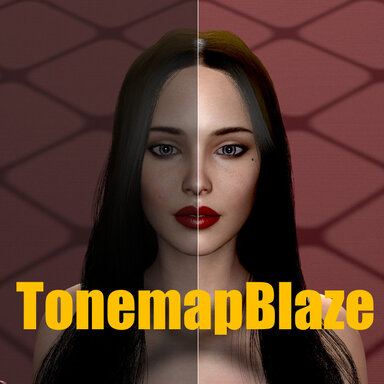
TonemapBlaze - This plugin is a very lightweight and fast plugin used to correct Colortone.

🙆‍♀️ ‍ If you think this asset is valuable, please leave a recommendation or review for the community.
🙋‍♀️ Reporting bugs or issues will help me improve the plugin and help others.
TonemapBlaze
â—Ź This plugin is used to correct colortone.
● It is highly optimized for speed, making it so lightweight that it adds virtually no performance overhead. (Because its role is specialized in colortone correction, it doesn’t really 'do much'...

Read more about this resource...
 
Hello, I’ve been enjoying all of your creations—they’re amazing!This new plugin is absolutely fantastic as well!However, when I change the MMD camera or POV, I’m experiencing an issue where a black silhouette doesn’t align correctly with the character or objects.I just wanted to leave a message in case it helps. Thank you!
 
Hello, I’ve been enjoying all of your creations—they’re amazing!This new plugin is absolutely fantastic as well!However, when I change the MMD camera or POV, I’m experiencing an issue where a black silhouette doesn’t align correctly with the character or objects.I just wanted to leave a message in case it helps. Thank you!
Please send me some screenshots or a video. I think I wasn’t able to handle the MMD camera properly (Honestly, I’ve never played around with MMD).
Bugs can only be fixed if I’m able to reproduce them. (I might even need the MMD you’re enjoying, haha.)
 
Did you test this in VR?
I tried it yesterday in VR and the images went crazy, as in seing copies of the screen. Removing the plugin made it go back to normal.
I can try later to test the plugin in VR and provide a screenshot if that's helpful.
 
Hey, this is pretty nice! I have a report of a small issue though - when you change FOV (e.g. I'm using field of view controller plugin), plugin will glitch out, so you have to re-enable it. But I can't do that with triggers since there's no access to session plugin settings via triggers.
 
Did you test this in VR?
I tried it yesterday in VR and the images went crazy, as in seing copies of the screen. Removing the plugin made it go back to normal.
I can try later to test the plugin in VR and provide a screenshot if that's helpful.
I haven’t been able to test it in VR, but after finishing the work, I will release it in the next version.
 
Hey, this is pretty nice! I have a report of a small issue though - when you change FOV (e.g. I'm using field of view controller plugin), plugin will glitch out, so you have to re-enable it. But I can't do that with triggers since there's no access to session plugin settings via triggers.
When tested together with Acid Bubble’s Field of View Controller plugin, there were no issues. For now, I need to be able to reproduce it, so if you could send me a screenshot or a short video, I will take care of it.
 
When tested together with Acid Bubble’s Field of View Controller plugin, there were no issues. For now, I need to be able to reproduce it, so if you could send me a screenshot or a short video, I will take care of it.
Sure, this happens when I do it via trigger or just normally clicking in the UI.
 
Sure, this happens when I do it via trigger or just normally clicking in the UI.
I fxed it. I will reflect this in the next version. Thank you.
 
Hi,
Just to confirm it works great on a Pico4u VR headset 🤩

I was wondering if it was a better experience to instead of loading individual LUT files, you could pick a folder where LUT files are and have a selection box show the list of those LUTs with also a next and previous. This would help selecting and comparing them without going through the slow process of selecting individual files.
Thanks.
 
Back
Top Bottom