• Hi Guest!

    We have posted a new VaM2 dev log on Patreon, starting a monthly cadence of written progress updates between Beta releases. Highlights include the new Gizmos System, Selection Carousel, and Modes System with Context-Specific Editing. Beta1.2 is 15 of 21 items complete.

    Read the full post on Patreon, or follow progress on the public Trello roadmap.
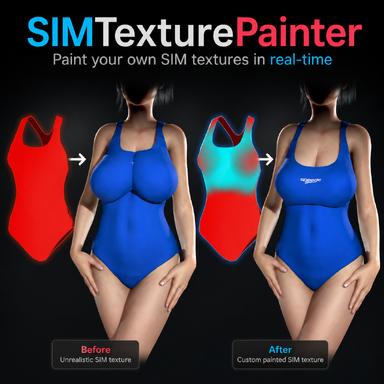
SIMTexturePainter

Plugins + Scripts SIMTexturePainter

Download [<1 MB]

Mxx

Member
Joined
Apr 9, 2024
Messages
18
Reactions
58
Mxx updated SIMTexturePainter with a new update entry:

v1.1 - No longer needed to delete _work folder

v1.1 — Update Notes
  • Textures are now saved to Saves/PluginData/SIMTextures/ instead of Saves/SIMTextures/. This location does not require a confirmation dialog when files are overwritten or deleted, which made it possible automatically get rid of the temporary work files. And so, it's no longer needed to manually delete a _work folder.
  • If you have textures from v1.0 in the old Saves/SIMTextures/ folder, nothing breaks — existing presets still reference those files and...

Read the rest of this update entry...
 
Hello there ! Out of curiosity, would it be possible to make a VR compatible version in the future ?
 
Absolutely fantastic plugin! This is a game changer!

But I have 2 suggestions:

1) Expand the range of available sim strengths, rather than just 0, 25%, 50%, 75% or 100%. Why not a "r value" slider?

I use r=254 a fair bit for things like straps that i want stuck and laying flat, but hate using R=255 because, IMO, a simmed item should always be removable.

2) save the completed sim texture in the clothing items local folder. Then one that gest created when you hit "Create UV template texture" on the clothing item texture page. Having to navigate to root/saves/sim textures/other/clothingName to locate/switch textures is a pain, while the local folder is available from the "load texture" screen. Adding a 3rd location for clothing files seems unnecessary. It would seem to make sense to leave the "work" folder where it is in your update.

NOTE: I post this unofficially as an ordinary Vam user. Don't give my suggestions any extra consideration because of my (sometimes) mod status.
 
Absolutely fantastic plugin! This is a game changer!

But I have 2 suggestions:

1) Expand the range of available sim strengths, rather than just 0, 25%, 50%, 75% or 100%. Why not a "r value" slider?

I use r=254 a fair bit for things like straps that i want stuck and laying flat, but hate using R=255 because, IMO, a simmed item should always be removable.

2) save the completed sim texture in the clothing items local folder. Then one that gest created when you hit "Create UV template texture" on the clothing item texture page. Having to navigate to root/saves/sim textures/other/clothingName to locate/switch textures is a pain, while the local folder is available from the "load texture" screen. Adding a 3rd location for clothing files seems unnecessary. It would seem to make sense to leave the "work" folder where it is in your update.

NOTE: I post this unofficially as an ordinary Vam user. Don't give my suggestions any extra consideration because of my (sometimes) mod status.

These are great suggestions. I'll take them into consideration for future updates!
 
These are great suggestions. I'll take them into consideration for future updates!
Hey creator, I think you got the shortcut wrong for the red drawing tool in your video.

It’s not Ctrl + Space. On my setup, it’s Shift + Spacebar to draw with the red brush.
 
Hey creator, I think you got the shortcut wrong for the red drawing tool in your video.

It’s not Ctrl + Space. On my setup, it’s Shift + Spacebar to draw with the red brush.

Yeah I just saw your review mention it. Maybe I might upload a new video at some point, but for now the description gives the correct shortcut so hopefully it won't be too hard to figure out for most people
 
I have a suggestion: could we paint textures as separate material groups, or mask out individual material groups so that the painting process doesn't affect other areas?
 
I have a suggestion: could we paint textures as separate material groups, or mask out individual material groups so that the painting process doesn't affect other areas?

Unless I misunderstood what you mean, the plugin already does that when a clothing item has multiple material parts. So when a clothing item has a separate material slot for sleeves or buttons, then you can hide those individual parts in the bottom right of the plugin UI. If a clothing creator hasn't given the clothing item more than 1 material, then it won't show other parts for you to deselect.
 
Unless I misunderstood what you mean, the plugin already does that when a clothing item has multiple material parts. So when a clothing item has a separate material slot for sleeves or buttons, then you can hide those individual parts in the bottom right of the plugin UI. If a clothing creator hasn't given the clothing item more than 1 material, then it won't show other parts for you to deselect.
I apologize for my oversight; I didn't notice this feature existed when I used it.
 
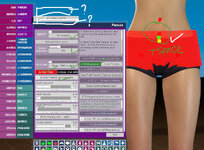
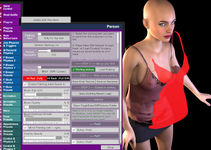
When I hold down the Space key and move the brush, nothing happens. Also, I can’t see the A and B menus—could that be the reason?
 

Attachments

  • 260430163534.jpg
    260430163534.jpg
    359.9 KB · Views: 0
When I hold down the Space key and move the brush, nothing happens. Also, I can’t see the A and B menus—could that be the reason?

There are a some clothing items that don't have Sim Data (the creator of that clothing item didn't generate it when publishing), which means you'd need to manually generate the sim data yourself. Which can be done with:
Open the clothing item in Clothing Creator → Generate Sim Data → Clear Package → enable Sim → Save → Load the newly created Clothing Item → Refresh Clothing List in the Plugin → Select the new Clothing Item

With other clothing I've noticed the painting isn't working like it should. I'm still investigating why and if it's something I can fix or if it's a problem with how it was created.

As for that menu above, that is from a different plugin I had active called Naturalis. It's not part of my plugin so it doesn't matter that you don't have that
 
I’ve tested several pieces of clothing, including ones I made myself that have SIM textures, but none of them work. Could this be related to my VR device? I haven’t turned on the VR device, though.Also, I can’t see the ?and ? menus i draw in pic
 
I’ve tested several pieces of clothing, including ones I made myself that have SIM textures, but none of them work. Could this be related to my VR device? I haven’t turned on the VR device, though.Also, I can’t see the ?and ? menus i draw in pic

Can you share the link of a clothing item you're having problems with so I can test it myself to see what might be going wrong?
 
could not work
 

Attachments

  • QQ20260430-223401.png
    QQ20260430-223401.png
    361.9 KB · Views: 0
  • QQ20260430-223437.png
    QQ20260430-223437.png
    48.5 KB · Views: 0
I came across a "dress" clothing item with several regions The plugin wouldn't write on the top, only the skirt. Further investigation revealed that unusually, the clothing item used 2 UV sets, one for the top and the other for the skirt. UV set. It seems the plugin was only detecting the skirt UV set. This is one of those weird edge case bugs that probably wont affect may clothing items, so I leave it up to you to decide if it's worth fixing. I'll PM you the file. It's a pre-hub download with no license info, so it should not be redistributed.
 
I came across a "dress" clothing item with several regions The plugin wouldn't write on the top, only the skirt. Further investigation revealed that unusually, the clothing item used 2 UV sets, one for the top and the other for the skirt. UV set. It seems the plugin was only detecting the skirt UV set. This is one of those weird edge case bugs that probably wont affect may clothing items, so I leave it up to you to decide if it's worth fixing. I'll PM you the file. It's a pre-hub download with no license info, so it should not be redistributed.

I've actually been able to fix this (at least, with all of the clothing items I've tested that had this issue) along with your other suggestions. I should be close to releasing that update
 
Once you have the kinks worked out of this plugin, and if you were looking for an idea to expand it... how about adding the capability to create alpha files? That would be *so* much easier drawing on a 3d model than working with the UV set and an image editor!
 
Once you have the kinks worked out of this plugin, and if you were looking for an idea to expand it... how about adding the capability to create alpha files? That would be *so* much easier drawing on a 3d model than working with the UV set and an image editor!

If you're in the VaM discord server, check the work-in-progress thread ;)
 
Back
Top Bottom