• Hi Guest!

    We are extremely excited to announce the release of our first Beta1.1 and the first release of our Public AddonKit!
    To participate in the Beta, a subscription to the Entertainer or Creator Tier is required. For access to the Public AddonKit you must be a Creator tier member. Once subscribed, download instructions can be found here.

    Click here for information and guides regarding the VaM2 beta. Join our Discord server for more announcements and community discussion about VaM2.
  • Hi Guest!

    VaM2 Resource Categories have now been added to the Hub! For information on posting VaM2 resources and details about VaM2 related changes to our Community Forums, please see our official announcement here.
Hair Horizontal Flipper (not a plugin)

Plugins + Scripts Hair Horizontal Flipper (not a plugin)

Download [10.1 MB]

m3te0r1te

New member
Joined
Dec 3, 2025
Messages
5
Reactions
17
m3te0r1te submitted a new resource:

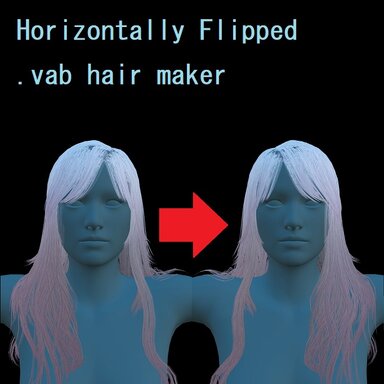
Hair Horizontal Flipper (not a plugin) - input hair.vab to generate horizontally-flipped-hair.vab

Initial release with minimum functionality.
This is more of a proof of concept, so please don't expect much.

# Usage #
Drag & Drop *your hair*.vab file(s) on this .exe. (corresponding .jpg/.vam/.vaj files should be there along with the .vab)
New files will be created on the same directory of the input.vab file.

gonna write some guides here soon™

Many thanks to Borogravian for providing a nice starting point in this thread
[URL...

Read more about this resource...
 
For what it's worth, I compiled this myself (don't like running exe's without knowing what's in them) and tested it, and it seems to work well! Nice job!
 
This is probably a dumb question. But where do you find the .vab file?
You can find them inside .var files.
.var files are actually just renamed .zip files, so you can extract their contents using any unzip tool.

If you don’t know which .var file contains the hair file you're looking for, there are two ways to find it out in game:
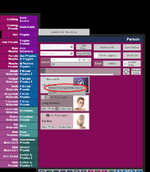
  1. Easy way:
    Go to Person → Hair.
    Hover your mouse over the small box icon of the hairstyle.
    A tooltip will show you which package the hair belongs to.
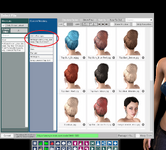
  2. If you need more specific information:
    Open the Customize window of the hairstyle, then go to Scalp Materials → Textures.
    Click the Select button next to one of the texture slots.
    The window opened will show you the exact .var file that contains the hair files you’re looking for.
(There may be easier ways, but these are the two methods I’m aware of.)
 

Attachments

  • method1.png
    method1.png
    177.6 KB · Views: 0
  • method2.png
    method2.png
    479.9 KB · Views: 0
is there a possibility to future versions have a merge-like feature , for example on eyebrows usage it would be an excellent tool to build one side then flip merge both sides .
 
is there a possibility to future versions have a merge-like feature , for example on eyebrows usage it would be an excellent tool to build one side then flip merge both sides .
For now, I have to say I'm not sure. I’ll let you know when I have a clearer answer.
 
Back
Top Bottom