• Hi Guest!

    We are extremely excited to announce the release of our first Beta1.1 and the first release of our Public AddonKit!
    To participate in the Beta, a subscription to the Entertainer or Creator Tier is required. For access to the Public AddonKit you must be a Creator tier member. Once subscribed, download instructions can be found here.

    Click here for information and guides regarding the VaM2 beta. Join our Discord server for more announcements and community discussion about VaM2.
  • Hi Guest!

    VaM2 Resource Categories have now been added to the Hub! For information on posting VaM2 resources and details about VaM2 related changes to our Community Forums, please see our official announcement here.
Nebula for everyone

Looks Nebula for everyone

Download [<1 MB]

Derglesnaf

New member
Joined
Apr 1, 2025
Messages
12
Reactions
6
Derglesnaf submitted a new resource:

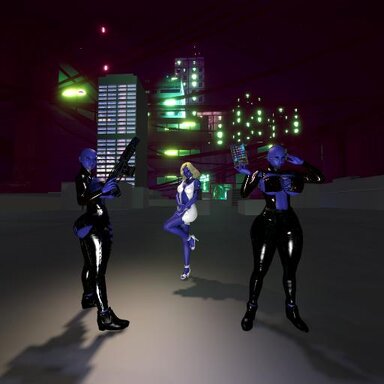
Nebula for everyone - 3 Nebulas from GOTG movies/spinoff

Alright, 3 hours later and many posts later, I think I have FINALLY figured out how to upload. Been using VaM for around a year and made these models months ago and always wanted to share with the community. 3 models available, 2 bimbofied,1 exposed and 1 not, and a look inspired by the What If...? series not bimbofied.

Read more about this resource...
 
Alright so looking closer at my dependancies, there are a lot that are not required, I'm going to work on getting the right dependancies without the clutter tomorrow/later, and upload an update. From what I've read it's going to involve looking at the actual file in my PC which I didn't sign up for but oh well. Any tips for this would be appreciated.
 
Your scene calls a lot of dependencies that are not on the hub. This is not good, because it hides your resource from the default view. Try to get rid of all of them so you get that coveted hub-hosted var label. Yes, 126 dependencies is kind of out of control. You can fix most of this in game. Check all the hair, clothes and morphs to see what the actual source is. If it's somebody else's scene, you're pulling in everything in that scene. That's where the long list of sub-dependencies comes from. Your sub-dependency list is longer than your direct dependencies. Try to match the name of each used resource with the original one from the asset creator. Clothes and hair are a big problem with duplicates being posted. Always go to the OG resource, which is usually further down on the list. Search the list by the name of the resource, then uncheck the one you used and use the original instead. Pay attention to what the package builder is telling you about dependencies.
 
Alright so looking closer at my dependancies, there are a lot that are not required, I'm going to work on getting the right dependancies without the clutter tomorrow/later, and upload an update. From what I've read it's going to involve looking at the actual file in my PC which I didn't sign up for but oh well. Any tips for this would be appreciated.
Hi Derglasnaf,

Congrats on your first upload.

Dependencies can be a bit confusing at first, but it would be good to trim that list down to what you actually need for the scene/look. I've got a bit carried away creating things and had to take a hedge trimmer to my looks and scenes many times.
This plugin is really useful to see what dependencies are being used in a scene in vam.


Spud gave some great tips that should clear things up. You can also check out this guide.

 
See also this script I updated for listing dependencies. There's no reverse lookup in game. This helps with that.
 
Thank you for all the tips, I've spent 2 hours going through everything in VaM, downloaded notepad + + and did stuff in there with the JSON file but I honestly have no idea what i'm doing and how to replace the old json with the new one or if thats actually what i have to do or not I have no idea I didn't know it would be so complicated I thought I would just create a scene and upload it. I have no idea where to find and remove sub-dependencies in VaM or out of it so I'm going to stop for now and wait on some more advice lol
 
Hi Derglasnaf,

Congrats on your first upload.

Dependencies can be a bit confusing at first, but it would be good to trim that list down to what you actually need for the scene/look. I've got a bit carried away creating things and had to take a hedge trimmer to my looks and scenes many times.
This plugin is really useful to see what dependencies are being used in a scene in vam.


Spud gave some great tips that should clear things up. You can also check out this guide.

I'm using the list on my upload to see what needs to be removed, I know what needs to be removed it's just the actual removing part I have no idea how to do. I've looked at the guides and I still barely know what I'm doing.
 
Also I created this scene from scratch using the Create option, (other than changing models to my look which uses Lefthandbuffalos Ruby model) so I don't know why there are so many sub dependancies.
 
Last edited:
Also I created this scene from scratch using the Create option, (other than changing models to my look which uses Lefthandbuffalos Ruby model) so I don't know why there are so many sub dependancies.
Sub dependencies get pulled in from the things you are using; like skins, clothes, hair, cua's etc. If what you are using comes from another creators var, then the dependencies they used to make the scene are listed as sub-dependencies for your scene too. Normally it's not a problem if you are using the original creators version of things, as they tend to be mindful to use just what is needed to make the scene.

One example of sub dependencies. You are using something from my Hellraiser Priestess clothing/look. I made a demo scene for that look to pack the skin textures and clothing together, so using it also adds the sorcery pose pack and the vam-rotator plugin i used in the demoscene.

The trouble comes when someone packs hair/clothing/texture in with a large scene with alot of dependencies and sub dependencies. I'd recomend looking for what is using the wolverine333.lauren var. as that has alot of dependencies itself. If it's a hairstyle that has been repacked, search for the original version on the hub and use that instead. (you can hover over the little cube/box icon at the top of hairs and clothing items in the list and it will show the var name that it comes from. If it's different from the creator name on the item itself, it has been duplicated/repacked. If you have duplicates of the same thing in your hair or clothing lists, that's normally what causes this.

Good luck.
 
Sub dependencies get pulled in from the things you are using; like skins, clothes, hair, cua's etc. If what you are using comes from another creators var, then the dependencies they used to make the scene are listed as sub-dependencies for your scene too. Normally it's not a problem if you are using the original creators version of things, as they tend to be mindful to use just what is needed to make the scene.

One example of sub dependencies. You are using something from my Hellraiser Priestess clothing/look. I made a demo scene for that look to pack the skin textures and clothing together, so using it also adds the sorcery pose pack and the vam-rotator plugin i used in the demoscene.

The trouble comes when someone packs hair/clothing/texture in with a large scene with alot of dependencies and sub dependencies. I'd recomend looking for what is using the wolverine333.lauren var. as that has alot of dependencies itself. If it's a hairstyle that has been repacked, search for the original version on the hub and use that instead. (you can hover over the little cube/box icon at the top of hairs and clothing items in the list and it will show the var name that it comes from. If it's different from the creator name on the item itself, it has been duplicated/repacked. If you have duplicates of the same thing in your hair or clothing lists, that's normally what causes this.

Good luck.
I really want to fix this but I still have absolutely no clue what I'm doing. Am I supposed to download all the things used in my scene from the VaM hub website, not the VaM hub in VaM? I don't think I'm going to fix this anytime soon :(
 
I really want to fix this but I still have absolutely no clue what I'm doing. Am I supposed to download all the things used in my scene from the VaM hub website, not the VaM hub in VaM? I don't think I'm going to fix this anytime soon :(
The Vam hub is the same stuff in vam as on the main website, so it makes no difference.
I think you are over thinking this and stressing unnecessarily. You don't need to remove all dependencies, just get it down to a reasonable number of hub hosted ones.
Open your scene and check the clothing/hair or any textures you changed. With hairs and clothing you can filter "show Active" to view what is on the person. Hover your mouse over the little cube icon at the top left of the clothing item and you will see which var it is pulling it in from. If that is different from the creator name on the clothing/hair, then it's probably a duplication that's pulling in stuff from another scene. You can then search the original creator/item if you don't have it already and use that one instead.
Check to see which one is coming from wolverine333.lauren, as I think removing that one will fix allot of your issues.
 
The Vam hub is the same stuff in vam as on the main website, so it makes no difference.
I think you are over thinking this and stressing unnecessarily. You don't need to remove all dependencies, just get it down to a reasonable number of hub hosted ones.
Open your scene and check the clothing/hair or any textures you changed. With hairs and clothing you can filter "show Active" to view what is on the person. Hover your mouse over the little cube icon at the top left of the clothing item and you will see which var it is pulling it in from. If that is different from the creator name on the clothing/hair, then it's probably a duplication that's pulling in stuff from another scene. You can then search the original creator/item if you don't have it already and use that one instead.
Check to see which one is coming from wolverine333.lauren, as I think removing that one will fix allot of your issues.
Ohhhhh okay thank you so much, I know those cubes now always ignored them before I was super overthinking it. I'll get it cleaned up soon then!
 
Back
Top Bottom