
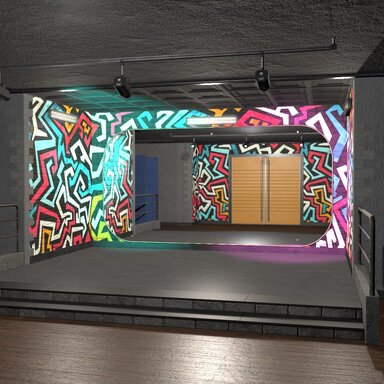
Onyx: After Dark

Environments Onyx: After Dark

Download [272.71 MB]

Zephyr3D

Well-known member
Joined
Oct 26, 2021
Messages
30
Reactions
434
Zephyr3D submitted a new resource:

Onyx: After Dark - Behind closed doors, the night is yours!

ONYX: AFTER DARK
Behind closed doors, the night is yours.​

Step away from the dancefloor and into the darker side of ONYX.

Hidden within the walls of an underground nightclub, this private backroom blends raw industrial architecture, vibrant street art and atmospheric lighting into a space with a character of its own.

From the raised...

Read more about this resource...
 
Fantastic environment! Really dig the aesthetic, details, and overall vibe! The mattress physics plugin is on another level, entirely!

That said, I've had some issues with the plugin file paths. It looks like they are local paths (i.e. Custom/Scripts/CustomSurfaceMirror_v1/CustomSurfaceMirror.cslist) instead of package paths (i.e. Zephyr3D.StudioOnyx.2:/Custom/Scripts/CustomSurfaceMirror_v1/CustomSurfaceMirror.cslist). These throw errors on scene load, so it was pretty clear what was wrong and I was able to get the path issues sorted out by extracting the VAR into my VAM root and renaming things to align with the scene config.

With the VAR extracted, I found that the script reference in CustomSurfaceMirror.cslist is CustomSurfaceMirror.cs, but the .cs filename in the VAR is CustomSurfaceMirror_v2.2.cs. Renaming the file got the mirror plugin to load, however, even with all the files in place and no more loading errors, the mirror script didn't produce a reflection. The controls all worked to move the mirror plane and whatnot, but after trying a bunch of combinations of settings, all I got was a black surface. Nothing in the error log, just the blank asset.

Even if these issues are not fixed, I'm still really excited about this environment and will use the hell out of it, but thought it should at least be reported to you. Cheers!
 
Fantastic environment! Really dig the aesthetic, details, and overall vibe! The mattress physics plugin is on another level, entirely!

That said, I've had some issues with the plugin file paths. It looks like they are local paths (i.e. Custom/Scripts/CustomSurfaceMirror_v1/CustomSurfaceMirror.cslist) instead of package paths (i.e. Zephyr3D.StudioOnyx.2:/Custom/Scripts/CustomSurfaceMirror_v1/CustomSurfaceMirror.cslist). These throw errors on scene load, so it was pretty clear what was wrong and I was able to get the path issues sorted out by extracting the VAR into my VAM root and renaming things to align with the scene config.

With the VAR extracted, I found that the script reference in CustomSurfaceMirror.cslist is CustomSurfaceMirror.cs, but the .cs filename in the VAR is CustomSurfaceMirror_v2.2.cs. Renaming the file got the mirror plugin to load, however, even with all the files in place and no more loading errors, the mirror script didn't produce a reflection. The controls all worked to move the mirror plane and whatnot, but after trying a bunch of combinations of settings, all I got was a black surface. Nothing in the error log, just the blank asset.

Even if these issues are not fixed, I'm still really excited about this environment and will use the hell out of it, but thought it should at least be reported to you. Cheers!


Really appreciate the heads up, the mirror uses a custom shader and I've never had to package a plugin before, I'll be sure to fix this as soon as I can, thank you for taking the time to report that and the kind words!
I'm planning to release more props for this so stay tuned, and I've already updated the plugins to include more features with mirror performance settings and reliability. And the mattress plugin I've developed a new system to avoid physics explosions, it works really well and it seems to stand up against to all the crazy stress testing, I can't break it! haha

If you have any particular requests on what you would like to see with this room next, any texture variants or anything like that, let me know, I'll do my best to accommodate!

Much love <3
 
Back
Top Bottom