Posesaver

Plugins + Scripts Posesaver

Download [<1 MB]
Kimowal updated Posesaver with a new update entry:

PoseSaver Update – May 2026

PoseSaver Update – May 2026


Hey everyone! 🫡 Small but meaningful update based on your feedback:


What's new:


  • VR thumbnails are now clickable – Fixed a bug where the thumbnail panel buttons weren't responding to VR controller input. Should work properly now.
  • Thumbnail panel anchor atom – You can now attach the thumbnail panel to an Empty atom in your scene. Just add an Empty atom, position it wherever you want, then select it from the new "Anchor...

Read the rest of this update entry...
 
OK new update pending based on feedback. thank you guys and thank you for your patience
 
Hey, about latest update:

it would be great if Ruvik's would actually work with your plugin (since you're kind of advertising it in your update..). As I mentioned before I believe, when I save it with Ruvik's enabled, it doesn't restore finger poses. So I am using https://hub.virtamate.com/resources/posesaver-extended-by-mo84.62592/ - this one, maybe take a look if you're planning to implement it. Disabling finger posing was a good move, and using Ruvik on top separately works (and it worked before as well).. but I think the point is to use your plugin restore pose together with Ruvik's saved fingers when using single click... instead of having to use two separate plugins with two separate preset loads to load just a single pose.
 
Hey, about latest update:

it would be great if Ruvik's would actually work with your plugin (since you're kind of advertising it in your update..). As I mentioned before I believe, when I save it with Ruvik's enabled, it doesn't restore finger poses. So I am using https://hub.virtamate.com/resources/posesaver-extended-by-mo84.62592/ - this one, maybe take a look if you're planning to implement it. Disabling finger posing was a good move, and using Ruvik on top separately works (and it worked before as well).. but I think the point is to use your plugin restore pose together with Ruvik's saved fingers when using single click... instead of having to use two separate plugins with two separate preset loads to load just a single pose.
I hear what you say and it is absolutely doable, But i never intended for a one in all solution for Posesaver in the first place. i rather keep it simple. as it is. However...i am also building them like this for a reason. i have another plugin that uses mine as one. still in early release on patreon but hence why i would rather take away instead of overflowing one plugin with lots of functions. which make it easier to do mistakes in coding and harder to find. when all is ready there will be what you think of and more but for now i will concentrate on seeing what is actually a need for this plugin.
 
I think it's pretty simple to just read and store finger bones under the hood when loading/saving a pose.. no extra UI needed, and it would simplify loading fingers by a lot. But I see you have other plans, I'll keep an eye on your stuff.
 
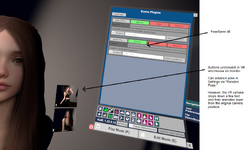
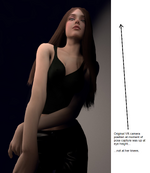
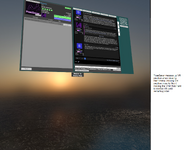
@Kimowal, the VR pose navigation buttons are not working for me in 46.var when interacting with VR controllers or mouse (screenshot 01). Pressing "Random Pose" in settings causes the VR camera to drop down a few feet and end up in a location noticeably lower than where the preview image was taken (screenshot 02). Pressing the VAM Hub button displays the Hub in a similarly misaligned position (view is low and to the left, close to the ground) which makes reading the hub annoyingly difficult in VR (screenshot 03). Maybe both problems are related. Though, I am not sure why the mouse cannot click the buttons either. :unsure:

PoseSaver.46 works fine when when VAM is launched in Desktop mode.
 

Attachments

  • 01-vr-unclickable-buttons.png
    01-vr-unclickable-buttons.png
    1.6 MB · Views: 0
  • 02-vr-view-drops-to-floor.png
    02-vr-view-drops-to-floor.png
    575.1 KB · Views: 0
  • 03-vr-main-menu-session-misalignment.png
    03-vr-main-menu-session-misalignment.png
    1.6 MB · Views: 0
@Kimowal, the VR pose navigation buttons are not working for me in 46.var when interacting with VR controllers or mouse (screenshot 01). Pressing "Random Pose" in settings causes the VR camera to drop down a few feet and end up in a location noticeably lower than where the preview image was taken (screenshot 02). Pressing the VAM Hub button displays the Hub in a similarly misaligned position (view is low and to the left, close to the ground) which makes reading the hub annoyingly difficult in VR (screenshot 03). Maybe both problems are related. Though, I am not sure why the mouse cannot click the buttons either. :unsure:

PoseSaver.46 works fine when when VAM is launched in Desktop mode.
Hey that is correct. my plugins are optimized for desktop not vr, but i will look into it🤗 Update : new version is pending . please tell if you find any bugs with it.
 
Last edited:
Kimowal updated Posesaver with a new update entry:

PoseSaver Update VR Interaction Fix

PoseSaver Update – VR Interaction Fix​

This update addresses two VR-specific issues reported in PoseSaver:

  • Fixed the pose thumbnail buttons not responding to VR controllers or mouse input.
  • Fixed pose changes affecting the VR tracking origin, which could move the camera and VaM Hub close to the floor.
  • Saved desktop camera movements are now ignored while running in VR.
  • Desktop camera functionality remains unchanged.
  • Maintains compatibility with VaM’s...

Read the rest of this update entry...
 
@Kimowal, it works better now, thanks! Mouse and VR controllers can now operate the preview buttons. There probably should be a way to animate the view in VR like in Desktop mode (and they should appear the same), but if that gets figured out months from now then that is fine with me. I do not currently need animated transitions as I intend to use this as a tool to speed up pose creation, so its current behavior in VR is perfect for me for now :).
 
@Kimowal, it works better now, thanks! Mouse and VR controllers can now operate the preview buttons. There probably should be a way to animate the view in VR like in Desktop mode (and they should appear the same), but if that gets figured out months from now then that is fine with me. I do not currently need animated transitions as I intend to use this as a tool to speed up pose creation, so its current behavior in VR is perfect for me for now :).
Thank you🤗 for animation that is something posesaver wont have, instead i have made two animation programs, Animatis(a bit heavyweight but if u have played with virt-a-mate a while it shouldn`t be too hard) and simple recorder. i recomend simplerecorder couse it is real easy to make animation with this, and i need a vr tester so i would really appreciate if you could try it and give me feedback.
 

Similar threads

Back
Top Bottom