• Hi Guest!

    We are extremely excited to announce the release of our first Beta1.1 and the first release of our Public AddonKit!
    To participate in the Beta, a subscription to the Entertainer or Creator Tier is required. For access to the Public AddonKit you must be a Creator tier member. Once subscribed, download instructions can be found here.

    Click here for information and guides regarding the VaM2 beta. Join our Discord server for more announcements and community discussion about VaM2.
  • Hi Guest!

    VaM2 Resource Categories have now been added to the Hub! For information on posting VaM2 resources and details about VaM2 related changes to our Community Forums, please see our official announcement here.
SoundRouterFromAB

Plugins + Scripts SoundRouterFromAB

Download [<1 MB]

atani

Invaluable member
Wiki Contributor
Featured Contributor
Joined
Jan 15, 2021
Messages
3,612
Solutions
112
Reactions
3,296
Now, if certain creators started using this (with suitable triggers), their scenes might actually become playable ...

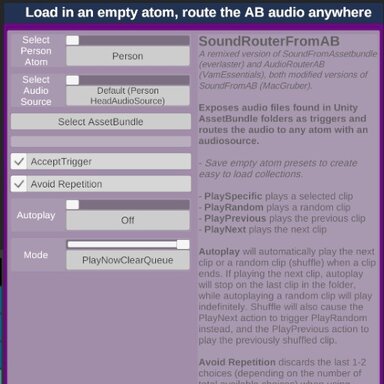
Just PLEASE: Make a proper thumbnail. Those "GUI-thumbnails" are indistinguishable from each other in BrowserAssist ...
 
Just PLEASE: Make a proper thumbnail. Those "GUI-thumbnails" are indistinguishable from each other in BrowserAssist ...
Ok, that is reasonable. I'll get one soon. Never considered that usecase.
 
Just PLEASE: Make a proper thumbnail. Those "GUI-thumbnails" are indistinguishable from each other in BrowserAssist ...
I don't have Browser Assist patron's version to see how plugin loading works there.
VAM doesn't show thumbnails for plugins when loading them. Does BA shows them if available or is the Hub thumbnail used instead?
 
I don't have Browser Assist patron's version to see how plugin loading works there.
VAM doesn't show thumbnails for plugins when loading them. Does BA shows them if available or is the Hub thumbnail used instead?

Ummmh ... I haven't used the free version of BrowserAssist in ages, so take with truckloads of salt, but I'd be surprised if custom thumbnails were a paid-version-only feature (Mostly because JayJayWon hasn't worked on that one in ages)

What I do to bind a thumbnail to a plugin in BA:
* Go to BA main window (the in-scene window, not the session-plugin GUI)
* select resource-type: "Plugin" (not PluginPresets!) -> You see loads of white squares representing the respective .cslist and .cs files (white because they have no associated thumbnail)
* select "Plugin_I_want_to_select.cslist" or "Plugin_I_want_to_select..cs"
* Directly above the bottom window/frame, there's a tab "info" -> click that.
* There's a button called something like "select thumbnail (from drive?)"
-> NOTE: If you can't see the button, you might have to "scroll right", ie grab the horizontal scrollbar at the bottom of the frame & push it to the left
* Browse to thumbnail folder, select pic

Voila! Now your .cs/.cslist/.dll file has a snazzy thumbnail! Only 678 more to go! (x)

I have my thumbnails under "Custom/Images/Thumbs4UIAssist/" - I built up a thumbnail collection manually, from the respectivve thumbnails here on the Hub. I can share, if you're interested?

---
(x) I recommend creating a thumbnail-collection sorted by creatorname - then you can filter by creatorname in BA, and in the filebrowser window, when you browse inside your thumbnail-folder, there's a checkbox "keep editor open" (or something) at the lower right. That way, you don't need to navigate the full path for every single .cs/.cslist file
 
Last edited:
The list of differences between the free and paid version of BA mentioned plugins, but I didn't look too much into it nor use the plugin.

I have my thumbnails under "Custom/Images/Thumbs4UIAssist/" - I built up a thumbnail collection manually, from the respectivve thumbnails here on the Hub. I can share, if you're interested?
If the thumbnail shown comes from your local files, then you can just save and add this one in that folder as I updated it after your request. Not a great cover, but at least it's not a GUI image anymore ;)
 
The list of differences between the free and paid version of BA mentioned plugins, but I didn't look too much into it nor use the plugin.


If the thumbnail shown comes from your local files, then you can just save and add this one in that folder as I updated it after your request. Not a great cover, but at least it's not a GUI image anymore ;)

Already done :cool:

And I quite like the image - anyhow, the important thing is that it is visually distinctive. Our brains can process images much (much!!!) faster than text. Thumbnails make searching a lot more convenient.
 
Back
Top Bottom