
• Hi Guest!

    We have posted a new VaM2 dev log on Patreon, starting a monthly cadence of written progress updates between Beta releases. Highlights include the new Gizmos System, Selection Carousel, and Modes System with Context-Specific Editing. Beta1.2 is 15 of 21 items complete.

    Read the full post on Patreon, or follow progress on the public Trello roadmap.
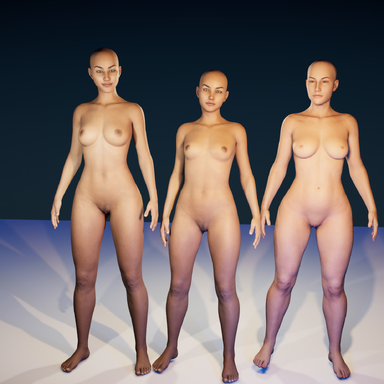
Three full body blendshapes for VAM2

Blend Shapes Three full body blendshapes for VAM2

Download [14.09 MB]

Saint66

Well-known member
Joined
May 31, 2020
Messages
337
Solutions
6
Reactions
687
Saint66 submitted a new resource:

Three full body blendshapes for VAM2 - I have made three full body morphs, a young (Byci), a sexy (Juve) and a thicc one (Paula)

Hi,

converted full body morphs from my VAM1 to be used in VAM2.
Place the file in the root of your \VAM2\Addons folder. After a VAM2 restart, they will be recognized and added to your games addons.

Haha, first customer addon package for VAM2 ever View attachment 508735View attachment 508736I guess :p

Read more about this resource...
 
I have loaded these but get nothing in VAM 2. Where exactly does "root of your \VAM2\Addons folder" mean? Sorry to be so thick.
 
I have loaded these but get nothing in VAM 2. Where exactly does "root of your \VAM2\Addons folder" mean? Sorry to be so thick.
Sorry for answering late. Just copy the v2a files into your addons folder of VAM2, root means not in a subfolder or such. When you next time start VAM2, these files will be processed by VAM 2 and extract them to a folder with creators name.
The blendshapes should then be available ingame. Activate them under Addons->ByCreator->Saint, then you can apply them under Blendshapes of your GF8 figure
1754210667762.png
1754210752088.png
 
Back
Top Bottom