VaM 1.x Windows reinstall, What's the latest settings and how to do the cpu patch?

Threads regarding the original VaM 1.x
Joined
Mar 11, 2024
Messages
15
Reactions
2
Hey I saw there was another post about performance and bad Fps in VR. I didn't want to poach their thread. So I thought to make a new one.

I just wanted to see if there is some more links or guides on some of the things they talked about.
I have recently had to reinstall windows and lost all my settings. I run an AMD Ryzen 5 3600x paired with a 2070super. Alot less power than Fuchsschweif pc in their post and I'm getting abysmal Fps in VR (Rift s)

1. I Turned off high quality physics.
2. I turned on generate depth texture.

Any other settings I should change or dont matter to fps? I basically just dumped them all to low and then set process priority to high
I equally dont really understand the physics rate, or physics update cap? Is 1 more than 3? are we updating more or less for example?

Are there any other settings youd change?
I also wanted to look at the cpu patch?

I dont Understand how to install it or how to adjust but I heard it can give up to 30% better performance.
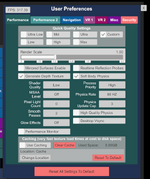
 

Attachments

  • Screenshot 2026-11-16 123513.png
    Screenshot 2026-11-16 123513.png
    106.5 KB · Views: 0
Ok after applying the cpu patch I actually noticed 100fps drop In just the basic scene your given...Not entirely sure why that is.

I used
[threads]
computeColliders=6
skinmeshPart=6
applyMorphs=6
skinmeshPartMaxPerChar=6
applyMorphMaxPerChar=6
affinity=1,3,5,7,9,11

[threadsVR]
computeColliders=6
skinmeshPart=6
applyMorphs=6
skinmeshPartMaxPerChar=6
applyMorphMaxPerChar=6
affinity=1,3,5,7,9,11
[profiler]
enabled=0

Which is my Cpu specs in the spoiler and this in the gpu.

wait-for-native-debugger=0
gfx-enable-gfx-jobs=1
gfx-enable-native-gfx-jobs=1

Currently without hair. Just the modern bedroom and 2 people. Im at 45fps... and this is in desktop mode. Before Ive even booted VR.

If I remove Naturalis 73 (Phys rate set to 60 and cap to 1). Then it goes from 45 to 82 fps...
and If I remove body language it goes from 82 to 130/150fps.

again all in desktop. Not exactly inspiring. I'm not entirely sure how I got it to run so buttery smooth before in VR
 
Last edited:
The defaults are quite good for most people and uses. Unless your PC is a complete turd, low shader quality and 0 pixel lights will make everything look like shit, not advised.
A rule of thumb is FPS with VR to be half of what it is on desktop mode. With a Rift S you probably can get more than half as the resolution of the device is not as large as more modern headsets. Your hardware is not great for VR use, so keep your expectations realistic.

Scenes vary enormously, as well as persons and what they use. Lights, hair clothes, soft body physics are usually the main points where FPS drops a lot.
 
The defaults are quite good for most people and uses. Unless your PC is a complete turd, low shader quality and 0 pixel lights will make everything look like shit, not advised.
A rule of thumb is FPS with VR to be half of what it is on desktop mode. With a Rift S you probably can get more than half as the resolution of the device is not as large as more modern headsets.
Your hardware is not great for VR use, so keep your expectations realistic. 45 FPS in VR with 2 persons moving around is very decent; were you expecting a constant 90 FPS? That's only for very expensive equipment.
Im getting around 45fps in desktop mode and roughly 15/20 fps in VR.

Im aiming for atleast 30fps in VR would be nice.

Ive done some testing (Seeabove)
If I remove Naturalis 73 (Phys rate set to 60 and cap to 1). Then it goes from 45 to 82 fps...
and If I remove body language it goes from 82 to 130/150fps. (All of this are desktop numbers)

I wonder if theres some settings involving my VR that I might of changed or some cpu/gpu changes I made somewhere.
 
I edited my answer after reading better what you wrote.
Yeah some additional info too. this is all tested with no hair or clothes and no plugins except for naturalis and body language, which I used for benchmarks in the same scene.

The scene is empty with 2 Points lights both set to pixel not auto.
and just the old modern bedroom cua. So a relativity basic scene.

I used to get fairly good FPS. atleast 30 if not 40 in VR. But now I cant seem to scrap out of 20.

Ok Because of the reinstall my ram was set to 2666mhz instead of 3600mhz so thats enabled now as well. Looking into the results.
 
The real benchmark to consider is MacGruber's benchmark scene that is also used to test the cpu patch. Finding on that thread someone with similar specs helps to have a comparison.

If you want to do your own benchmarking, get an average FPS of the scene on your current settings and then using the default settings. The 0 pixel lights and low quality shader must be horrible to use when hair is involved.
The more stuff you have the worse your performance may be, more noticeable after going past 2/300 GB. Having a clean VAM to compare with your normal VAM is also a good idea.
 
Ok.


So....After I changed my xmp bios for ram from default (None) to xmp 1 to get 3600 instead of 2666

and doing this as well = "Windows graphics settings. Under Settings → System → Display → Graphics, add VaM.exe and set it to High Performance."
mass to 4x, smooth pass to 2

Made sure to match my phys refresh rate to 80mhz for the RIFT S.

swapped the usb Port my vr uses, from my red port on my Tomohawk X570 to blue.

Made sure my power settings were all high performance.

Im now hitting 80fps with both body language and naturalis running in VR and my pc isnt making crazy sounds anymore.


No idea what offically fixed it. But atm this seems to work. Im going to rerun my test again and see what happens.
 
Back
Top Bottom