
• Hi Guest!

    We have posted a new VaM2 dev log on Patreon, starting a monthly cadence of written progress updates between Beta releases. Highlights include the new Gizmos System, Selection Carousel, and Modes System with Context-Specific Editing. Beta1.2 is 15 of 21 items complete.

    Read the full post on Patreon, or follow progress on the public Trello roadmap.
Desk Duty

Scenes Desk Duty

Download [1.38 MB]

Waffle

New member
Joined
Apr 14, 2023
Messages
10
Reactions
8
Waffle submitted a new resource:

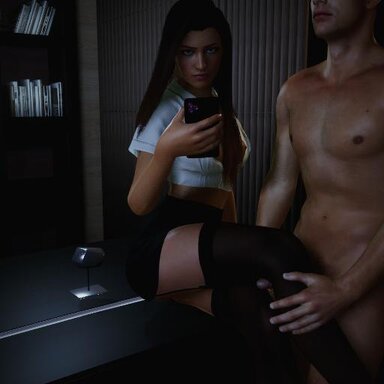
Desk Duty - In the boss's office, stocking-clad assistant endures a leg-job

In the boss's office, stocking-clad assistant endures a leg-job

This is my first VaM scenario, and it’s still a work in progress. I’m focusing on improving animation flow, natural motion, and overall immersion.


Feedback is very welcome— whether it’s about animation quality, poses, pacing, or ideas for improvement. I’m actively learning and refining with each update.

View attachment 586208View attachment 586209
View attachment 586207

Read more about this resource...
 
A fun little scene, good for a first effort. The animations work. I'd say the dependency list is the only problem area. You have things listed as dependencies that are not actually used in the scene. You might have used a dirty session in package builder, or you've been hand editing the contents of the var. These dependencies should be eliminated:

Nameerf.Coco+Hair (Not on hub, not in scene, carries odd sub-dependencies. Nuke it.)
Wolverine333.Maria (Scene calls duplicate morphs from its package, generally avoid this one.)

The scene uses morphs that are not the original morphs, they came from some other package, like Maria. Search the hub for "dependency hell" for threads on this topic. For hair, clothing and morphs, always make sure you're using the item from the original creator, not a duplicate from some random package. This is a huge problem in Vam.

It looks like you changed the file name when you posted an update. Please don't do this. The convention is Creator.Name.Version#. When you change the Name part for an update, then Vam doesn't know there is an update to be downloaded. A lot of people do this, but it causes this problem.
 
Thanks for the feedback.
Yes, dependencies are my main struggle. I'm working to clean these up. I've started from scratch multiple times, but they keep slipping in.
For the naming convention, I'll keep it in mind and fix it.
Again, thanks for the feedback—I appreciate it a lot.
 
Thanks for the feedback.
Yes, dependencies are my main struggle. I'm working to clean these up. I've started from scratch multiple times, but they keep slipping in.
For the naming convention, I'll keep it in mind and fix it.
Again, thanks for the feedback—I appreciate it a lot.
Best advice for avoiding dependency nightmares: create a separate stripped down VaM install to use as a dedicated packaging environment. Load only the exact dependency vars you need for the scene.

Each of the vars that were mentioned are only in the list because a single morph is being used from them. Here is what's being called:

Nameerf.Coco+Hair.latest:/Custom/Atom/Person/Morphs/female/taxi/Morphs Mega Pack/PHMLipUpperDepth.vmi
Wolverine333.MIA.latest:/Custom/Atom/Person/Morphs/female/Morphs Mega Pack/PHMNosePinch.vmi

Both are ripped from Morph.Morphs_Mega_Pack, which is not available on the hub. My advice is to find replacement morphs from hub-hosted vars to replace them entirely.
 
Waffle updated Desk Duty with a new update entry:

Desk Duty

In the boss's office, a stocking-clad assistant endures a leg-job.

This is my first VaM scenario, and it’s still a work in progress. I’m focusing on improving animation flow, natural motion, and overall immersion.

Feedback is very welcome—whether it’s about animation quality, poses, pacing, or ideas for improvement. I’m actively learning and refining with each update.

I’ve also fixed the dependencies that were not actually present in the scene, tweaked animation 3, and used a new...

Read the rest of this update entry...
 
Best advice for avoiding dependency nightmares: create a separate stripped down VaM install to use as a dedicated packaging environment. Load only the exact dependency vars you need for the scene.

Each of the vars that were mentioned are only in the list because a single morph is being used from them. Here is what's being called:

Nameerf.Coco+Hair.latest:/Custom/Atom/Person/Morphs/female/taxi/Morphs Mega Pack/PHMLipUpperDepth.vmi
Wolverine333.MIA.latest:/Custom/Atom/Person/Morphs/female/Morphs Mega Pack/PHMNosePinch.vmi

Both are ripped from Morph.Morphs_Mega_Pack, which is not available on the hub. My advice is to find replacement morphs from hub-hosted vars to replace them entirely.
Thank you—that’s a really good idea, I’ll do that.

And yeah, sometimes I honestly have no idea how some dependencies end up in my addon package folder. I should probably do a proper cleanup as well.
 
Well, you created a new dependency on Bubblez because you used Hunting Succubus' eyes. Go get the eyes from the original var, not from Bubblez. You have to check everything you use in the scene to make sure it's the OG resource, not from some random look or scene. In the active resource list, hover over the little cube, and it will tell you where that resource came from. I know, it's a pain. Welcome to dependency hell.
 
Well, you created a new dependency on Bubblez because you used Hunting Succubus' eyes. Go get the eyes from the original var, not from Bubblez. You have to check everything you use in the scene to make sure it's the OG resource, not from some random look or scene. In the active resource list, hover over the little cube, and it will tell you where that resource came from. I know, it's a pain. Welcome to dependency hell.
I’ll fix it. I tried removing the Hunting Succubus Eyes dependency, because even when it’s not in use, the look still seems to rely on it. But deleting it from my addon package now causes this issue.
 
You have to enter the name of the item in the search box and pick the one that is from Hunting Succubus, not the one from Bubblez, or whatever. Vam is weird like that.
 
Waffle updated Desk Duty with a new update entry:

Desk Duty

In the boss's office, a stocking-clad assistant endures a leg-job.

This is my first VaM scenario, and it’s still a work in progress. I’m focusing on improving animation flow, natural motion, and overall immersion.

Feedback is very welcome—whether it’s about animation quality, poses, pacing, or ideas for improvement. I’m actively learning and refining with each update.

Updates
-I’ve also fixed the dependencies that were not actually present in the scene, tweaked animation 3, and used a new...

Read the rest of this update entry...
 
This update is clean. Yay! The only remaining issue is that the ambient sound doesn't play. You have to add an audio source, then set the button to play the scene sound through the audio source. Go to the Add menu (the + sign), Sound, Audio Source. It's like an invisible speaker. I put it just outside the office window. Then, the button can be set like this:

VaM.exe Screenshot 2026.04.28 - 09.32.46.35-crop.jpg


I set the volume on the audiosource to 0.2 so as not to overwhelm the scene. If you want it to play automatically when the scene loads, then you can add the MacGruber LogicBrick EventSceneLoad plugin to the scene. You can add it to anything, even the toggle button. The UI is the same, you just set it to play the clip on scene load.

Yes, there's a learning curve to this thing! 😁
 
Thanks for sharing your work.

A little tip if I may: When naming files, the version is the number before the .var. So, instead of "Waffle.desk_duty_v4.1.var", you should name the file "Waffle.desk_duty.4.var". This helps VAM to know that this is an updated version of the VAR, and avoids peoples library being cluttered with multiple versions of the same file unnecessarily.

Hope that helps.
 
Thanks for sharing your work.

A little tip if I may: When naming files, the version is the number before the .var. So, instead of "Waffle.desk_duty_v4.1.var", you should name the file "Waffle.desk_duty.4.var". This helps VAM to know that this is an updated version of the VAR, and avoids peoples library being cluttered with multiple versions of the same file unnecessarily.

Hope that helps.
Thanks for the tip I still have a lot to learn !
 
In Package Builder, you're supposed to choose Update Existing, rather than the default, which is to create a new package. I think choosing update would keep the same name.
 
Back
Top Bottom