


-

VaM 1.x any plugin that can make part of penis invisible?
Yeah, with the plugin below if you create an alpha mask for it. https://hub.virtamate.com/resources/person-transparency-with-alpha-masks.45075/- Clownmug
- Post #2
- Forum: Questions & Answers
-
Question Save a hairstyle I edit in game with brush tool?
It might be just a broken feature. Everyone just does Open in Creator and save it as a new hair item as far as I know.- Clownmug
- Post #5
- Forum: Questions & Answers
-
VaM 1.x Stiffen joints
The setting you'd want to increase would be spring rather than damper. If you don't want to change the nodes to "On" for Timeline, you could try changing them to "Comply" and increasing the Comply Position/Rotation Spring. -
VaM 1.x Step Family Content
Only the worst of the worst international criminals would make a scene with young superhero characters that are labelled 18+ and step family where they fight with time stop powers. -
Question Local LLM For Voice Over With Exertion Modulation
Rather than going the TTS route, why not put your script through video+audio gen (with nsfw LoRA) like LTX or MiniMax H3? The speech might be a little more natural when driven by a video.- Clownmug
- Post #8
- Forum: Questions & Answers
-
Solved Any plugin to possess Atoms via triggers?
It's not for possession but the plugin below could be used for your workaround. Instead of ParentLink you can use its "Lock" trigger to target and follow the [CameraRig]. This should be persistent with scene reloading as far as I know. https://hub.virtamate.com/resources/alignhelper.43130/- Clownmug
- Post #2
- Forum: Questions & Answers
-
VaM 1.x Vam without pc
Are you asking if there's a standalone version? I don't think that exists. There are alternatives like VR HOT though.- Clownmug
- Post #2
- Forum: Requests To Community
-
VaM 1.x Looking for a Plugin
Maybe this plugin? https://hub.virtamate.com/resources/experimental-cloth-cua.45228/- Clownmug
- Post #4
- Forum: Requests To Community
-
VaM 1.x Look for a specific clothing item (Frilled top socks)
There's a frilly sock that comes with this scene by AnythingFashionVR. Maybe that's the one you're looking for? https://hub.virtamate.com/resources/free-motion-capture-with-skirt-play.19169/- Clownmug
- Post #2
- Forum: Questions & Answers
-
Looks 26-15-5
Clownmug submitted a new resource: Swashbuckler Lady - Genderbent character from a romance novel Read more about this resource... -
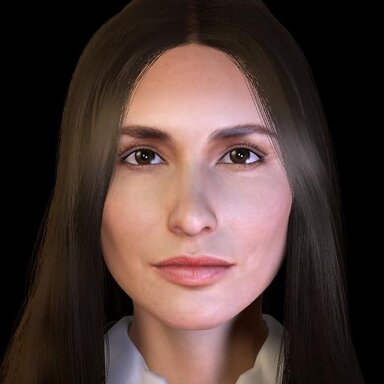
Looks 26-15-5 1
Hub-Hosted VAR CC BYA professional woman that would love to help people come together. -
Looks 3-15-2
Clownmug submitted a new resource: Data Avian - Tech Expert Read more about this resource... -
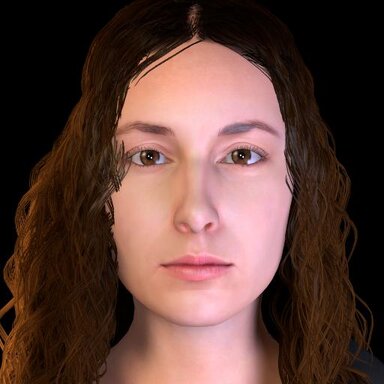
Looks 3-15-2 1
Hub-Hosted VAR CC BYA professional woman that would love to discuss tech stuff with you. Credits: Uses modified version of kemenate's Curls 01. -
VaM 1.x I've Screwed Up (Pose Freezes Person Atom!)
I tested the pose preset you provided. On the "Control & Physics 1" tab the "Detach Person Root Control" option was enabled with the pose which might be the cause. Also on the Control tab of the head controller the "Allow Possess/Grab" options were disabled which would prevent moving that as well.- Clownmug
- Post #3
- Forum: Questions & Answers
-
VaM 1.x Folks do you know who this is?
I think it's That Campus Girl by IAmAFox. It seems like they deleted the resource though.- Clownmug
- Post #2
- Forum: Requests To Community
-
Question Any Plugin that better matches character location for changing out appearance/looks?
This is the most popular plugin for genital alignment as far as I know. https://hub.virtamate.com/resources/diviningrod.8992/ The one below is new and looks like might be a lot more powerful going by the example video. I haven't tried it myself to know how well it works though...- Clownmug
- Post #2
- Forum: Questions & Answers
-
Looks 12-9-12
Clownmug updated Lily with a new update entry: Version 3 Read the rest of this update entry... -
Looks 12-9-12 - Version 3
- Revised textures and facial morphs -
Looks 3-12-15
Clownmug updated Tiny Bud Murmurs with a new update entry: Version 5 Read the rest of this update entry... -
Looks 3-12-15 - Version 5
- Revised textures and facial morphs