• Hi Guest!

    We are extremely excited to announce the release of our first Beta1.1 and the first release of our Public AddonKit!
    To participate in the Beta, a subscription to the Entertainer or Creator Tier is required. For access to the Public AddonKit you must be a Creator tier member. Once subscribed, download instructions can be found here.

    Click here for information and guides regarding the VaM2 beta. Join our Discord server for more announcements and community discussion about VaM2.
  • Hi Guest!

    VaM2 Resource Categories have now been added to the Hub! For information on posting VaM2 resources and details about VaM2 related changes to our Community Forums, please see our official announcement here.
Version 2 Update: Local Storage Enhancement

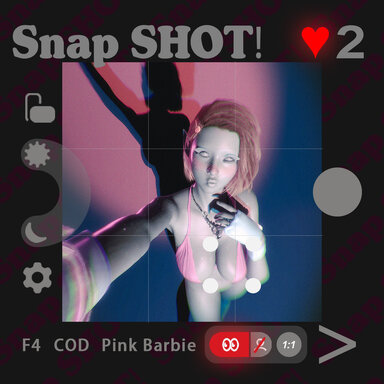
We’re excited to announce the latest version of the SupperGR ShotSequence Manager Plugin, packed with key improvements to enhance your experience. This update introduces local storage for critical data, ensuring your counters and settings persist even when the scene isn’t saved.


🚀 What’s New in v2:

1. 📊 Local Counter System

  • The SHOT counter (photo counter) is now stored in a local configuration file.
  • The FAV counter (favourite cam counter) is also saved separately.
  • Data persists across sessions, even if you close the scene without saving.
  • Location: Saves/PluginData/SupperGR/ShotSequenceManager/CountingConfig.json

2. ❤️ Favourite Cam Persistence

  • Favourite cam marks are saved locally, allowing them to persist between scene loads.
  • When you mark a cam as a favourite, it will stay marked until you manually reset it.
  • Favourite cams are clearly indicated with a heart symbol (♥) in the pose dropdown menu.

3. 🔄 Backup and Restore System

  • You can now manually back up your entire plugin configuration.
  • Backup location: Saves/PluginData/SupperGR/ShotSequenceManager/backups
  • Restore from backups at any time to recover important settings.

4. 🎯 What This Means for You

  • No need to save the scene to preserve your counter progress and favourite settings.
  • Your favourite cams will be remembered across sessions automatically.
  • Scene files stay minimal and free from unnecessary data bloat.
  • Separate data management: counters and scene data are now independent.

How It Works:

Before:

  • Counters were saved in the scene file, requiring the scene to be saved to keep data.
Now:

  • Counters and favourite marks are saved locally, ensuring persistence without the need for scene saves.
  • Scene files are leaner, faster load times, and no longer burdened with counter data.

Why This Matters:

  • Persistent experience: Counters and favourite settings are saved locally, so you don’t have to worry about losing your progress.
  • Scene files stay clean: Only scene-specific visual data is saved in the scene file.
  • Improved performance: Faster scene loading times and reduced file size.

Best Practices:

  1. Continue using the plugin as you normally would — everything will work automatically.
  2. Counters and favourite marks will persist even if the scene isn’t saved.
  3. Use manual backups to safeguard your configurations.

Technical Details:

  • Backward compatibility: No need to change anything in your existing scenes.
  • Data migration: Old scenes will automatically generate local configuration files.
  • Performance optimization: The plugin runs smoothly without any scene load delays.
  • Privacy-focused: All data is stored locally on your machine for full control.

Important Notes:

  • Manual reset is available to clear counters or favourites at any time.
  • Backup files can be restored if necessary, ensuring your settings are never lost.
  • Local data is now fully independent of scene saves, keeping your workflow simple.

User Experience Enhancements:

  • Instant feedback when marking favourite cams.
  • Visual indicators (♥) clearly show your favourite cams in the dropdown menu.
  • No more save anxiety — counters and favourites will always be there when you need them.

Enjoy the freedom to work without worrying about saving your scene! Your data is safely stored locally, ensuring you can keep creating without interruption :LOL:
Back
Top Bottom