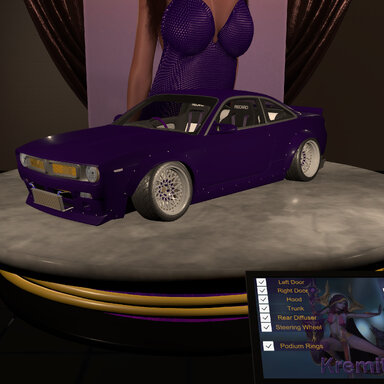


A Nissan Silvia S14 with a Boss Body Kit from Pandem/Rocket Bunny sits a top a rotating platform as it's displayed for show.
Scene comes with a Podium I built in Blender, a car model I downloaded from Sketchfab and adjusted/modified for VAm.
Using Captain Varghoss' "VaMRotator", this scene gives you control of rotation for the Podium, the podium's inner core, the podium rings, and the rear wheels of the car.
Use the control panel to adjust rotation speeds or hide/display parts.
Use manual controls and adjustments to open doors, hood, trunk, steering wheel, or even the wheels & brakes.
Var file includes:
- Premade showcase scene
- Podium asset bundle
└─ Subscene for assembled Podium
- Nissan Silvia S14 Boss asset bundles:
└─ "Buildaboss": This asset bundle contains each part individually.
└─ Configure your own custom S14 Boss with the parts you want.
└─ Includes subscene for easy loading and assembly.
└─ Use this for props, or with the included subscene to have easier control of specific parts.
└─ "Prebuiltboss": This asset bundle contains over a dozen different configurations.
└─ This is good for someone that just wants a pre-configured car for a prop.
└─ Allows for less CUAs to complete the look you want by combining the Prebuiltboss and Buildaboss asset bundles.
└─ This does not allow for control of wheels and some configurations may need to still be assembled with additional Buildaboss CUAs.
Source model is "Rocket Bunny S14 Boss Aero - Nissan 240SX Silvia" by Ddiaz Design and is licensed under a Creative Commons Attribution license.
Kiosk is from "Interactive Kiosk" by woodluyr and is licensed under a Free Standard license.
Rotations are powered by "VaMRotator" by Captain Varghoss. (Patreon)
Coordinates for manually placing components (based on a default 0, 0, 0 CUA location):
DoorLeft: -0.84277, 0.547711, 0.666506
DoorRight: 0.84277, 0.547711, 0.666506
Hood: 0, 0.800317, 0.740657
LeftFrontBrake: -0.825, 0.323285, 1.32385 @-8°(Z)
LeftFront: -0.825, 0.323285, 1.32385 @-8°(Z)
LeftRearBrake: -0.8375, 0.32431, -1.32047 @-4°(Z)
LeftRear: -0.8375, 0.32431, -1.32047 @-4°(Z)
MainParts: 0, 0, 0
RearDiffuser: 0, 0, 0
RightFrontBrake: 0.825, 0.323285, 1.32385 @8°(Z)
RightFront: 0.825, 0.323285, 1.32385 @8°(Z)
RightRearBrake: 0.8375, 0.32431, -1.32047 @4°(Z)
RightRear: 0.8375, 0.32431, -1.32047 @4°(Z)
SteeringWheel: 0.37502, 0.721439, 0.27302 @17.5°(X)
Trunk: 0, 0.903956, -1.56278
WindowLeft: -0.84277, 0.547711, 0.666506
WindowRight: 0.84277, 0.547711, 0.666506
Enjoy, and please share your work with the rest of the class..