

!!! WARNING !!!
Only works with VAM version 1.22.0.13
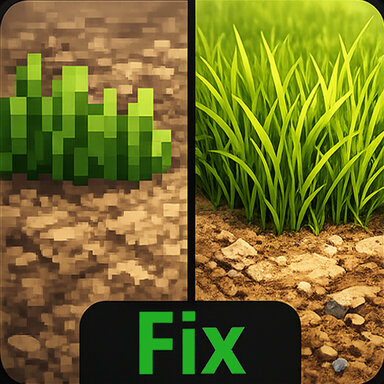
The main goal of this "patch" is to fix an old bug that caused grass on the terrain to display incorrectly (or not at all), and the terrain itself to look very blurry or pixelated.
The archive contains a "Modified" folder with two modified VAM core files that have been updated to include 13 Unity3D native Terrain related base shaders that were not included in the final build of the game.
Before applying the patch, first go to the "Virt-A-Mate\VaM_Data" folder and create a backup copy of the original files ("globalgamemanagers.assets" and "globalgamemanagers") so that you can restore them in case of problems and the inability to launch VAM.
Then replace them with the files from the "Modified" folder.
Full list of added shaders (for developers) :
Nature/Terrain/Diffuse
Nature/Terrain/Standard
Nature/Terrain/Specular
Hidden/TerrainEngine/Splatmap/Standard-Base
Hidden/TerrainEngine/Splatmap/Standard-AddPass
Hidden/TerrainEngine/Splatmap/Specular-Base
Hidden/TerrainEngine/Splatmap/Specular-AddPass
Hidden/TerrainEngine/Splatmap/Diffuse-AddPass
Hidden/TerrainEngine/Details/Vertexlit
Hidden/TerrainEngine/Details/WavingDoublePass
Hidden/TerrainEngine/Details/BillboardWavingDoublePass
Hidden/TerrainEngine/BillboardTree
Hidden/TerrainEngine/CameraFacingBillboardTree

This is an updated version due to compatibility issues when using the fix with different versions of VAM.
Only works with VAM version 1.22.0.13
The main goal of this "patch" is to fix an old bug that caused grass on the terrain to display incorrectly (or not at all), and the terrain itself to look very blurry or pixelated.
The archive contains a "Modified" folder with two modified VAM core files that have been updated to include 13 Unity3D native Terrain related base shaders that were not included in the final build of the game.
Before applying the patch, first go to the "Virt-A-Mate\VaM_Data" folder and create a backup copy of the original files ("globalgamemanagers.assets" and "globalgamemanagers") so that you can restore them in case of problems and the inability to launch VAM.
Then replace them with the files from the "Modified" folder.
Full list of added shaders (for developers) :
Nature/Terrain/Diffuse
Nature/Terrain/Standard
Nature/Terrain/Specular
Hidden/TerrainEngine/Splatmap/Standard-Base
Hidden/TerrainEngine/Splatmap/Standard-AddPass
Hidden/TerrainEngine/Splatmap/Specular-Base
Hidden/TerrainEngine/Splatmap/Specular-AddPass
Hidden/TerrainEngine/Splatmap/Diffuse-AddPass
Hidden/TerrainEngine/Details/Vertexlit
Hidden/TerrainEngine/Details/WavingDoublePass
Hidden/TerrainEngine/Details/BillboardWavingDoublePass
Hidden/TerrainEngine/BillboardTree
Hidden/TerrainEngine/CameraFacingBillboardTree
This is an updated version due to compatibility issues when using the fix with different versions of VAM.