
You like this plugin? I'd love to know!
Leave a like, and tell me in your review how this is helpful or could be improved!
About
Debug Console shows you all logs in a single UI similar to Unity's editor console. With the option to filter by log level, collapse identical messages into a single entry, and global filters to ignore messages, everything stays clean and readable. You can even use the search bar to find specific messages.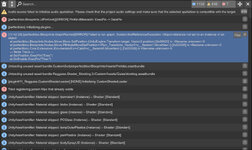
How To
Add the plugin as a session plugin. You can drag and resize the console to your liking, and configure global filters in the plugin settings. Make sure to update your session plugin preset to save the plugin settings, as well as the current size and position of the console.All The Logs
Debug Console shows you all log messages, even those that normally don't appear in VaMs built-in log view. This is especially useful if you want to catch all errors while developing plugins or creating scenes. Use log filters in the plugin settings to hide anything that is not relevant for you.
- "In-game Debug Console" by yasirkula (MIT, https://github.com/yasirkula/UnityIngameDebugConsole)
- Slut show - Your personal Exhibition Hall by supperGR (CC BY-NC-SA)
- Sabrina by willmason (CC BY)
- Motoko 2.0 beta by mopedlampe (CC BY)
- Skin 6 by Riddler (CC BY)
- Tron Hair by Miki (CC BY-NC-ND)
- CyberPunk Lines Layered by EuLinRabei (CC BY)
- [NoOC] SexySet07 by GenericMale51 (CC BY-NC-SA)
- Shorts_M_Set_v2 by VL_13 (CC BY)
- Half Mesh Lingerie Set by VirtaArtieMitchel (CC BY)
- Mummy Outfit by Yaneks (CC BY)
- AshAuryn's Sexpressions (174 morphs) (Legacy) by AshAuryn (CC BY)
- VaMoose-Creations Hacker girl apartment NYC by Damarmau (CC BY)