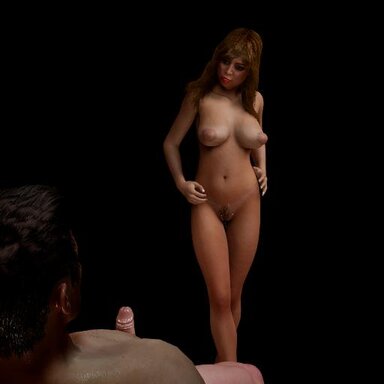

You are in your favorite place to do some serious gooning on the internet and your favorite girl comes in to entertain you personally in your home! This scene is totally developed for AR use only. You could play it on desktop, but it has a big blue background. The scene is you embodying the guy and having close up and intimate fun with your favorite girl(s).
I decided to try out the AR thing in my Quest3 a while back and even though the scene I through together was very basic, I was pretty impressed. I have been improving it for a while, and it is almost there. There are over thirty poses (I have no idea exactly how many, but I seldom make it through the whole sequence in one sitting) and still a few bugs, but I decided to share it as it is to see if there is any interest to continue developing it. One problem is if you switch in and out of Embody, you have to use the "World Grab" function to realign things in Embody when you go back. You will also probably have to do this on first load. I spent a lot of time trying to keep the shifting around to a minimum as you change positions, but it is not perfect. It doesn't bother me, but I wanted it perfect for posting here.
If you need help in setting up the AR function, I highly recommend the guide here for Virtual Desktop (not the Steam version). Once I installed this, it is all that I use to access VAM in VR and AR :
 hub.virtamate.com
BASIC INSTRUCTIONS:
Load the scene and after it is loaded go to embody and then say "Begin". The girl will start dancing (if she isn't already) and some music will start. After that all you have to say is "Next" to proceed to the next position, this will take you through the numerous different positions. Some poses may take a few "strokes" for everything to align, so give it a chance. These are all fairly tight poses, so I had some difficulty making it perfect on each load. If a pose does not load properly, try saying "Reset" this resets the poses of both characters. There is also a "Normal" command this reloads everything for the current position. This can come in handy if you use the "Deep" or "Easy" commands to change her stroke and you want to go back to normal. The Deep and Easy functions can be basically reversed on some poses depending on which axis is being animated for the hip action. While in some positions, I like to reach out and grab her head to move her closer or just to add to the animation, you might try that. There is also a function built in that if you say "Tease" she goes through a series of different hip and head motions. These were originally built for one pose, but I use them all over the place. To deactivate this and it can also become accidently activated if you say a word that sounds like "Tease" or "Tease Me", you can turn it off by saying "Stop Tease". There is a list of some of the most basic commands in the scene and you can toggle it on and off by saying "Commands". There are a lot more commands you can find and try. They can be found in Scene Plugins, under the PI labeled "MacGruber Speech Recognition".
There is also some furniture in the scene that is turned off, these "match" some furniture items in my little office (where this was made), you can turn them on and off by saying "Furniture". These poses are probably best viewed in voyeur mode (Embody Off). At a point later in the scene the characters will move to a different location for their fun. At that point Embody will kick out and not load automatically after each position change. You can sit where you are and enjoy watching the action. Several of these poses are designed to be viewed in voyeur mode, there is a level of eroticism of watching a coupld up close and they will include you to a small level at one point. At any time though you can engage the embody mode and get a first-person view.
BASIC COMMANDS:
Begin - returns to the beginning of the scene and starts the action
Stop - stops all action
Next - moves to the next position
Reset - resets the poses of the man and the girl
Fuck Me - restarts the girl's thrusts after a stop
Fuck Her - restarts the man's thrusts after a stop
Normal - resets all poses and settings for the current position
Deep - changes the thrust of whoever is thrusting to more penetration (Sometimes using Easy will do it for that pose)
Easy - changes the thrust of whoever is thrusting to less penetration (Sometimes using Deep will do it for that pose)
Embody/Engage - Turns on embody for a first-person view and control of the man's head
Off/Away - Turns on embody for a first-person view and control of the man's head
Naked - Removes the people clothes and puts heels on the girl (useful also to remove the cum from the girl if it bothers you)
Commands - Toggles the in scene command list On and Off
That's all I can think of to get you started, I hope you all like it. If you do and want more development of this and the several others in the pipeline, please let me know with a good review. If I don't know that you all are enjoying these, then it is not worth the work it takes to get these scenes post ready and posted.
GOOD REVIEWS LEAD TO MORE POSTS!
I decided to try out the AR thing in my Quest3 a while back and even though the scene I through together was very basic, I was pretty impressed. I have been improving it for a while, and it is almost there. There are over thirty poses (I have no idea exactly how many, but I seldom make it through the whole sequence in one sitting) and still a few bugs, but I decided to share it as it is to see if there is any interest to continue developing it. One problem is if you switch in and out of Embody, you have to use the "World Grab" function to realign things in Embody when you go back. You will also probably have to do this on first load. I spent a lot of time trying to keep the shifting around to a minimum as you change positions, but it is not perfect. It doesn't bother me, but I wanted it perfect for posting here.
If you need help in setting up the AR function, I highly recommend the guide here for Virtual Desktop (not the Steam version). Once I installed this, it is all that I use to access VAM in VR and AR :
How to launch without SteamVR (Performance Increase) - Guides -
As of right now (June 2025), there are 3 methods I know of to launch in VR without SteamVR. Will go through them quickly to increase your performance. This guide is the basic guide. Advanced guide here What is this? It is a list of methods to...
hub.virtamate.com
BASIC INSTRUCTIONS:
Load the scene and after it is loaded go to embody and then say "Begin". The girl will start dancing (if she isn't already) and some music will start. After that all you have to say is "Next" to proceed to the next position, this will take you through the numerous different positions. Some poses may take a few "strokes" for everything to align, so give it a chance. These are all fairly tight poses, so I had some difficulty making it perfect on each load. If a pose does not load properly, try saying "Reset" this resets the poses of both characters. There is also a "Normal" command this reloads everything for the current position. This can come in handy if you use the "Deep" or "Easy" commands to change her stroke and you want to go back to normal. The Deep and Easy functions can be basically reversed on some poses depending on which axis is being animated for the hip action. While in some positions, I like to reach out and grab her head to move her closer or just to add to the animation, you might try that. There is also a function built in that if you say "Tease" she goes through a series of different hip and head motions. These were originally built for one pose, but I use them all over the place. To deactivate this and it can also become accidently activated if you say a word that sounds like "Tease" or "Tease Me", you can turn it off by saying "Stop Tease". There is a list of some of the most basic commands in the scene and you can toggle it on and off by saying "Commands". There are a lot more commands you can find and try. They can be found in Scene Plugins, under the PI labeled "MacGruber Speech Recognition".
There is also some furniture in the scene that is turned off, these "match" some furniture items in my little office (where this was made), you can turn them on and off by saying "Furniture". These poses are probably best viewed in voyeur mode (Embody Off). At a point later in the scene the characters will move to a different location for their fun. At that point Embody will kick out and not load automatically after each position change. You can sit where you are and enjoy watching the action. Several of these poses are designed to be viewed in voyeur mode, there is a level of eroticism of watching a coupld up close and they will include you to a small level at one point. At any time though you can engage the embody mode and get a first-person view.
BASIC COMMANDS:
Begin - returns to the beginning of the scene and starts the action
Stop - stops all action
Next - moves to the next position
Reset - resets the poses of the man and the girl
Fuck Me - restarts the girl's thrusts after a stop
Fuck Her - restarts the man's thrusts after a stop
Normal - resets all poses and settings for the current position
Deep - changes the thrust of whoever is thrusting to more penetration (Sometimes using Easy will do it for that pose)
Easy - changes the thrust of whoever is thrusting to less penetration (Sometimes using Deep will do it for that pose)
Embody/Engage - Turns on embody for a first-person view and control of the man's head
Off/Away - Turns on embody for a first-person view and control of the man's head
Naked - Removes the people clothes and puts heels on the girl (useful also to remove the cum from the girl if it bothers you)
Commands - Toggles the in scene command list On and Off
That's all I can think of to get you started, I hope you all like it. If you do and want more development of this and the several others in the pipeline, please let me know with a good review. If I don't know that you all are enjoying these, then it is not worth the work it takes to get these scenes post ready and posted.
GOOD REVIEWS LEAD TO MORE POSTS!




![[Male] Modular Beard Pack](https://1424104733.rsc.cdn77.org/data/resource_icons/0/155.jpg?1591007428)
![[Male/Futa] Body Hair Pack](https://1424104733.rsc.cdn77.org/data/resource_icons/0/201.jpg?1590342116)
![[Male] Hairstyles Pack 01](https://1424104733.rsc.cdn77.org/data/resource_icons/0/198.jpg?1590311994)
![[Unisex] Morphs](https://1424104733.rsc.cdn77.org/data/resource_icons/0/213.jpg?1590806147)