




Automatically replace scene character appearances with your own presets during scene loading.
Stop loading the original character appearances from scenes!
Unlike traditional appearance loader plugins, this plugin intercepts VaM's character appearance restoration process during scene loading. It prevents the original scene appearances from being applied and directly replaces them with your preselected .vap appearance presets.
与传统外观加载插件不同,本插件会在 VaM 场景加载过程中拦截人物外观恢复流程,阻止原场景人物外观加载,直接使用你预先指定的 .vap 外观预设进行替换。
Unlike traditional appearance loaders that apply a new preset after the scene has finished loading, this plugin intercepts VaM's character loading and restoration process, replacing the original appearance data with your selected preset before it is restored.
This means you don't have to wait for the original character appearance to load before changing it.
The plugin consists of two components:
When loading a scene with multiple female characters, presets are assigned according to the order in which female Person atoms appear in the scene.
For example:
If fewer than three presets are selected, the available presets are reused cyclically.
Male characters are left unchanged.
Saves/PluginData/vam.appearance-preset-loader.selection.json
The selected presets are saved automatically and read by the BepInEx loader during scene loading.
No manual file editing is required.
Copy VamAppearancePresetLoader.dll into your VaM BepInEx plugins directory:
BepInEx/plugins/
Launch VaM once to initialize the plugin and generate its configuration.
Step 2 – Install AppearancePresetPicker
Copy AppearancePresetPicker.cs into:
Custom/Scripts/
Step 3 – Add the picker to VaM
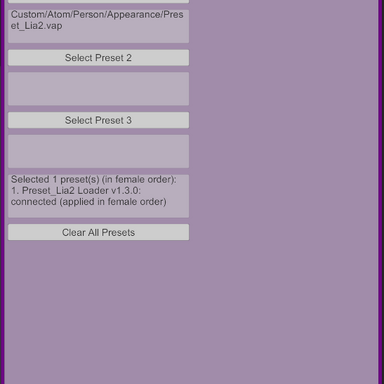
Use the three preset selection buttons to choose your preferred .vap files.
You can select just one preset or configure multiple presets for scenes with several female characters.
Once configured, your selections are saved globally.
Step 5 – Load a scene
Load any scene as usual. The BepInEx loader will automatically read your selected presets and replace the original female character appearances during the loading process.
它可以让你在进入场景之前,提前选择自己喜欢的人物外观预设。在场景加载过程中,插件会拦截人物外观恢复流程,使用你指定的 .vap 预设替换场景原本保存的外观数据。
与传统的外观加载插件不同,本插件并不是等场景完全加载后再替换人物,而是在人物外观恢复阶段进行替换。
这样就不需要先加载场景原本的人物外观,再等待新外观加载完成。
本项目由两个组件组成:
当场景中存在多名女性人物时,插件会按照女性 Person Atom 在场景中的出现顺序,依次分配外观预设。
例如:
如果选择的预设数量少于 3 个,则会循环使用已选择的预设。
目前仅替换女性人物,男性人物保持场景原有外观。
功能包括:
Saves/PluginData/vam.appearance-preset-loader.selection.json
AppearancePresetPicker 会在选择预设后自动保存结果,VamAppearancePresetLoader 则会在场景加载时读取该文件。
整个过程自动完成,无需手动修改 JSON 文件。
BepInEx/plugins/
启动一次 VaM,让插件初始化并生成配置文件。
Custom/Scripts/
可以只选择一个预设,也可以根据场景人物数量设置多个预设。
选择完成后,插件会自动保存选择结果。
VamAppearancePresetLoader 会自动读取你设置的外观预设,并在人物加载过程中替换场景原本的女性人物外观。
之后进入其他场景,也会继续使用你设置的外观预设。
Stop loading the original character appearances from scenes!
Unlike traditional appearance loader plugins, this plugin intercepts VaM's character appearance restoration process during scene loading. It prevents the original scene appearances from being applied and directly replaces them with your preselected .vap appearance presets.
- Skip Original Appearances: No need to load the scene's original character appearance before replacing it.
- Replace During Scene Loading: Appearance replacement happens during the character restoration process, not after the entire scene has loaded.
- Multiple Character Support: Configure up to 3 different appearance presets. They are automatically assigned to female characters in scene order, with cyclic reuse when necessary.
- Global Preset Selection: Select your preferred appearances once, and they will automatically be used in subsequent scenes.
告别场景自带人物外观!
与传统外观加载插件不同,本插件会在 VaM 场景加载过程中拦截人物外观恢复流程,阻止原场景人物外观加载,直接使用你预先指定的 .vap 外观预设进行替换。
- 阻止原外观加载: 不再先加载场景自带的人物外观,再进行二次替换。
- 加载时直接替换: 在人物外观恢复阶段完成替换,而不是等待场景加载完成后再操作。
- 支持多人物场景: 最多设置 3 个不同的外观预设,自动按照女性人物出现顺序分配,支持循环使用。
- 全局预设配置: 一次设置,之后加载其他场景也会自动使用指定外观。
VaM Appearance Preset Override
Automatically replace scene character appearances with your own presets during scene loading.Overview
VaM Appearance Preset Override allows you to use your own character appearance presets instead of the original appearances saved in a scene.Unlike traditional appearance loaders that apply a new preset after the scene has finished loading, this plugin intercepts VaM's character loading and restoration process, replacing the original appearance data with your selected preset before it is restored.
This means you don't have to wait for the original character appearance to load before changing it.
The plugin consists of two components:
- AppearancePresetPicker – A VaM in-game plugin for selecting your preferred .vap appearance presets.
- VamAppearancePresetLoader – A BepInEx plugin that intercepts the scene loading process and applies the selected appearance presets.
Features
1. Replace appearances during scene loading
- Intercepts VaM's character appearance restoration process.
- Replaces the original appearance data with your selected preset before restoration.
- Original scene appearances are not applied when an override is successfully performed.
- No need to manually load appearance presets after entering a scene.
2. Support for multiple characters
You can configure up to three appearance presets.When loading a scene with multiple female characters, presets are assigned according to the order in which female Person atoms appear in the scene.
For example:
| Scene character | Applied preset |
|---|---|
| First female Person | Preset 1 |
| Second female Person | Preset 2 |
| Third female Person | Preset 3 |
| Fourth female Person | Preset 1 |
Male characters are left unchanged.
3. In-game preset selection
AppearancePresetPicker uses VaM's native file browser to select .vap files.- Supports browsing subfolders.
- Allows up to three preset slots.
- Displays the currently selected preset paths.
- Saves selections globally, so they are not overwritten by scene-saved plugin settings.
- Includes a button to clear all selected presets.
4. Automatic integration
The two plugins communicate through:Saves/PluginData/vam.appearance-preset-loader.selection.json
The selected presets are saved automatically and read by the BepInEx loader during scene loading.
No manual file editing is required.
Installation
Requirements:- Virt-A-Mate
- BepInEx (compatible installation)
- Both plugin components
Copy VamAppearancePresetLoader.dll into your VaM BepInEx plugins directory:
BepInEx/plugins/
Launch VaM once to initialize the plugin and generate its configuration.
Step 2 – Install AppearancePresetPicker
Copy AppearancePresetPicker.cs into:
Custom/Scripts/
Step 3 – Add the picker to VaM
- Open any Atom's Plugin Manager.
- Add AppearancePresetPicker.cs.
- You can also use a saved plugin preset to load it automatically.
Use the three preset selection buttons to choose your preferred .vap files.
You can select just one preset or configure multiple presets for scenes with several female characters.
Once configured, your selections are saved globally.
Step 5 – Load a scene
Load any scene as usual. The BepInEx loader will automatically read your selected presets and replace the original female character appearances during the loading process.
Configuration
The BepInEx plugin provides configuration options for controlling its behavior, including:- Enable / Disable the loader.
- Female-only appearance replacement.
- Default, female and male preset settings.
- Picker integration.
- Preset selection file location.
- Advanced storable handling.
- Plugin storable import options.
- Verbose logging.
- Configuration reload hotkey.
Important Notes
- The current implementation replaces female character appearances. Male characters remain unchanged.
- Preset assignment is based on the order of female Person atoms in the scene, not their names.
- If no preset is selected in AppearancePresetPicker, the loader can use presets configured in its BepInEx configuration.
- This plugin replaces appearance data during character restoration. It does not guarantee that unrelated scene dependencies or assets referenced elsewhere will never be loaded.
VaM 外观预设自动替换插件(Appearance Preset Override)
在场景加载时自动使用你指定的人物外观预设,替换场景原有的人物外观。插件介绍
VaM Appearance Preset Override 是一套用于 Virt-A-Mate 的人物外观预设替换工具。它可以让你在进入场景之前,提前选择自己喜欢的人物外观预设。在场景加载过程中,插件会拦截人物外观恢复流程,使用你指定的 .vap 预设替换场景原本保存的外观数据。
与传统的外观加载插件不同,本插件并不是等场景完全加载后再替换人物,而是在人物外观恢复阶段进行替换。
这样就不需要先加载场景原本的人物外观,再等待新外观加载完成。
本项目由两个组件组成:
- AppearancePresetPicker:VaM 内部插件,负责通过游戏自带的文件浏览器选择人物外观预设。
- VamAppearancePresetLoader:基于 BepInEx 的插件,负责在场景加载过程中拦截并替换人物外观。
主要功能
1. 场景加载时自动替换人物外观
- 在 VaM 场景加载过程中拦截人物外观恢复流程。
- 使用用户指定的 .vap 预设替换场景原本的外观数据。
- 成功执行替换时,不再应用场景原本保存的人物外观。
- 不需要进入场景后再手动加载外观预设。
2. 支持多人物场景
目前支持最多设置 3 个不同的人物外观预设。当场景中存在多名女性人物时,插件会按照女性 Person Atom 在场景中的出现顺序,依次分配外观预设。
例如:
| 场景人物 | 使用的外观预设 |
|---|---|
| 第 1 位女性人物 | 预设 1 |
| 第 2 位女性人物 | 预设 2 |
| 第 3 位女性人物 | 预设 3 |
| 第 4 位女性人物 | 预设 1 |
目前仅替换女性人物,男性人物保持场景原有外观。
3. 游戏内可视化预设选择
AppearancePresetPicker 使用 VaM 自带的文件浏览器选择 .vap 文件。功能包括:
- 最多设置 3 个外观预设。
- 支持浏览预设子目录。
- 显示当前选择的预设路径。
- 全局保存预设选择,不会因为加载其他场景而被场景内保存的旧参数覆盖。
- 提供一键清除全部预设的功能。
4. 自动联动
两个组件通过以下文件进行数据交换:Saves/PluginData/vam.appearance-preset-loader.selection.json
AppearancePresetPicker 会在选择预设后自动保存结果,VamAppearancePresetLoader 则会在场景加载时读取该文件。
整个过程自动完成,无需手动修改 JSON 文件。
安装教程
安装要求
- Virt-A-Mate
- BepInEx(兼容的安装环境)
- AppearancePresetPicker.cs
- VamAppearancePresetLoader.dll
第一步:安装 BepInEx 插件
将 VamAppearancePresetLoader.dll 放入 VaM 的 BepInEx 插件目录:BepInEx/plugins/
启动一次 VaM,让插件初始化并生成配置文件。
第二步:安装 VaM 选择器
将 AppearancePresetPicker.cs 放入:Custom/Scripts/
第三步:添加预设选择器
- 打开 VaM 中任意 Atom 的 Plugin Manager。
- 添加 AppearancePresetPicker.cs。
- 也可以使用保存好的插件预设加载选择器。
第四步:选择人物外观
在插件界面中点击「选择预设 1」「选择预设 2」「选择预设 3」,选择自己需要的 .vap 文件。可以只选择一个预设,也可以根据场景人物数量设置多个预设。
选择完成后,插件会自动保存选择结果。
第五步:加载场景
现在可以正常加载 VaM 场景。VamAppearancePresetLoader 会自动读取你设置的外观预设,并在人物加载过程中替换场景原本的女性人物外观。
之后进入其他场景,也会继续使用你设置的外观预设。
配置说明
BepInEx 插件提供了相关配置选项,可用于控制插件运行行为,包括:- 启用 / 禁用外观替换。
- 女性人物外观替换。
- 默认、女性及男性预设配置。
- Picker 联动设置。
- 预设选择文件路径。
- 高级 Storable 数据处理。
- 插件 Storable 导入选项。
- 详细日志输出。
- 配置重新加载快捷键。
注意事项
- 当前版本主要针对女性人物外观替换,男性人物保持原场景外观。
- 多人物场景按照女性 Person Atom 的出现顺序分配预设,而不是根据人物名称识别。
- 如果没有通过 AppearancePresetPicker 选择预设,则可以使用 BepInEx 配置文件中设置的预设。
- 本插件替换的是人物外观恢复阶段的数据,并不保证场景中其他地方引用的依赖资源或无关资源不会被加载。
- 建议首次使用时先在简单场景中测试,确认人物外观及场景插件运行正常。