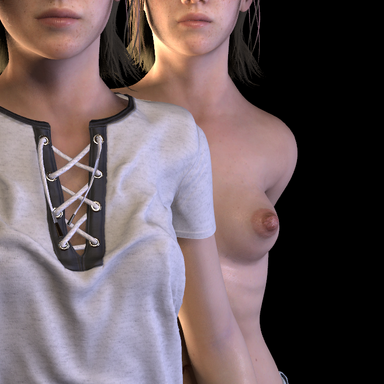


Credits: Character: 'Ellie' by JackyCracky, 'Shirt Base v2' by VL_13, 'Torn Jeans Shorts' by PetaZwerga
Credits: Character: 'Ellie' by JackyCracky, panty by maru01
Eliminate Nipple & Pubic Hair Clipping
This session/scene/person plugin automatically eliminates nipple & pubic hair clipping through clothing. As a scene/session plugin, it affects all person atoms in a scene.
How it Works
The routine detects certain terms in a clothing item's display name and its tags to determine whether it covers the nipples or pubic hair, is in exposed state or in sim detached state. If a covering clothing item is in sim detach state, nipples / pubic hair width will be visible. The following terms are considered (positive: nipples/pubic hair covered, negative: nipples/pubic hair exposed):
Nipples
- Positive display name contents: "top", "shirt", "bra", "sweater", "blouse", "dress", "jacket", "hoodie"
- Negative display name contents: "lash", "eye"
- Positive tags: "top", "shirt", "bra", "hoodie", "jacket", "sweater", "dress", "hidenipples"
- Negative tags: "accessory", "glasses", "gloves", "hat", "jewelry", "mask", "panties", "pants", "bottom", "shoes", "socks", "stockings", "arms", "feet", "hands", "head", "legs", "neck"
- Positive display name contents: "pant", "pants", "shorts", "bodysuit", "trunk"
- Negative display name contents: "lash", "eye"
- Positive tags: "panties", "pants", "shorts", "bodysuit", "hidepubes"
- Negative tags: "accessory", "glasses", "gloves", "hat", "jewelry", "mask", "shoes", "socks", "arms", "feet", "hands", "head", "neck"
- Negative display name contents: "expose", "exposed", "open", "up", "down", "harness", "lewd", "raised"
- Negative tags: "expose", "exposed"
Overriding
In some cases, if clothing names or tags are not set or misleading, nipples or pubic hair are not hidden even though a clothing item covers them, or nipples / pubic hair is hidden despite the clothing item is in an exposed state.
- If nipples/pubic hair are not hidden despite being covered by a clothing item, open the clothing item's 'User Prefs' and enter the tag 'hidenipples' or 'hidepubes'.
- If nipples/pubic hair are hidden despite being in exposed state, open the clothing item's 'User Prefs', type in 'exposed' in the top input field and hit enter (or tick 'expose' in the 'Other Tags', if it is already present).
Nipple Morphs Affected
Depending on gender (m/f), the following base nipple morphs are included: Nipple Diameter (f), Nipples Diameter (m/f), Nipple Length (f), Nipples Large (m/f), Nipple Size (f), Nipples Size (m/f), Nipples (m/f), Nipples Apply (f), and Nipples Depth (m/f).
You can add up to three additional nipple morphs which will be added to a slot system and also considered in the hiding routine.
You can define the flattened (hidden) nipple morph value. This value will be applied to all nipple morphs in hidden state.
Session Plugin Preset
You can save a fully configured session plugin preset (including flattened morph value and up to three additional nipple morphs). This will restore the desired configuration each time you start VaM automatically.
In case you encounter a bug or unwanted behaviour, please report the circumstances as detailed as possible. Thank you!