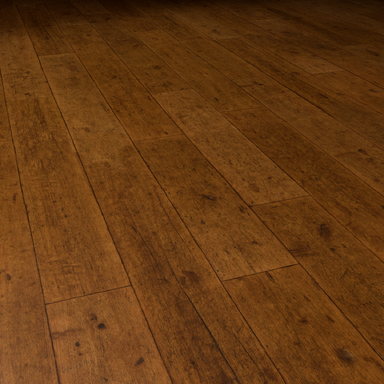
Old Wooden Floor Texture

Textures Old Wooden Floor Texture

Download [42.93 MB]
How to apply floor textures:

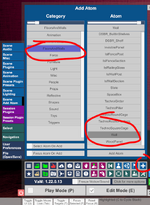
Make sure to use a Native Wood Panel atom from the + button on the UI

You can also use textures like this for most of the Native atoms, like walls, cubes, cylinders, slate, etc...

1785154325404.png


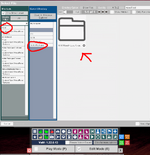
Then open the new Wood Panel atom and go to its Materials Tab, then the Textures sub tab on the far upper right.

You then need to set each of the textures for Diffuse, Specular, Gloss, and Normal Map (put the Normal in the BumpMap section.

1785154462769.png


You can adjust the color tinting, and lighting response colors on the Params tab.

Also, if you're using a native atom other than a WoodPanel, like a Slate or a Wall, my resource will not show up in the addonpackages list on the left side. You will have to browse the directories in the VaM interface to get to ../VaM/Addonpackages/.. then locate my package in the main browser window. VaM will only show packages that contain textures that are directory structured for that specific type of atom. There's no way to package textures to be as easily available for all of the different types of atoms, like Cubes, or Slates, or Walls.



1785155457633.png
 

Attachments

  • 1785154256689.png
    1785154256689.png
    337.2 KB · Views: 0
  • 1785155345613.png
    1785155345613.png
    360.4 KB · Views: 0
Last edited:
Also, you don't need to scale the WoodPanel atom (or any native atoms) at all, you can simply change the TileScale in the Material/Texture tab. The default is 100.0X, so in the case of this wood floor, if you wanted to make the texture appear larger you would reduce this value to 20.0, or 30.0. Make sure that all the X and Y values are the same, and that the values are the same across all of the texture maps. Then again, if you just want a quick and dirty way to change the perceived size of the texture, you can simply scale in the Physics Objects tab.

1785221338584.png


Note: Even though the slider bar looks maxxed out at 15.0, you can select the value text and enter any number you like, and the slider bar will change scale to reflect the new value. Say you wanted the scale to be 30.0X, then just type in 30 in the value field.
 
Last edited:
Back
Top Bottom