
• Hi Guest!

    We have posted a new VaM2 dev log on Patreon, starting a monthly cadence of written progress updates between Beta releases. Highlights include the new Gizmos System, Selection Carousel, and Modes System with Context-Specific Editing. Beta1.2 is 15 of 21 items complete.

    Read the full post on Patreon, or follow progress on the public Trello roadmap.
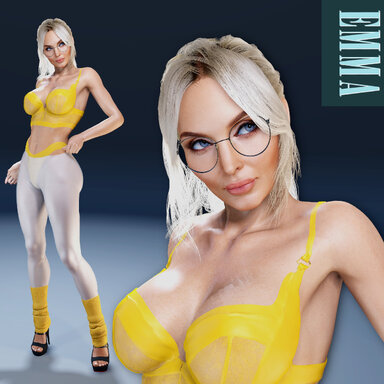
Emma

Looks Emma

Download [34.08 MB]

Poli5

Well-known member
Joined
Oct 19, 2021
Messages
369
Reactions
2,239
Poli5 submitted a new resource:

Emma - Fit milf

Fit milf: Emma
In her early 40s, she combines confidence and vitality with a strong commitment to fitness. Regular workouts are part of her daily life, reflecting her determination and self-care. Open to new relationships and currently dating, she is sociable, grounded, and comfortable with who she is.

Custom morphs - with extra...

Read more about this resource...
 
It was a bad idea to make normal textures in jpg. The quality of the leather makes it look like a terry cloth.
 
It was a bad idea to make normal textures in jpg. The quality of the leather makes it look like a terry cloth.
You shouldn't jump to conclusions.
1. I do it so it takes up less space on the consumers HDD, export files faster when working, and i don't think it looses that much quality. If i did a texture release i might do it differently - yes.
2. I don't think the texture is rougher than other custom texture releases designed for specific models. Releasing heavy files for each model is not good practice in my opinion
 
By compressing normal maps into jpg, you belittle your talent.

It is clear that this is done to save space, but Jpg does not transmit vector information, and this is the main reason why it is categorically unsuitable for normals.The normal map stores not just the color, but the direction of the vector in space. The color of each pixel is an instruction for light.

Red channel (R): X-axis deviation (Left-right).
Green channel (G): Y-axis deviation (Up-down).
Blue channel (B): Z-axis deviation (Depth).

Blockiness (8x8 artifacts): JPG divides the image into blocks. There will be sudden color changes at the joints of the blocks. For the normal, this means that the surface will look "square" or covered with a checkerboard pattern instead of smooth curves.
Color noise: JPG blurs sharp transitions. A small hollow or scratch encoded by a couple of pixels will simply disappear, and the relief will become "soapy".
 
Last edited:
Not quite. Normal maps don't store vectors directly in the image file. They store RGB values that the renderer interprets as vector directions.
A JPG. can store that information just like a PNG. can. The difference is that JPG. compression alters the pixel values a bit, but not enough for me to do it differently.
You write "but Jpg does not transmit vector information, and this is the main reason why it is categorically unsuitable for normals" You are implying that the PNG. can store this information, which is not accurate. So JPG. isn't unsuitable because it "doesn't transmit vector information." You could say it's unsuitable because it's lossy and changes the values that encode the vectors.

I used to keep normal maps as PNG. But after reviewing it IG and comparing the maps i made a decision to change them to JPG. files, as the reasons i have already given you.

I have now given my reasons for doing it this way. I don't want to go further into this discussion.
 
I can see you edited your response while i was answering. The response i made was meant to answer your initial message.
 
I put it wrong. Please understand, because Eng. not my native lang. Of course, no image format physically stores vectors. Both JPG, PNG, and BMP store just the values of the color channels (RGB). They are just containers for numbers.
The renderer interprets these numbers as vectors.
Not so long ago, I became interested in image enhancement to train my own Upscaling model. And I ran into problems with the gpg format. When I switched to PNG and BMP format, all the problems with vector transfer disappeared. Based on this, my conclusion is drawn.

Anyway, thanks for the feedback. Your work is unique and of great interest.
 
I want to apologize for my previous attempt to impose my opinion.
When making a new texture today, I found that if you save the normal layer in jpg with a quality at least above 90%, there is absolutely no difference.
The difference can only be seen if you use compression. And then only in the red vector, for some reason it turns out with green artifacts.

And I immediately remembered our conversation. It turns out that all this time I have been using a converter that is not suitable for this.Thanks to you, I will also make this world EASIER now. 😊
 
I want to apologize for my previous attempt to impose my opinion.
When making a new texture today, I found that if you save the normal layer in jpg with a quality at least above 90%, there is absolutely no difference.
The difference can only be seen if you use compression. And then only in the red vector, for some reason it turns out with green artifacts.

And I immediately remembered our conversation. It turns out that all this time I have been using a converter that is not suitable for this.Thanks to you, I will also make this world EASIER now. 😊
Hey Demorfeus.

Thank you for coming back with that realization. You are still right about the normal map being to rough on this model though. But still, nothing to do with the jpg/png format lol.

I did take a look at your profile, and was made aware of upscaling textures, which i had never thought about. I have experimented with it, and now use it frequently, so i did get a lot out of your input :p
 
Hey Demorfeus.

Thank you for coming back with that realization. You are still right about the normal map being to rough on this model though. But still, nothing to do with the jpg/png format lol.

I did take a look at your profile, and was made aware of upscaling textures, which i had never thought about. I have experimented with it, and now use it frequently, so i did get a lot out of your input :p
Oh, I'm very pleased to know that.
I'm currently working on a diffuse model that generates natural pores on existing textures. It turns out to be very realistic, but the seams become noticeable after that and you have to put them in Substance Painter. After that, the seams become soapy. So far, I have not found a high-quality way to fix this.
 
Oh, I'm very pleased to know that.
I'm currently working on a diffuse model that generates natural pores on existing textures. It turns out to be very realistic, but the seams become noticeable after that and you have to put them in Substance Painter. After that, the seams become soapy. So far, I have not found a high-quality way to fix this.
Yeah that would be on of the downsides of generating/upscaling textures. I have only used it for diffuse facial textures, to bump the details up in the face only.

I would try to generate a layer similar in Substance, and then using a black mask to paint it in on the seams, so you have a transition between your generated pores layer, and then the pores you have generated/upscaled. That, or maybe create a brush for pores similar, that you can paint directly on to the seams, and try to match your existing pores.

Hope it makes sense
 

Similar threads

Back
Top Bottom