
• Hi Guest!

    We are extremely excited to announce the release of our first Beta1.1 and the first release of our Public AddonKit!
    To participate in the Beta, a subscription to the Entertainer or Creator Tier is required. For access to the Public AddonKit you must be a Creator tier member. Once subscribed, download instructions can be found here.

    Click here for information and guides regarding the VaM2 beta. Join our Discord server for more announcements and community discussion about VaM2.
  • Hi Guest!

    VaM2 Resource Categories have now been added to the Hub! For information on posting VaM2 resources and details about VaM2 related changes to our Community Forums, please see our official announcement here.
Sim Setter

Plugins + Scripts Sim Setter

Download [<1 MB]

coinstacc

Member
Joined
Aug 26, 2024
Messages
29
Reactions
95
coinstacc submitted a new resource:

Sim Setter - Save and restore a specific clothing sim shape.

>add clothing item
>it freaks out and clips through the model
>make adjustments to pose so it will stop clipping
>make adjustments to morphs so it will stop clipping
>gradually ease everything back to the way it was so clothing sim can adjust with it
>clothing sim is following nicely
>finally get it looking good and proper
>accidentally nudge person atom control
>complete sim explosion, back to square one
>mfw

So yeah. This is a thing that I realized could probably be done when I was...

Read more about this resource...
 
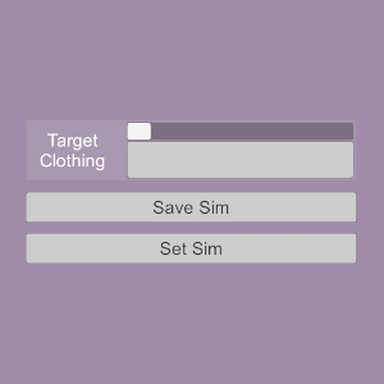
Judging by the description, it may be useful, but it is very hard to understand what I'm selecting; I can't read at all!
1773777127502.png
 
Judging by the description, it may be useful, but it is very hard to understand what I'm selecting; I can't read at all!
View attachment 574794
Yeah, the uid system doesn't play nice with the string chooser menu. I'm poking away at some quick improvements and fixes, so might try to add in some clarity to this; either by making the menu clearer, or having the name of the selected clothing item in a status text box I'm already adding the right half of the ui. You'll still be at the mercy of how the creators named the clothing, though. In the meantime, nothing bad should happen if you just test each one individually.
 
coinstacc updated Sim Setter with a new update entry:

Small QoL update + demo

Some minor updates to the plugin:
- Clothing item is now saved along with vertex locations, where previously you would have to select the clothing item to restore it or be shown an error.
- Text box added to right side of UI showing the name of the clothing item selected, because the full uid path in the menu can be hard to read
- Text box also shows which clothing item is saved, and how many vertices are stored.

I was not able to easily find a way to account for atom scale when saving and...

Read the rest of this update entry...
 
I've been wanting this ability for so long. So this is very exciting. I hope you can expand it into being able to save and set for more than one item at a time, and more than one saved pose.
The way I usually build my scenes is with many poses that I'm snapping to, so I don't think the limitations apply there.
 
Last edited:
I've been wanting this ability for so long. So this is very exciting. I hope you can expand it into being able to save and set for more than one item at a time, and more than one saved pose.
The way I usually build my scenes is with many poses that I'm snapping to, so I don't think the limitations apply there.
Expanding on this, it would be great to be able to build a library of sim presets for a given clothing item, maybe paired with specified poses. Or even just some way to save a preset to load in a different scene. I'm aware this may be the kind of thing that's waaay harder than it sounds.

In any case, great plugin! I've added it to my defaults!

(I leave this comment just as a Vam user, not as a (sometimes) moderator. Please don't give my suggestion any extra consideration because of its source.)
 
Yeah, the uid system doesn't play nice with the string chooser menu. I'm poking away at some quick improvements and fixes, so might try to add in some clarity to this; either by making the menu clearer, or having the name of the selected clothing item in a status text box I'm already adding the right half of the ui. You'll still be at the mercy of how the creators named the clothing, though. In the meantime, nothing bad should happen if you just test each one individually.
I know Meshed solved this issue with texture names by displaying the text in a larger font at the top of the page when the user positions the mouse on top of the tiny text. Not sure if that option is available to plugin makers, though.
 
I know Meshed solved this issue with texture names by displaying the text in a larger font at the top of the page when the user positions the mouse on top of the tiny text. Not sure if that option is available to plugin makers, though.
I'm sure there are some super elegant ways of doing something like that, but I'm sadly not at the level of ui wizardry that some other plugin makers have reached. Hopefully the text in the info box will be sufficient, since the menu is easy to scroll through.

I've also clearly underestimated the scope of this idea's usefulness! My original thought was just that one could add more instances of the plugin for extra clothing items or poses, but that would become extremely unwieldy the more of each are added. Allowing for more sim sets to be saved, and across multiple clothing items, is something that could likely be done fairly easily within the plugin as it's running, but I'd need more thinking time on the method of saving/loading and how to best organize it in the UI and exposed triggers.

As for individualized poses, I just tried triggering a pose change and set sim at the same time, and it seems like doing that simultaneously will override the set sim with the sim reset that accompanies the pose load. I'd probably need to add another physics frame delay to the plugin to offset when it queues up the load. Would probably want to make it user adjustable, too. :unsure:

Much to think about!
 
Hey, awesome plugin!! Just wondering if this will work after a scene is packaged - i.e., if I put the saved scene with the saved sim into a VAR, will the user be able to click "load sim" and it knows where to find the save data?
 
Hey, awesome plugin!! Just wondering if this will work after a scene is packaged - i.e., if I put the saved scene with the saved sim into a VAR, will the user be able to click "load sim" and it knows where to find the save data?
Yes, it should, the data is saved in with the scene json data and then loaded back into the plugin on scene load; it's not saved out as a separate file or anything. I've opened the packaged demo scene several times and have never encountered any issue with the saved positions not loading, but if anyone does find any issues let me know and I'll look into it.


Also, for those wanting an expanded version, I'm almost done with a modified version of the script (which I'm calling "OutfitSetter") which will allow for saving of multiple clothing items. It'll still only be able to save one state at a time, though, so it won't fix the entire scope. So just to gauge interest, what do people thing about having a clothing plugin that can handle multiple states? So each relevant clothing item would have its own plugin instance and triggers and such. The added hurdle of course would be needing to edit the clothing files to allow for plugins, so it's not a seamless solution. Currently that feels easier to conceive of building than the universal version, though I'm still mulling over all the potential options and how they'd work. (I plan on including all the different plugins in the resource anyway so people can use whichever one fits a given situation best, none of them would be deprecated by another.)
 
Hey, awesome plugin!! Just wondering if this will work after a scene is packaged - i.e., if I put the saved scene with the saved sim into a VAR, will the user be able to click "load sim" and it knows where to find the save data?
Alright, seeing an issue pop up with your scene that just went up, which is that the clothing uid path was saved with .latest but when I load in the scene on my end the clothing uses the .1 path, so there's a uid mismatch and plugin doesn't catch the saved clothing. (Editing the json file to have .1 does allow it to work properly.) Too late in the night to figure out a fix now but that'll be something to look at tomorrow. Sorry for the immediate bug lmao.
 
Alright, seeing an issue pop up with your scene that just went up, which is that the clothing uid path was saved with .latest but when I load in the scene on my end the clothing uses the .1 path, so there's a uid mismatch and plugin doesn't catch the saved clothing. (Editing the json file to have .1 does allow it to work properly.) Too late in the night to figure out a fix now but that'll be something to look at tomorrow. Sorry for the immediate bug lmao.
ahaha good catch!! Luckily, not something that's really scene-critical. Thanks for looking into it!
 
Back
Top Bottom