
• Hi Guest!

    We are extremely excited to announce the release of our first Beta1.1 and the first release of our Public AddonKit!
    To participate in the Beta, a subscription to the Entertainer or Creator Tier is required. For access to the Public AddonKit you must be a Creator tier member. Once subscribed, download instructions can be found here.

    Click here for information and guides regarding the VaM2 beta. Join our Discord server for more announcements and community discussion about VaM2.
  • Hi Guest!

    VaM2 Resource Categories have now been added to the Hub! For information on posting VaM2 resources and details about VaM2 related changes to our Community Forums, please see our official announcement here.
ClothingFadeMulti

Plugins + Scripts ClothingFadeMulti

Download [<1 MB]

YangQianQian17

New member
Joined
Nov 7, 2025
Messages
4
Reactions
14
YangQianQian17 submitted a new resource:

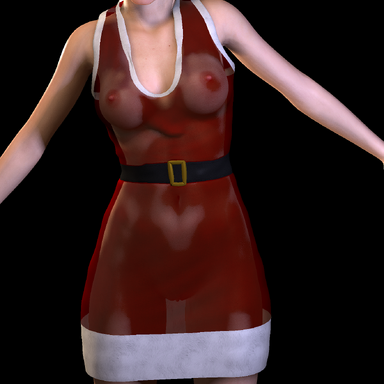
ClothingFadeMulti - Countdown-enabled clothing transparency adjustment, compatible with Timeline.

“该插件设计用于与时间轴无缝集成,实现平滑、渐进的服装透明效果。它配备了可自定义的倒计时器,允许你设定线性淡出过渡的精确时长(以秒为单位)。

该套餐包含两个版本,方便您使用:

  • 标准版:支持最多4件服装物品,保持界面简洁简洁。
  • 扩展版:支持最多10件服装,以实现更复杂的场景配置。”
    View attachment 559477

Read more about this resource...
 
How is this different from animating alpha channels in timeline?
 
How is this different from animating alpha channels in timeline?
"This is simpler and more convenient than using the Timeline, making it much more suitable for beginners. To clarify, the main advantage is that it can be triggered and activated using other UI buttons. While the Timeline requires the playhead to pass a specific point to trigger an effect, this plugin allows you to maintain the current state of the clothing (for example, a 'cum' state) even after the Timeline has restarted from the beginning."
 
YangQianQian17 updated ClothingFadeMulti with a new update entry:

Release a new version 2

The invincible me is back, Hahaha! O(∩_∩)OThis update brings two powerful new features:

  • Search Function: You can now quickly filter and find the specific clothing items you want to target for transparency.
  • START (Once): This button triggers the fade effect only once. This ensures that your animation maintains its final state even during Timeline loops, or prevents accidental re-triggers when using physical buttons.
  • UNLOCK once button: To...

Read the rest of this update entry...
 
Back
Top Bottom