
• Hi Guest!

    We are extremely excited to announce the release of our first Beta1.1 and the first release of our Public AddonKit!
    To participate in the Beta, a subscription to the Entertainer or Creator Tier is required. For access to the Public AddonKit you must be a Creator tier member. Once subscribed, download instructions can be found here.

    Click here for information and guides regarding the VaM2 beta. Join our Discord server for more announcements and community discussion about VaM2.
  • Hi Guest!

    VaM2 Resource Categories have now been added to the Hub! For information on posting VaM2 resources and details about VaM2 related changes to our Community Forums, please see our official announcement here.
Posesaver

Plugins + Scripts Posesaver

Download [<1 MB]
I tried it without loading any Session Plugins or Scene Plugins, using only PoseSaver Ver.1.5.1, but the shape distortion still occurred.

My verification procedure is very simple: load a scene, load an Appearance Preset, load PoseSaver, click “Save New Pose” several times, then click the thumbnail on the far right. That's all.

I have no idea why, but since it happens with some Looks and not others, the cause might lie with the Looks themselves.

There are several Looks that cannot be used with this Plugin, and those Looks were my favorites. It's disappointing...
 
I tried it without loading any Session Plugins or Scene Plugins, using only PoseSaver Ver.1.5.1, but the shape distortion still occurred.

My verification procedure is very simple: load a scene, load an Appearance Preset, load PoseSaver, click “Save New Pose” several times, then click the thumbnail on the far right. That's all.

I have no idea why, but since it happens with some Looks and not others, the cause might lie with the Looks themselves.

There are several Looks that cannot be used with this Plugin, and those Looks were my favorites. It's disappointing...
Think ive fixed it now. il have an update for this in a couple of secs
 
Kimowal updated Posesaver with a new update entry:

1.5.1 fix

Hopefully fixed the Look-dependent shape distortion bug in PoseSaver

The Problem:
- PoseSaver 1.4.3+ was resetting ALL pose morphs to default if they weren't explicitly saved in the pose
- This broke Looks that store their base shape morphs in Custom/Atom/Person/Morphs/... folders
- When switching poses, these Look morphs would get reset to default, causing distortion

Hopefully this is history now. but il need you guys to test it.

Read the rest of this update entry...
 
I tried using PoseSaver Ver.1.5.1 fix, but the shape distortion still occurred.

I'm not sure if this will help resolve the issue, but I did notice one thing.

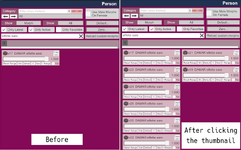
The attached image shows the initial state and the active Morph after distortion occurs for the Look where shape distortion happens. The ears for this Look are shaped like elf ears, and after performing “Save New Pose,” clicking the thumbnail causes those ears to stretch significantly left and right. Looking at the right side of the attached image, you can see the number of active Morphs has increased. Is this the intended behavior of PoseSaver?
 

Attachments

  • スクリーンショット 2025-12-03 221914.png
    スクリーンショット 2025-12-03 221914.png
    138.8 KB · Views: 0
I tried using PoseSaver Ver.1.5.1 fix, but the shape distortion still occurred.

I'm not sure if this will help resolve the issue, but I did notice one thing.

The attached image shows the initial state and the active Morph after distortion occurs for the Look where shape distortion happens. The ears for this Look are shaped like elf ears, and after performing “Save New Pose,” clicking the thumbnail causes those ears to stretch significantly left and right. Looking at the right side of the attached image, you can see the number of active Morphs has increased. Is this the intended behavior of PoseSaver?
well id say it goes with what i thought was needed to save the pose perfectly, but its not. i see what the problem is and will try again. issue is that instead of only alter morphs that are used in the pose i used saving of all morphs inside the atom. this is wrong approach and il have to see how to properly fix this. im on it though and we can have another try soon. update : ok new update is ready and have been released.
 
Last edited:
Kimowal updated Posesaver with a new update entry:

1.5.2

MAJOR FIX: Look/Appearance Distortion Issue Resolved

PROBLEM FIXED:
Previous versions (1.4.3 - 1.5.1) could cause character shape distortion when switching between poses. This happened because PoseSaver was capturing morphs that belong to the Look's appearance preset, not just pose-specific morphs. When loading poses, these saved Look morphs would overwrite or conflict with the current appearance.

THE SOLUTION: Baseline Morph Snapshot System
PoseSaver now uses a smart delta-save system...

Read the rest of this update entry...
 
I tried using PoseSaver Ver.1.5.1 fix, but the shape distortion still occurred.

I'm not sure if this will help resolve the issue, but I did notice one thing.

The attached image shows the initial state and the active Morph after distortion occurs for the Look where shape distortion happens. The ears for this Look are shaped like elf ears, and after performing “Save New Pose,” clicking the thumbnail causes those ears to stretch significantly left and right. Looking at the right side of the attached image, you can see the number of active Morphs has increased. Is this the intended behavior of PoseSaver?
Hey, did you try the new version? hopefully it works for you know.
 
Awesome!
Clicking the thumbnails no longer distorts the shapes!
Thanks for your patience and persistence in fixing this!
No thank you Fttp!🤗 This was an important part so thank you so much for pointing out, this is good help for me too as a new creator so i appreciate it very much 🤗🫶
 
Hello and thank you for this great plugin, it's a good alternative to bodylanguage without all the forced behaviors of BL :)
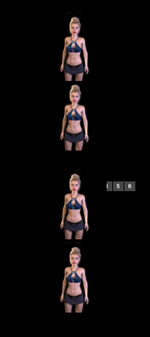
There is a little problem though when using several cameras in a pose, the buttons are not aligned properly with the thumbnails of the poses in my game (I use 1440p in fullscreen), and most of them end up hidden under the thumbnails :
Screenshot185024.png
 
Hello and thank you for this great plugin, it's a good alternative to bodylanguage without all the forced behaviors of BL :)
There is a little problem though when using several cameras in a pose, the buttons are not aligned properly with the thumbnails of the poses in my game (I use 1440p in fullscreen), and most of them end up hidden under the thumbnails :
View attachment 546791
Hello Bastl and thank you for the kind words :)🍺 yes it shouldnt behave like that for sure, i forgot to align it for all solutions, well good news ive already fixed this :) i have an update that il release soon and it should fix this along with overlaps(hidden buttons behind thumbnails that you could get on some resolutions, should not happen now.).
 
Kimowal updated Posesaver with a new update entry:

1.5.3

PoseSaver v1.5.3 - Update Notes

UI FIX: On-Screen Thumbnail Layout & Camera Button Alignment

PROBLEM FIXED:
Previous version had UI layout issues when displaying pose thumbnails on screen, particularly at different
resolutions (1080p, 1440p). Camera selection buttons were misaligned with thumbnails, and pagination controls
were partially cut off on 1080p displays.

Read the rest of this update entry...
 
I tried using the Multi-Camera System for the first time in PoseSaver Ver.1.5.3.
Unfortunately, I encountered the same issue previously reported where the camera buttons overlap with the thumbnails.
My screen resolution is 2560x1600.
While few users might have this resolution, I would appreciate it if you could address this.
Also, currently, even if you assign many cameras, it seems only up to six camera buttons are displayed. Is this a specification limit?
Well, personally, I think six is sufficient.
 

Attachments

  • 2025-12-06 090652.png
    2025-12-06 090652.png
    32.7 KB · Views: 0
I tried using the Multi-Camera System for the first time in PoseSaver Ver.1.5.3.
Unfortunately, I encountered the same issue previously reported where the camera buttons overlap with the thumbnails.
My screen resolution is 2560x1600.
While few users might have this resolution, I would appreciate it if you could address this.
Also, currently, even if you assign many cameras, it seems only up to six camera buttons are displayed. Is this a specification limit?
Well, personally, I think six is sufficient.
Wow we almost posted about the same issue at the same time
I saw the 6 camera limit was specified in one of the updates, I also think 6 cameras per pose is sufficient even though I wouldn't say no to more haha
 
Thanks Kimowal for the quick update! I just tested it out and unfortunately the problem is still there when I add cameras, the spaces between the thumbnails is now perfect but the cameras buttons are not aligned on my screen in 1440p:

View attachment 547264
I hope this isn't too hard to solve :)
Problems are to be resolved 🫡 i`l get at it! 😊
 
Wow we almost posted about the same issue at the same time
I saw the 6 camera limit was specified in one of the updates, I also think 6 cameras per pose is sufficient even though I wouldn't say no to more haha
Actually yes 6 cams should be sufficient, but hey why should there be restrictions tight? :) il see if we cant go for a higher number 😊 Thanks guys for keeping the feedbacks coming🍺
 
I tried using the Multi-Camera System for the first time in PoseSaver Ver.1.5.3.
Unfortunately, I encountered the same issue previously reported where the camera buttons overlap with the thumbnails.
My screen resolution is 2560x1600.
While few users might have this resolution, I would appreciate it if you could address this.
Also, currently, even if you assign many cameras, it seems only up to six camera buttons are displayed. Is this a specification limit?
Well, personally, I think six is sufficient.
Fttp dont you worry ofcourse im gonna fix this 🫡
 
ok so i think ive fixed it, or at least this is how my show up at 1440p :
1764996928629.png


problem was i tuned the buttons and thumbnails to my own setting (duh..should ofcourse have thought of this) but now i think i got it correct so il update in a sec. please try it out and tell me if it now works or not :)
 
Kimowal updated Posesaver with a new update entry:

1.5.4

🔄 PoseSaver Update Text (Hub “Updates” section)​


PoseSaver v1.5.x – Multi-Camera UI fix


  • Fixed a layout issue with the Multi-Camera System on higher resolutions.
  • On 2560×1440 and 2560×1600 (and some UI scale combinations), the camera buttons could overlap the pose thumbnails or appear misaligned.
    • Fully resolution-independent and UI-scale-independent
    • Used as the parent for all camera buttons,
...

Read the rest of this update entry...
 
ok so i think ive fixed it, or at least this is how my show up at 1440p : View attachment 547370

problem was i tuned the buttons and thumbnails to my own setting (duh..should ofcourse have thought of this) but now i think i got it correct so il update in a sec. please try it out and tell me if it now works or not :)
Sorry Kimowal but I'm still having the problem even with the last update 😅

The thumbnails work fine but the camera buttons are still hidden by the thumbnails so they are impossible to click
On your screen I don't see any camera button at all 🤔
For me the problem is only with the camera buttons like on this screenshot :
screenshot.jpg
 
Thank you for always providing prompt updates.
Unfortunately, however, the issue with the camera button has not been resolved in my environment either.

I've also noticed something else.
I feel there's an awkward timing in when the camera button appears on the screen.
I would like the camera button to appear immediately after clicking “Add Current Camera Angle,” but currently, it seems it doesn't appear until after clicking “Save New Pose.”
 
DARNIT! 😂 ok im at it :) Update : ok i tried to learn from cheesyfx without being a "copycat" , but it seems some things just have to be done one way, naturally, so ivedone a quick fix to see if it fixed the problem im releasing it now. guys thank you so much for being so patient❤️‍🔥 please retry once ive uploaded the new update.(and how i write is why i use chatgpt for update-text 😂)
 
Last edited:
Kimowal updated Posesaver with a new update entry:

1.5.4-camera fix take two(AND ¤%&¤%&¤%& IF THIS DOESNT FIX IT! 😂)

🔄 PoseSaver Update Text (Hub “Updates” section)(no new text-just a quickfix)​


PoseSaver v1.5.x – Multi-Camera UI fix


  • Fixed a layout issue with the Multi-Camera System on higher resolutions.
  • On 2560×1440 and 2560×1600 (and some UI scale combinations), the camera buttons could overlap the pose thumbnailsor appear misaligned.
    • Fully resolution-independent and UI-scale-independent
    • Used as the parent for all camera...

Read the rest of this update entry...
 

Similar threads

Back
Top Bottom