• Hi Guest!

    We are extremely excited to announce the release of our first Beta1.1 and the first release of our Public AddonKit!
    To participate in the Beta, a subscription to the Entertainer or Creator Tier is required. For access to the Public AddonKit you must be a Creator tier member. Once subscribed, download instructions can be found here.

    Click here for information and guides regarding the VaM2 beta. Join our Discord server for more announcements and community discussion about VaM2.
  • Hi Guest!

    VaM2 Resource Categories have now been added to the Hub! For information on posting VaM2 resources and details about VaM2 related changes to our Community Forums, please see our official announcement here.
Posesaver

Plugins + Scripts Posesaver

Download [<1 MB]
Heck yea, you're on a roll! Will do check LightAssistant for sure! With new Timeline fix, posing plugin is looking very good indeed (but you know me, I'll keep pestering you about those advanced fingers posing later 😏). Take it easy, man's gotta rest as well 🙏
Deffently!😂ive stopped playing and just trying to think what the hell i could make next! 😂 put i think this will be the last for a while, couse im thinking of updating the lightAssistant with some significant futures (save/load etc..) but il wholeheartly promise you il get those advanced fingers posing added 🫡 Again thank you so much! ❤️
 
Deffently!😂ive stopped playing and just trying to think what the hell i could make next! 😂 put i think this will be the last for a while, couse im thinking of updating the lightAssistant with some significant futures (save/load etc..) but il wholeheartly promise you il get those advanced fingers posing added 🫡 Again thank you so much! ❤️
Cheers man. Also side note if you decide to play with it some day - I noticed you included sliders in your plugin for fingers as well (which is nice), but I believe it's just fine to simply store existing finger joints rotations- user is expected to pose it himself (like via Ruvik plugin) and your pose save would simply register current rotation of finger bones, no extra UI needed at all, simple enable it to save those extra parameters.

For a pretty fresh plugin this is all pretty great, so I'm looking forward for improvements! Have fun and see you 💖
 
Hey, few things I noticed in the plugin:

If you save a preset, I don't think you can skip making a screenshot? (I am talking about preset so you can load set of poses, not a pose). If you press escape it just skips dialogues and nothing is saved. Also, if I want to update my current preset (without retaking a picture), so press save, choose my previously saved one - I think it doesn't really update, but I'll need to triple check it. I think it didn't even update if I did choose a screenshot (no usual VAM dialogue about 'are you sure you wanna replace a file'). So looks like if you wanna make changes, you need to make new preset every time.
 
Hey, few things I noticed in the plugin:

If you save a preset, I don't think you can skip making a screenshot? (I am talking about preset so you can load set of poses, not a pose). If you press escape it just skips dialogues and nothing is saved. Also, if I want to update my current preset (without retaking a picture), so press save, choose my previously saved one - I think it doesn't really update, but I'll need to triple check it. I think it didn't even update if I did choose a screenshot (no usual VAM dialogue about 'are you sure you wanna replace a file'). So looks like if you wanna make changes, you need to make new preset every time.
Babul il check this out. just not too night. 🍺🍺😁😁😁😁
 
Hey, few things I noticed in the plugin:

If you save a preset, I don't think you can skip making a screenshot? (I am talking about preset so you can load set of poses, not a pose). If you press escape it just skips dialogues and nothing is saved. Also, if I want to update my current preset (without retaking a picture), so press save, choose my previously saved one - I think it doesn't really update, but I'll need to triple check it. I think it didn't even update if I did choose a screenshot (no usual VAM dialogue about 'are you sure you wanna replace a file'). So looks like if you wanna make changes, you need to make new preset every time.
ok so the savepreset is fixed (not uploaded yet):
1764394286564.png
however when it comes to the hands and fingers i have a solution so once thats in place i will post next update.
 
Thank you for continuing to improve Posesaver!

I tried using Ver.1.4.7, but encountered some strange behavior, so I'm reporting it.

1. The arrow buttons are not displayed. When repeatedly executing “Save New Pose”, thumbnails display up to 8 poses, but beyond that, they are not displayed on the screen at least. The arrow buttons are also nowhere to be found.

2. When repeatedly executing “Save New Pose”, the following error message appears:
!> PoseScreenCanvas.CreatePaginationControls: System.NullReferenceException: Object reference not set to an instance of an object
at Kimowal.PoseScreenCanvas.CreatePaginationControls (Int32 pageNumber, Int32 totalPages) [0x00000] in <filename unknown>:0

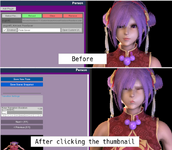
3. When executing “Save New Pose” and clicking a thumbnail, the character's shape may become distorted. I have attached an image showing this phenomenon when it occurs.
(Looks)
This happens with most presets, but some presets are unaffected.

I hope the cause can be identified...
 

Attachments

  • 2025-11-29 175731.png
    2025-11-29 175731.png
    430.7 KB · Views: 0
Thank you for continuing to improve Posesaver!

I tried using Ver.1.4.7, but encountered some strange behavior, so I'm reporting it.

1. The arrow buttons are not displayed. When repeatedly executing “Save New Pose”, thumbnails display up to 8 poses, but beyond that, they are not displayed on the screen at least. The arrow buttons are also nowhere to be found.

2. When repeatedly executing “Save New Pose”, the following error message appears:
!> PoseScreenCanvas.CreatePaginationControls: System.NullReferenceException: Object reference not set to an instance of an object
at Kimowal.PoseScreenCanvas.CreatePaginationControls (Int32 pageNumber, Int32 totalPages) [0x00000] in <filename unknown>:0

3. When executing “Save New Pose” and clicking a thumbnail, the character's shape may become distorted. I have attached an image showing this phenomenon when it occurs.
(Looks)
This happens with most presets, but some presets are unaffected.

I hope the cause can be identified...
Fttp! thank you for pointing this out. im adressing it and will have an update as soon as i can :)
 
Kimowal updated Posesaver with a new update entry:

1.4.8 -minor fix

PoseSaver 1.4.8 – Minor Fix Update


Small fix this time — thank you fttp for reporting the issues! 🙏


Fixes in this update:


  1. Missing Arrow Buttons
    When repeatedly using “Save New Pose”, thumbnails stopped showing after 8 entries and the arrow buttons disappeared.
    This is now corrected — pagination shows properly again.
  2. NullReferenceException on Pagination
    Some users received this error when saving multiple poses...

Read the rest of this update entry...
 
Thank you for the prompt update!

But...

I used Ver.1.4.8 and re-ran the steps I used when writing my previous report, but the three issues I reported still occur in Ver.1.4.8, just as they did in Ver.1.4.7.

Could it be that there's something wrong with my method...?
 
Thank you for the prompt update!

But...

I used Ver.1.4.8 and re-ran the steps I used when writing my previous report, but the three issues I reported still occur in Ver.1.4.8, just as they did in Ver.1.4.7.

Could it be that there's something wrong with my method...?
thats strange...ok il check it again from my side. Update: i now i know part of the problem - the layout of the screen on yours is different than mine.(see image), and since the thumbnails are not paginated? well then this happens.
I should have thought about this, sorry, but dont worry i think il got a fix, instead of applying the thumbnails in rows i can see if we can have a sort of slider menu for them, that way we shoulld be able to create way more poses too . il look into it right away.

1764423834795.png
 
Last edited:
Hey guys! sorry the update is taking some time, actully i needed a brake so i will be back at working on this tomorrow. hope you all had a super weekend :)
 
Kimowal updated Posesaver with a new update entry:

1.4.9

PoseSaver 1.4.9 – Thumbnail Strip & Pagination Stability​


Small but important stability pass on the screen thumbnail system.
This update finishes the work from 1.4.6–1.4.8 and makes the right-side strip reliable even with many poses.


1️⃣ Right-Side Thumbnail Strip Polished​


  • Thumbnails are now anchored a bit lower on the screen so they no longer overlap VaM’s top-right UI bar.
  • The vertical strip keeps the model and...

Read the rest of this update entry...
 
Thank you for the prompt update!

But...

I used Ver.1.4.8 and re-ran the steps I used when writing my previous report, but the three issues I reported still occur in Ver.1.4.8, just as they did in Ver.1.4.7.

Could it be that there's something wrong with my method...?
Hey :) try again now(new update released so you need to download it again) then tell me have it works ! :)
 
Hey :) try again now(new update released so you need to download it again) then tell me have it works ! :)
Thank you for the frequent updates!

I tried using Ver.1.4.9.
The page change button displayed properly, and no strange error messages appeared! I'm so happy!

However, the distortion of character shapes remains unchanged from before.
Please let me know if there's any additional information you need that I might be able to provide.
By the way, there were no issues with Ver.1.4.2. The shapes became distorted in Ver.1.4.3.
 
Thank you for the frequent updates!

I tried using Ver.1.4.9.
The page change button displayed properly, and no strange error messages appeared! I'm so happy!

However, the distortion of character shapes remains unchanged from before.
Please let me know if there's any additional information you need that I might be able to provide.
By the way, there were no issues with Ver.1.4.2. The shapes became distorted in Ver.1.4.3.
It's probably unrelated but I sometimes got weird shapes too - it looked like morphs applied twice or something. Check what happens if you default all character morphs when it happens - if it goes back to normal, then that's the problem. I got this bug I think when creating some morphs via plugins and not hitting "reload custom morphs" in VAM UI. To be 100% safe, see if the bug happens on other look - if yes, then check if it happens on clean install and default look. Maybe you have some weird rogue morph or something. I did use the plugin with almost all versions and it never happened to me.
 
Thank you for the frequent updates!

I tried using Ver.1.4.9.
The page change button displayed properly, and no strange error messages appeared! I'm so happy!

However, the distortion of character shapes remains unchanged from before.
Please let me know if there's any additional information you need that I might be able to provide.
By the way, there were no issues with Ver.1.4.2. The shapes became distorted in Ver.1.4.3.
Hey again 🙂 ok we at least closer to find out whats wrong. I do have backups so i will go back and see what ive done differently that might cause this. However it would ofcourse help me if you tell me ur settings and if you use any other plugins. But il get back to this once im off work🙂👍
 
It's probably unrelated but I sometimes got weird shapes too - it looked like morphs applied twice or something. Check what happens if you default all character morphs when it happens - if it goes back to normal, then that's the problem. I got this bug I think when creating some morphs via plugins and not hitting "reload custom morphs" in VAM UI. To be 100% safe, see if the bug happens on other look - if yes, then check if it happens on clean install and default look. Maybe you have some weird rogue morph or something. I did use the plugin with almost all versions and it never happened to me.
Yes that might be it! Il do a check Later today 🙂👍 thank you❤️
 
Yes that might be it! Il do a check Later today 🙂👍 thank you❤️
To be clear, that bug I was describing with morphs happened to me just normally in VAM way before you made the plugin, so I didn't experience anything like that in relation to your plugin, so that bug seems weird. I'll play around more later and see, maybe I can somehow replicate it though.
 
To be clear, that bug I was describing with morphs happened to me just normally in VAM way before you made the plugin, so I didn't experience anything like that in relation to your plugin, so that bug seems weird. I'll play around more later and see, maybe I can somehow replicate it though.
Ah ok i see. Hmm well il do a check anyway, if this is in vam itself then there is bound to be a fix for it. Il check too and see if its possible to recreate. Come to think of it i had a similar problem using runrudolfs amazing plugin (foreskin) but it was while using posesaver also, before i released it.
 
ok the problem is solved now i believe, update comming soon, however i had accidentaly brutaly made a small issue to the pose transition, it didnt snap instant as one would want by default, once i have this fixed our next update is comming. Update : fixed it! (i had set the pose to transition over 1 sec instead of instantly, but should now work properly) , Update is right around the corner!
 
Guys! im saying it again : Thank you all for the feedbacks and helping me improve Posesaver! i still havent tried any of my plugins in vr but will focus more on this after the 19th december, I had to quit my dayjob so then it will be full time coding and learning ins and outs 😁(at least for a while 😂 Holiday is coming afterall😊. )
 

Similar threads

Back
Top Bottom