Recent content by techwoof
-

VaM 1.x DLSS5, differences and benefits
I have a RTX 3090 and tried it when Burrito was validating support for the 3000 series. So those are my results and thoughts on the NR aspect, based on testing on my hardware: Pros: - It gives the character, scene and clothes a really good AO effect. - It helps stabilize ambient lights in...- techwoof
- Post #24
- Forum: Questions & Answers
-
Scenes THE GIRLS
This scene broke after the update on https://hub.virtamate.com/resources/frenni.41864. This scene uses version 1.1, not latest. The version should be pinned. Remove OniEkohvius.Frenni.5 from your addonpackages and download the var from Jan 18, 2024 which is OniEkohvius.Frenni.2. @Omega please... -
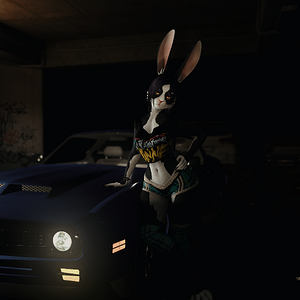
Alice with muscle car
Car asset by PerfectBloo Clothing asset by EuLinRabei Environment by EvilBox Plugins: PostFxPro, Supershot, CUASurfaceEditor, LightOptions- techwoof
- Media item
- anthro car cool female furry garage rebel
- Comments: 0
- Album: Alice Bunny
- Category: SFW/Artistic Albums
-
Plugins + Scripts LiveStreamConnectorToOBS
Hey there! Been wanting something like that for a long time for VAM1. I had some issues, i'm on the most recent version of VAM, when adding this plugin and streaming to OBS (setting the stream URL to a Media Source) i get really slow output, very delayed. It seems the plugin is streaming... -
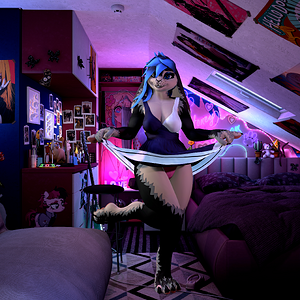
Bunnia2.png
Character is Shia Bunnia (https://shiapra.gumroad.com/l/bun), ported to VAM by me. Clothes from maru01, environment by EvilBox.- techwoof
- Media item
- anthro bedroom bunny cute furry girl goth panties skirt solo
- Comments: 0
- Album: Bunnia
- Category: General Albums
-
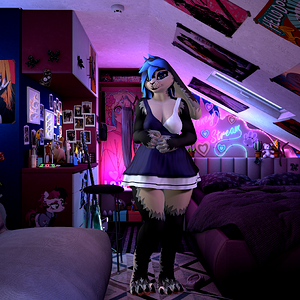
Bunnia.png
Character is Shia Bunnia (https://shiapra.gumroad.com/l/bun), ported to VAM by me. Clothes from maru01, environment by EvilBox.- techwoof
- Media item
- anthro bedroom bunny cute furry girl goth panties skirt solo
- Comments: 0
- Album: Bunnia
- Category: General Albums
-
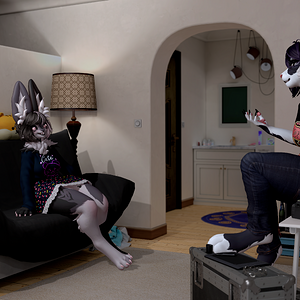
girlbuns.png
Casual bunny yapping! Both ports made by Sivel. Piper Kicks belongs to Peekabowo, Alice belongs to Foxipaws. Environment by EvilBox- techwoof
- Media item
- anthropomorphic bunny casual cute duo female furry sfw
- Comments: 0
- Category: SFW/Artistic Items
-
-
VaM 1.x Clothing simulation texture extraction
In this case the simulation is purely procedural. The settings will be stored on the .VAJ file, which you can find under the 'Physics' tab in-game. It will not simulate the part of the clothing that is attached to the person, but will simulate everything else applying an uniform setting. The...- techwoof
- Post #11
- Forum: Questions & Answers
-
VaM 1.x Clothing simulation texture extraction
Can't share the plugins right now, sorry You will not get the same simulation effect from VAM in Blender or anywhere else. You can only have the SIM textures and convert to weights on Blender (search for how to convert images into weights). There's no "hidden simulation textures" in the VAB. it...- techwoof
- Post #8
- Forum: Questions & Answers
-
VaM 1.x Clothing simulation texture extraction
Sim textures are not stored on the VAB. They will be referenced on the .VAJ or .VAM file , in the storables[] section.the ID for simulation settings will be "<author>:<assetname>Sim" and inside each material you will find the "simTexture" key which will reference the texture. I made a blender...- techwoof
- Post #4
- Forum: Questions & Answers
-
VaM 1.x Convert/Extract Animations/VAR to FBX
Hello there! Since i started on VAM a little more than a year ago my main goal was to make and extract animations, i did learned a few things. If you want to export something the BVH recorder is your best option, because of how person animations work inside VAM due to it's rigidbody physics...- techwoof
- Post #7
- Forum: Questions & Answers
-
VaM 1.x How to show actual scenes ONLY in scene browser?
This is an annoying limitation i tried to overcome as well, but there isn't much to do because the content you see in the browser are scenes. The issue is that many creators saves templates for stuff (characters, clothing demo/showcase, environments, plugin demo, etc) as scenes, cluttering...- techwoof
- Post #7
- Forum: Questions & Answers
-
VaM 1.x Is it possible to link limbs to objects without delay in movement?
This plugin helps easily set all control's spring and damper values as Geraldo said, but without the need to go one by one. https://hub.virtamate.com/resources/jointphysicshelper.39061/ Helps make the character more 'stiff'. You can increase max velocity as well, if your parent object moves fast.- techwoof
- Post #4
- Forum: Questions & Answers